
Your website generates leads. Your customer relationship management system manages your pipeline. But if those two systems aren't connected, there's a gap in the middle where leads quietly disappear. Someone fills out a form on your site, and the data lands in an inbox or a spreadsheet. A sales rep copies it into the CRM a day later, missing the context of what that person was actually looking at on your site.
For business-to-business companies with long sales cycles and buying committees, that gap is expensive. The website knows which pages a prospect visited, which content they downloaded, and how many times they came back before raising their hand. The CRM knows deal stage, revenue potential, and sales activity. When those systems don't share customer data, your sales team is flying blind and your marketing team can't prove what's working.
This article covers how to connect your B2B website to your CRM so lead data flows automatically, sales reps get context before their first outreach, and marketing can trace a closed deal back to the blog post that started it. Not CRM admin tutorials. Not platform comparison charts. Just the integration points that make your website and your sales pipeline work as one system.
What CRM Integration Actually Means (and What Most Companies Get Wrong)
Most B2B companies think CRM integration means "form submissions go to the CRM." That's the floor, not the ceiling. Real B2B CRM integration means your customer relationship management system has a complete picture of every interaction a prospect has with your website, from their first anonymous visit through closed-won. The problem is that most companies stop at Level 1 and wonder why the investment doesn't feel worth it.
The Spreadsheet-to-CRM Gap
Here's the scenario that plays out at thousands of B2B companies every day. A prospect fills out a contact form. The form triggers an email notification to a shared inbox. Someone on the sales team notices the email (eventually), then manually types the contact information into the CRM. By then, hours have passed. The context of what that prospect was looking at on the site? Gone. The pages they visited before the form? Never captured. Every manual step in this process introduces delay, data loss, and human error. These are exactly the kind of repetitive tasks that should never involve a person.
For B2B sales where speed to lead directly affects close rates, this gap costs real revenue. The prospect who filled out a form at 10am while researching solutions is in a completely different headspace by the time someone calls back at 3pm. They've moved on to your competitor's site. They've gotten pulled into meetings. The moment is gone.
Three Levels of Integration
Not every company needs the same depth of CRM integration. But knowing where you are on the spectrum helps you understand what you're missing and what to build toward.
- Level 1: Form-to-CRM. Form submissions automatically create a contact or lead record in your B2B CRM. No manual data entry, no copying from email. Basic, essential, and where most companies should start.
- Level 2: Behavioral data sync. The CRM system knows which pages a contact visited, what content they downloaded, how many times they returned to the site, and which campaign brought them in. Sales reps see the full customer journey before making their first call. This is where integration starts to streamline how marketing and sales work together.
- Level 3: Closed-loop reporting. Revenue data from the CRM feeds back to website analytics. Marketing can say "that blog post generated $47K in pipeline" instead of "that blog post got 3,000 pageviews." This is where the integration pays for itself, and where sales forecasting gets dramatically more accurate because pipeline data is grounded in real behavioral signals, not gut feel.
Most companies are stuck at Level 1 or somewhere between 1 and 2. The jump to Level 3 is where the real value lives, and it's more achievable than most people think.
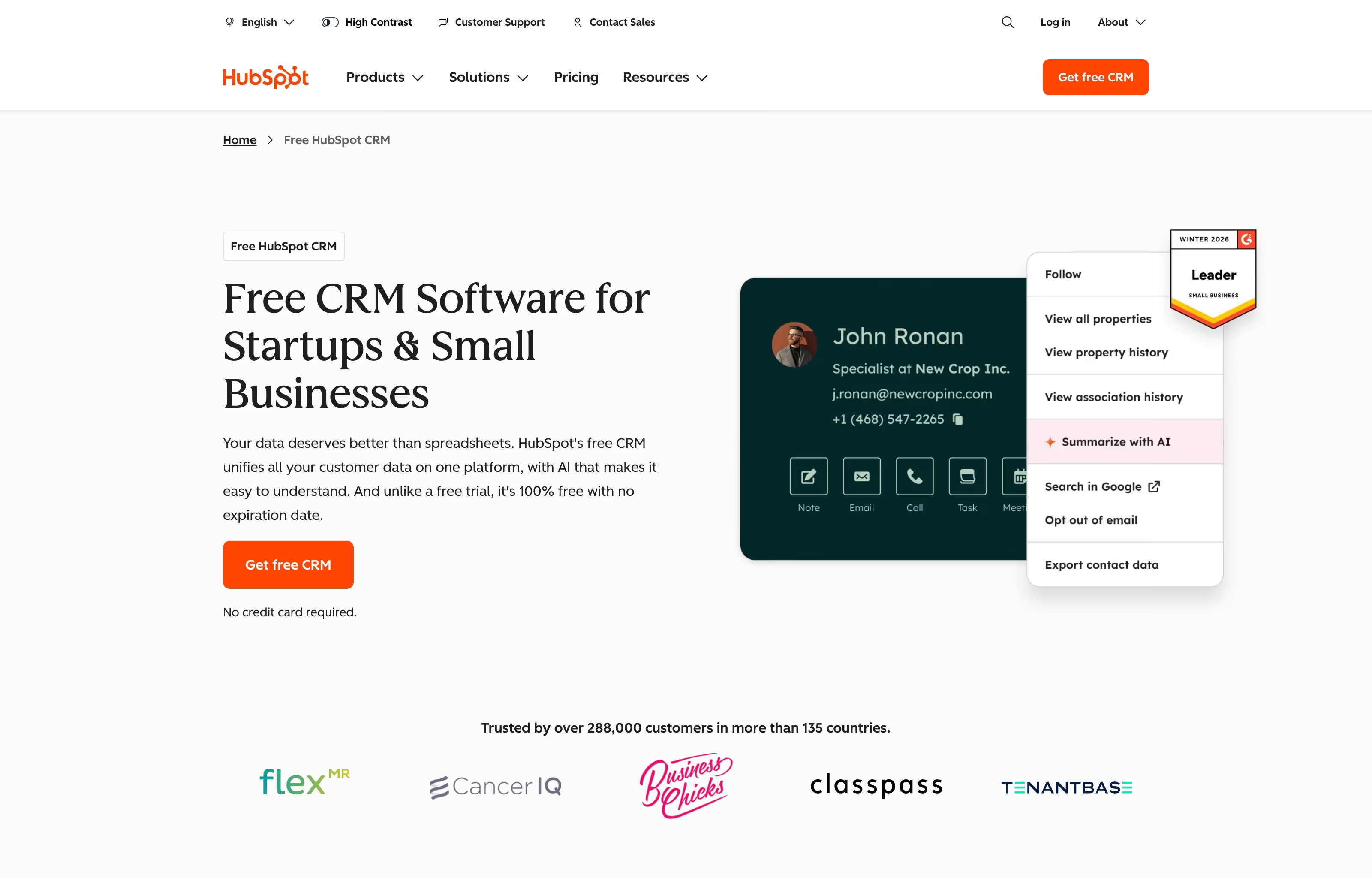
At its core, a CRM contact record should give your sales team everything they need to have a smart first conversation. HubSpot's free CRM shows what this looks like in practice: a single view where the contact's name, company, email, phone number, and action history all live in one place. Note the action buttons for notes, emails, calls, and tasks. When website behavioral data feeds into this same record, the rep sees not just who the contact is, but what they've been researching on your site.
The difference between a CRM that collects dust and one that your sales team actually uses often comes down to whether the data feels useful in the moment. A contact record with just a name and email is a digital Rolodex. A contact record that shows which pages the prospect visited, which content they downloaded, and how many times they came back before filling out a form? That's a conversation starter.
What Your Website Should Be Sending to the CRM
The integration is only as useful as the data flowing through it. A B2B CRM stuffed with names and email addresses isn't much better than a spreadsheet. The value comes from the context surrounding each contact: where they came from, what they looked at, and how engaged they are. Here's what your website should be pushing into your CRM system, and why each data point matters for the sales conversation.
Form Data (The Obvious Part)
Name, email, company, phone number, job title. The basics. But the basics alone aren't enough. Your CRM should also capture which form the person filled out (contact request vs. content download vs. consultation booking), which page they were on when they submitted it, and the answers to any qualifying questions you embedded (budget range, timeline, company size). Good contact management starts with capturing the right data at the point of conversion.
The form type alone tells the sales team something important. A consultation request signals a different level of intent than a whitepaper download. A form submitted from the pricing page means something different than one submitted from a blog post. This context should flow into the CRM automatically so the sales rep doesn't have to guess.
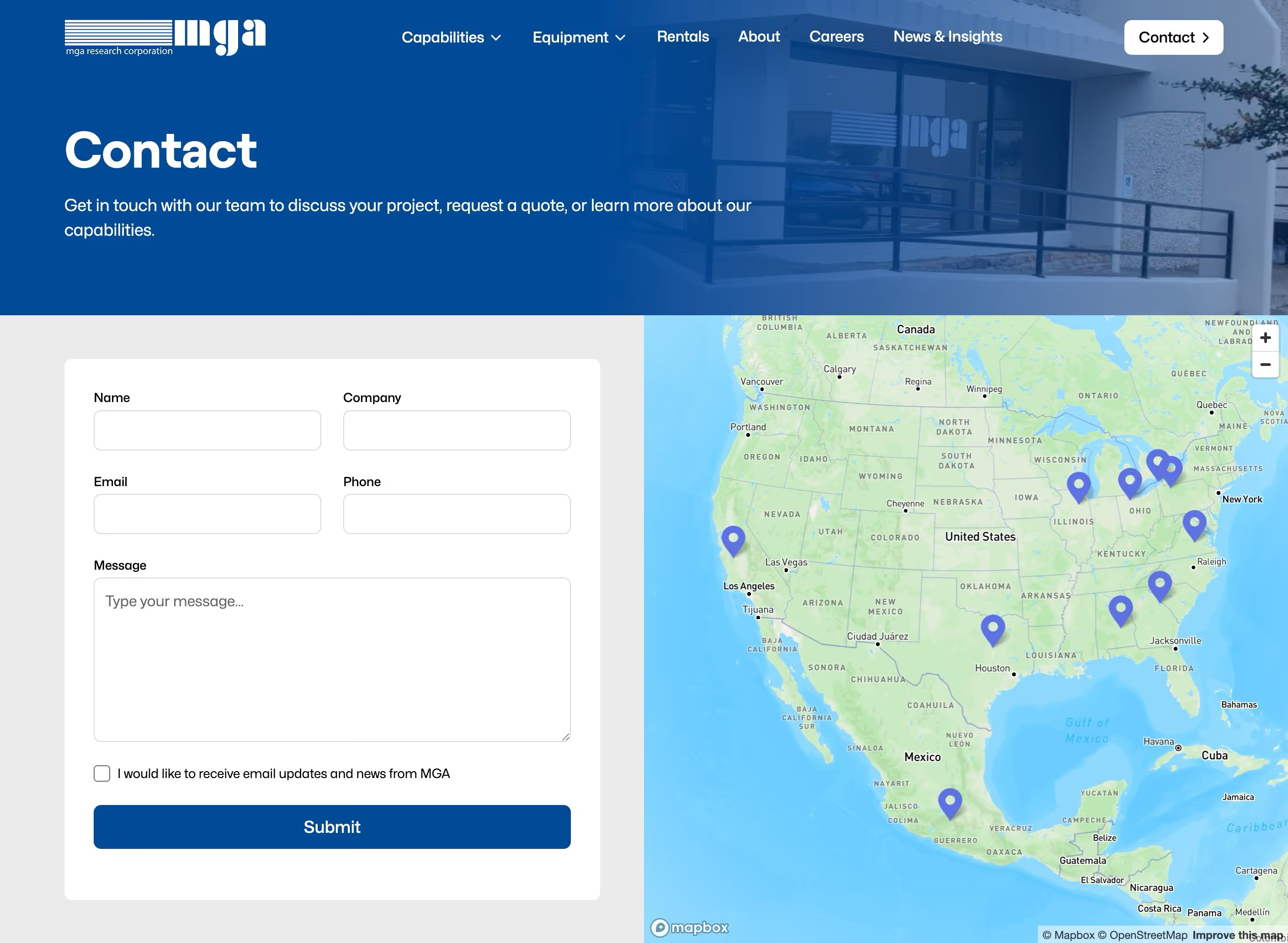
MGA Research Corporation's contact page is a good example of a clean B2B form that captures the essentials: name, company, email, phone, and a message field. The email opt-in checkbox is a nice touch for GDPR-conscious companies. What this form doesn't show (but should be happening behind the scenes) is the hidden data: UTM parameters, the referring page, and the traffic source that brought this visitor to the contact page in the first place. That's the data your CRM integration adds.
Traffic Source and Campaign Data
Where the visitor came from before they hit your site matters more than most companies realize. Organic search, paid ad, LinkedIn, email marketing campaign, social media, referral from a partner site. This data flows through UTM parameters and hidden form fields. A sales rep who knows the lead came from a Google search for "b2b website redesign cost" approaches the conversation differently than one who knows the lead clicked a LinkedIn ad about manufacturing websites.
Without source data, your marketing efforts are invisible in the CRM. You can't measure which channels produce the best leads, and you can't make informed decisions about where to spend next quarter's budget. Campaign data is the thread that connects marketing spend to sales results.
Page-Level Behavioral Data
Which pages the contact visited, how many sessions they had, which content they downloaded, and which pages they returned to most often. This requires a tracking script (most B2B CRM platforms provide one) installed on your website. When a lead visits your pricing page three times before requesting a consultation, that behavioral data changes the sales conversation entirely.
In B2B sales, multiple stakeholders from the same company often visit different pages. The engineer reads technical specs. The CFO checks the pricing page. The marketing director browses case studies. When the CRM captures page-level data for each contact, your sales team can see which decision-makers are engaged and what each one cares about. That's intelligence you can't get from a form submission alone.
Not all page visits carry the same weight. Here are the high-signal pages worth tracking closely in your B2B CRM:
- Pricing or investment pages. Strongest buying signal. Repeat visits here mean the prospect is actively evaluating cost.
- Case study and portfolio pages. They're evaluating your work and looking for social proof.
- Service or solution pages. They're trying to understand what you actually do.
- About and team pages. They're evaluating the people behind the company.
- Blog posts. Tells you which topics they care about and where they are in their research.
- Contact or demo request pages. Conversion intent, even if they don't submit the form.
Lead Source Attribution
First-touch vs. last-touch vs. multi-touch attribution. For B2B sales cycles that span weeks or months, a prospect might find you through a blog post, come back via a retargeting ad, and finally convert through a direct visit. Your CRM should capture the full customer journey, not just the last click. This is how marketing proves ROI and how leadership makes informed decisions about where to invest.
Multi-touch attribution is more complex to set up, but it's the only model that honestly reflects how B2B buyers actually find and evaluate companies. A prospect who first discovered you through a blog post six months ago deserves credit for that first touch, even if the final conversion happened through a direct visit.
For more on building the systems that feed your CRM:
- B2B Website Lead Generation: Turning Visitors Into Pipeline
- B2B Website SEO: A Technical and Content Strategy Guide
Beyond the Sale: Post-Close Data
B2B CRM integration isn't just for the sales pipeline. For B2B companies with ongoing client relationships, the website keeps generating useful signals after the deal closes. A current client browsing new service pages or reading case studies in a category they haven't purchased? That's an upsell signal that reflects evolving customer needs your account team should see. A client hitting your support documentation or FAQ pages repeatedly? That's a customer support signal that might prevent churn.
When your B2B CRM captures the full lifecycle of customer interactions, from first anonymous visit through the active relationship, retention improves and upsell opportunities surface naturally. Onboarding is smoother when the client success team inherits the full communication history rather than starting from a blank slate. For B2B companies where the lifetime value of a client relationship often dwarfs the initial deal, this post-sale data is worth as much as the pre-sale pipeline intelligence.
Choosing the Right B2B CRM for Your Website
This isn't a comprehensive CRM comparison guide. Those exist everywhere, and they're mostly written by the CRM companies themselves. This section focuses on what matters specifically for website integration: how easily the CRM software connects to your website platform, what native tracking functionality it offers, and where the common friction points show up.
HubSpot
HubSpot is the most common B2B CRM for mid-market companies and arguably the most user-friendly to integrate with most website platforms. The free CRM tier includes basic form capture and contact management. The Marketing Hub (paid) adds behavioral tracking, lead scoring, and marketing automation. If you're on Webflow, WordPress, or most modern website platforms, the integration is straightforward: install a tracking script, connect your forms via API or native integration, and contact data starts flowing.
The strength of HubSpot is that CRM, marketing automation, and website tracking all live in one ecosystem. The data connection is seamless because there's nothing to connect. HubSpot's app marketplace extends functionality with hundreds of integrations for tools your team already uses. The tradeoff is that costs scale with contact volume. What starts as a free CRM can get expensive once you're tracking thousands of website visitors and need the marketing automation features.
Salesforce
The enterprise standard. More powerful and more complex. Website integration typically requires an additional tool. Pardot (now Marketing Cloud Account Engagement) handles marketing automation, or you can use a third-party connector for form routing. The integration ceiling is higher than HubSpot's, but so is the setup complexity and cost. You'll likely need a dedicated administrator or consultant.
Salesforce's AppExchange has thousands of apps that extend CRM functionality in every direction. For manufacturers, industrial B2B businesses, and ecommerce companies with complex sales cycles, Salesforce also integrates with ERP systems like NetSuite and SAP. The website feeds the CRM, and the CRM feeds the ERP. That data chain is how leads eventually become orders. If your company already runs on Salesforce, building the website integration into the existing system usually makes more sense than switching CRM platforms.
Microsoft Dynamics, Pipedrive, Zoho CRM, and Mid-Market Options
Lighter-weight B2B CRM software options that work well for smaller sales teams and B2B businesses that don't need enterprise complexity. Microsoft Dynamics fits companies already invested in the Microsoft ecosystem. Pipedrive is built around pipeline visualization and is strong for sales-driven organizations. Zoho CRM offers solid marketing automation at a lower price point. Each has a different approach to website integration.
Integration capabilities vary significantly across these platforms. Some, like Zoho CRM, have native website tracking. Others rely on third-party tools like Zapier or Make to connect form submissions. The key question for scalability: does the CRM system support the behavioral tracking and workflow automation you need today, or will you outgrow it in 12 months? Migrating CRM platforms after you've built integrations is painful and expensive. It's worth thinking through your growth trajectory before picking a platform.
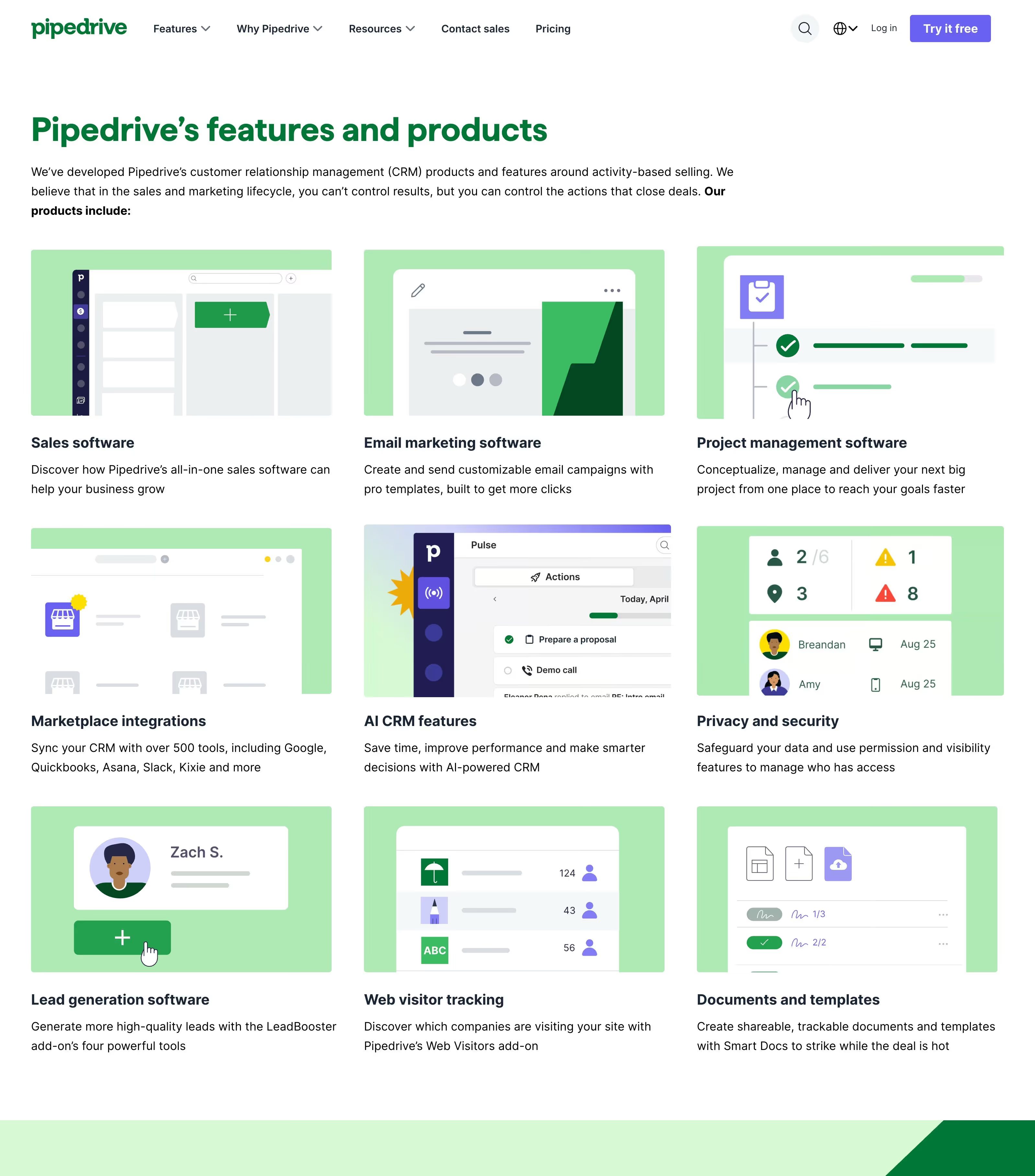
Pipedrive's features page gives a good sense of what a modern mid-market B2B CRM covers: sales software, email marketing, marketplace integrations, AI-powered CRM features, web visitor tracking, and lead generation tools. The breadth matters because your CRM isn't just a contact database. It's the system that connects your website activity to your sales process, your marketing campaigns, and your team's daily workflow.
What to Evaluate Before You Pick
Rather than comparing feature lists, focus on the integration-specific questions that determine whether a CRM solution will actually work with your website. These are the questions most companies forget to ask until after they've committed:
- Does it offer a native website tracking script? Or do you need a third-party tool to capture behavioral data?
- Can it capture form submissions automatically from your website platform? Webflow, WordPress, and other platforms each have different integration paths.
- Does it support hidden fields and UTM parameter capture? This is how source and campaign data flows into the CRM.
- Can it trigger automated workflows based on website behavior? Page visits, content downloads, and return visits should all be actionable.
- Does it support closed-loop reporting? Can you connect CRM revenue data back to website activity?
- What does the pricing look like at your contact volume? Some CRM systems charge per contact, which gets expensive fast when you're tracking website visitors.
- Does it integrate with the rest of your tech stack? Email platform, ERP, Slack, project management tools. The CRM doesn't exist in a vacuum.
Finding the right CRM isn't about which B2B CRM software has the most features. It's about which one connects to your website cleanly, gives your sales team the data they need, and doesn't require a full-time administrator to keep running.
For more on aligning your website with your sales process:
The Technical Side: How the Connection Actually Works
You don't need to be a developer to understand how B2B CRM integration works. But you should understand the moving parts well enough to have a smart conversation with your developer or agency, ask the right questions, and know when something isn't set up correctly.
Tracking Scripts and Cookies
Most B2B CRM platforms provide a JavaScript tracking snippet that goes on every page of your website. This script drops a cookie on each visitor's browser. The cookie tracks which pages they visit, how long they stay, and how often they return. All of this happens anonymously until the visitor identifies themselves.
Here's where it gets useful: when that anonymous visitor eventually fills out a form, the CRM system matches the cookie to the new contact record and retroactively attaches all their previous page visits. A prospect who visited your site six times over three weeks before filling out a contact form? The CRM now has a real-time picture of their entire browsing history. This is the foundation of behavioral tracking, and it's how B2B CRM integration transforms a simple form submission into a rich customer profile.
Form Submission Routing
There are three common approaches to getting form data from your website into your B2B CRM. Each has tradeoffs between ease of setup, design control, and reliability.
- Native CRM forms. Embed the CRM's own form widget directly on your website. HubSpot forms are the most common example. Simplest integration, but you're limited to the CRM's form design options, which may not match your site's look and feel.
- API connections. Your website form submits data directly to the CRM via its API. This is how most Webflow-to-CRM integrations work at scale. More design flexibility because you control the form completely, but it requires some development work.
- Middleware (Zapier, Make, n8n). Your website form submits to a middleware tool, which routes the data to the CRM. Easiest option for non-technical team members. The tradeoff is an added dependency: if Zapier goes down or a connection breaks, form data stops flowing until someone notices.
The right choice depends on your team's technical capability and your business needs. For most mid-market B2B companies, the API approach offers the best balance of flexibility and reliability. For teams without development resources, middleware gets you to Level 1 integration quickly.
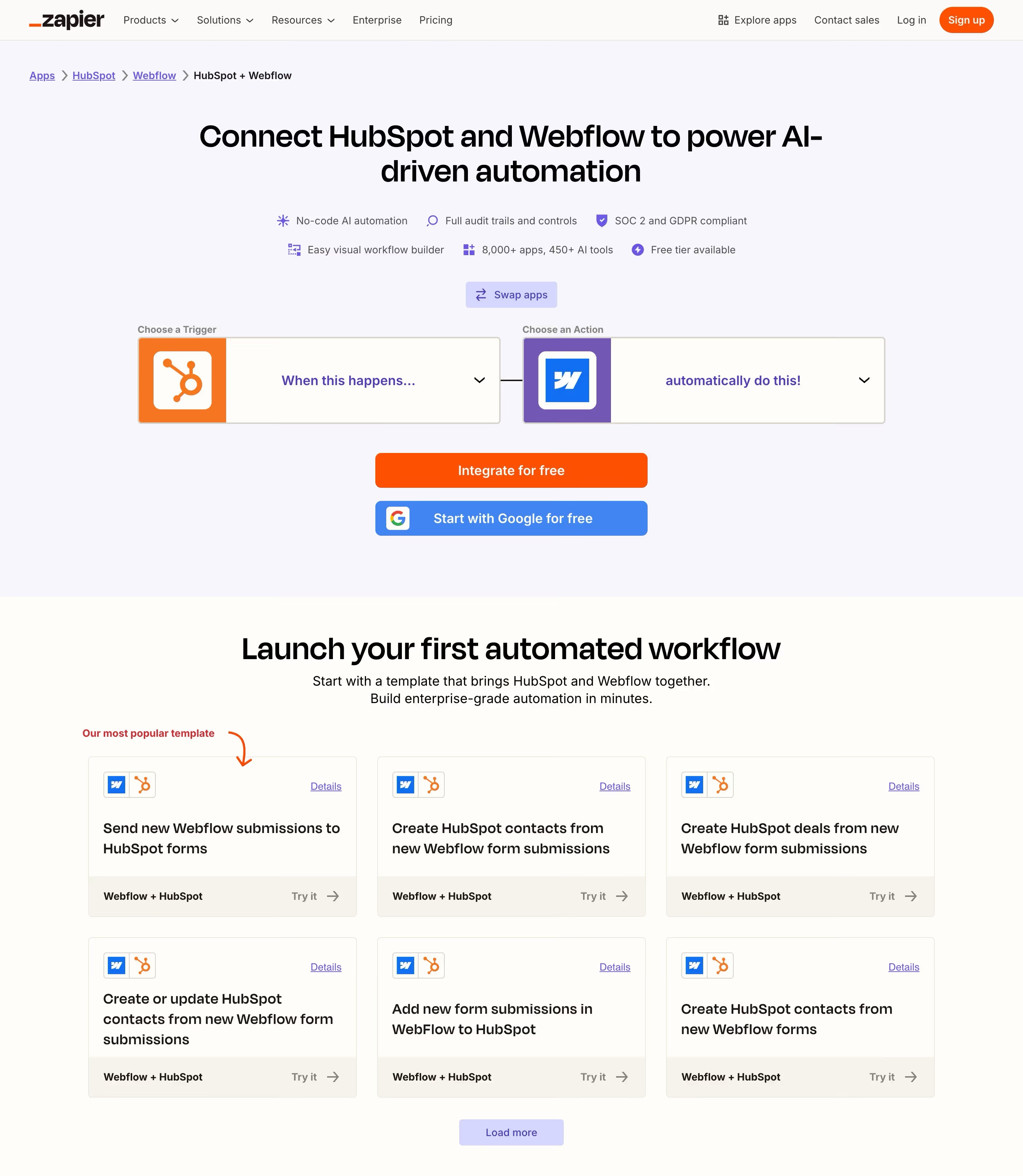
Zapier's Webflow-to-HubSpot integration page shows what the middleware approach looks like in practice. The trigger-and-action model is simple: "When this happens in Webflow, automatically do this in HubSpot." The pre-built templates at the bottom handle the most common use case: creating HubSpot contacts from new Webflow form submissions. No code required. You can be up and running in minutes, which is why middleware is the fastest path to Level 1 integration for teams without development resources.
Webhooks and Real-Time Notifications
For companies where response time is critical (and in B2B sales, it almost always is), webhooks are the mechanism that makes things happen instantly. A webhook is a real-time notification from your website to another system: "someone just did something important."
When a prospect requests a consultation at 2pm, your sales rep should know before 2:05pm. A webhook can trigger a Slack notification, create a task in the CRM, and start an automated email sequence, all within seconds of form submission. This kind of automation eliminates the follow-up delay that kills B2B conversions and ensures no lead sits waiting while someone checks an inbox.
Lead Scoring and Automated Workflows
Once the data flows from your website to your CRM, raw data alone doesn't help anyone. You need rules to act on it. Lead scoring and automated workflows turn customer data into sales actions. They're the mechanism that decides which leads get a phone call, which get an email sequence, and which aren't worth pursuing yet.
Building a Scoring Model That Reflects Your Sales Process
Lead scoring assigns point values to website behaviors and contact properties. The idea is simple: actions that indicate buying intent earn more points. When a contact accumulates enough points, they cross a threshold that triggers a sales action.
But the specific model should mirror how your company actually qualifies leads, not some generic template you downloaded. A manufacturing company might weight "visited the capabilities page" heavily because that's where serious buyers go. A SaaS company might weight "viewed the pricing page" more. A professional services firm might weight "downloaded a case study" because that signals evaluation mode. The best B2B CRM scoring models combine website behavior with demographic fit, and they're built with input from the sales team, not just marketing.
The inputs vary by company, but most effective scoring models draw from the same categories. Here's what typically goes into a B2B CRM scoring model:
- Website behavior. Pages visited, content downloaded, return visits. Pricing page visits score higher than blog post views.
- Contact properties. Job title, company size, industry match. A VP at a company in your target market scores higher than an intern at a company outside your ICP.
- Engagement recency. Activity this week matters more than activity three months ago. Decay scoring prevents stale leads from clogging the pipeline.
- Form type. A consultation request scores much higher than a whitepaper download. The form itself signals intent level.
- Negative signals. Unsubscribes, bounced emails, no website activity in 90 days. These should reduce the score, not just fail to add to it.
Workflows That Move Leads Through the Pipeline
Automated workflows are the action layer of your B2B CRM integration. They're the "if this, then that" rules that turn website behavior into sales process steps. When a lead downloads a case study, the CRM triggers a nurture email sequence. When a lead visits the pricing page three times, the CRM notifies the assigned sales rep via Slack. When a lead's score crosses the SQL threshold, the CRM changes the deal stage and creates a follow-up task for the sales team.
These workflows also support team collaboration between marketing and sales. Marketing can segment leads by behavior, score, or deal stage and see which are progressing through the pipeline. Sales can see which content a lead engaged with before the handoff. No one is working in a silo.
The key principle: workflow automation should handle the repetitive tasks so sales reps spend their time on conversations, not data entry and manual follow-up. Let the B2B CRM do the sorting, routing, and notifying. Let your people do the selling.
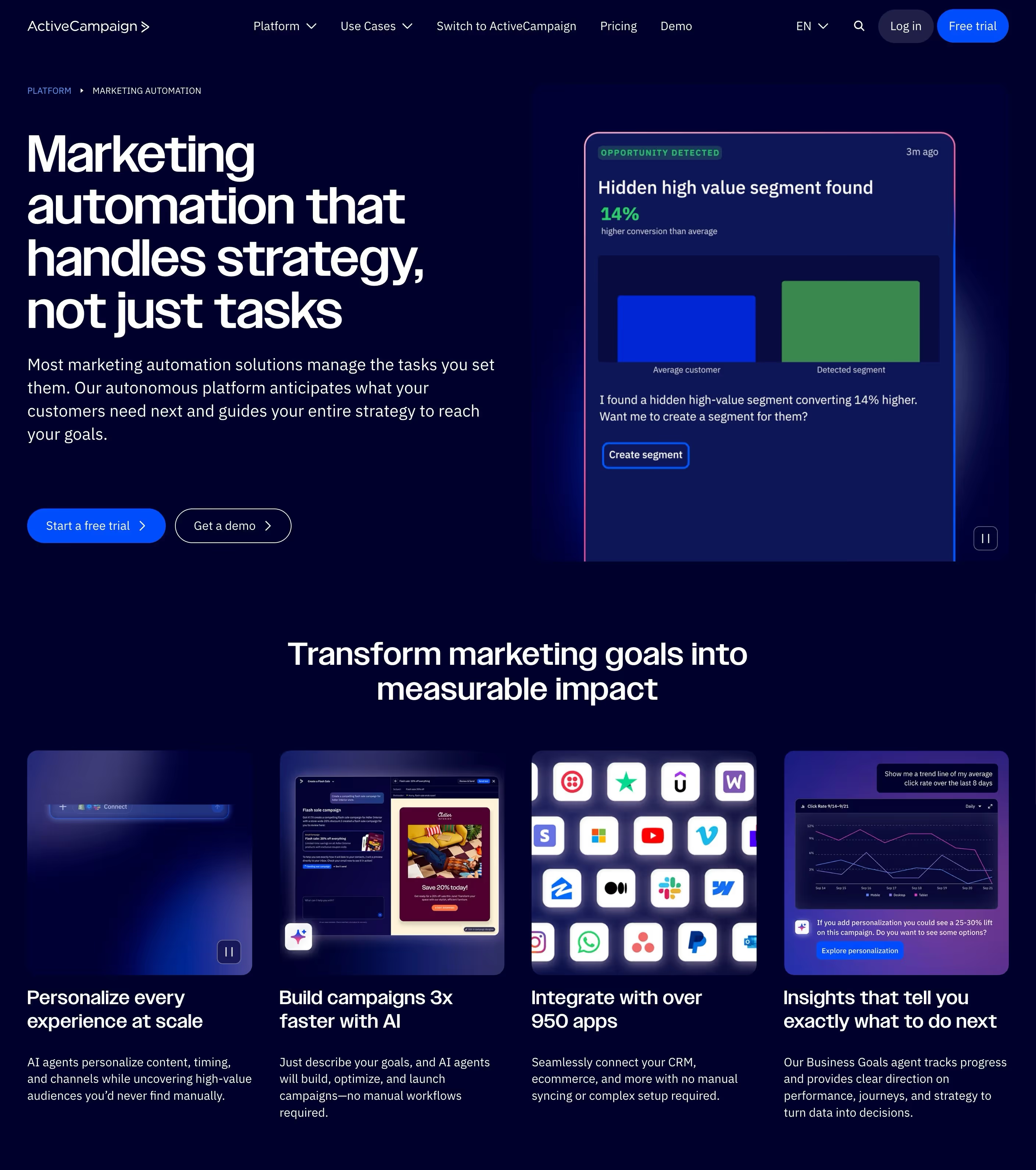
ActiveCampaign's marketing automation page illustrates what this looks like at the platform level. Their system highlights the core promise: automation that handles strategy, not just tasks. The product cards at the bottom show the range of what a marketing automation platform covers: audience segmentation, personalizing experiences at scale, building campaigns, integrating with 950+ apps, and surfacing insights about what's working. For B2B companies, the key is that all of this runs on the same behavioral data your website generates.
For more on building the lead generation system that feeds your CRM:
- B2B Website Lead Generation: Turning Visitors Into Pipeline
- B2B Website Conversion Optimization: A Data-Driven Approach
Common Integration Mistakes (and How to Avoid Them)
Getting data from your website into your CRM is the easy part. Keeping the integration clean, useful, and aligned with how your team actually sells? That's where most B2B companies stumble. These are the problems that show up after integration is "done" but isn't working the way it should.
Duplicate Records and Dirty Data
The fastest way to kill CRM adoption is flooding it with duplicates. When the same person fills out two different forms with slightly different email addresses, or when marketing imports a contact list that overlaps with existing records, duplicates multiply. Suddenly your sales team can't trust the data. They stop looking at website activity because they're not sure which record is the real one.
Deduplication rules should be set up before you start pushing website data into the B2B CRM, not after the damage is done. Most CRM systems have native deduplication based on email address. Use it. Clean customer information is the foundation that everything else depends on. If you can't trust the data, lead scoring, workflows, and attribution all fall apart.
Too Many Fields, Not Enough Structure
Companies often create dozens of custom CRM fields to capture every possible data point from the website. Six months later, half the fields are empty, reps ignore the data, and nobody knows which fields actually inform decision-making. The CRM becomes a junk drawer.
Start with the minimum viable data set: source, form type, key qualifying answers, and the behavioral signals your sales team says they actually look at. Add fields only when someone on the team specifically asks for them because they need that data to close deals. If a field doesn't change how someone sells, it doesn't need to exist.
Set It and Forget It
The integration needs ongoing attention. UTM parameters change when marketing campaigns change. New website pages need to be tagged for tracking in the CRM. Form fields evolve as the sales process evolves. Lead scoring thresholds need recalibration as you learn what actually converts. A scoring model that was perfect six months ago might be flagging the wrong behaviors today.
Schedule a quarterly audit of your website-to-CRM integration. Check that forms are still routing correctly, that tracking is firing on all pages, and that the workflows are still aligned with how your team sells. This maintenance isn't glamorous, but it's the difference between a CRM system that helps your team and one they ignore.
Ignoring Privacy and Consent
GDPR, CCPA, and other privacy regulations affect how you track website visitors and store their data in a CRM. Cookie consent banners aren't optional. Tracking visitors without consent can create legal liability. Make sure your CRM tracking script respects consent preferences and that your CRM system records consent status alongside customer information.
This matters especially for B2B companies selling into European markets or working with enterprise clients who audit vendor data practices. A cookie consent implementation that simply tracks everyone and hopes nobody notices is a liability waiting to surface during a client's vendor security review.
CMP's homepage shows a common approach to cookie consent: a banner at the bottom of the page with a clear privacy policy link and an "Ok, got it" button. For CRM integration, the important thing is what happens behind the scenes when someone clicks that button. If they accept, your tracking script fires and the CRM starts capturing behavioral data. If they decline (on sites with a more granular consent tool), the tracking script should not fire, and your CRM should record that this contact has not consented to tracking.

Measuring Integration ROI
The whole point of connecting your website to your B2B CRM is to make better decisions and close more deals. If the integration is working, the numbers should show it. If it's not, you need to know that too, before you spend another quarter optimizing something that's broken underneath.
Metrics That Show the Integration Is Working
Not every metric matters equally. Here are the ones that tell you whether your website-to-CRM integration is actually delivering value:
- Speed to first contact. How fast does a sales rep reach out after a form submission? Before integration, this is typically hours or days. After, it should be minutes. This is the easiest metric to measure and often the fastest to improve.
- Lead-to-opportunity rate. Are website leads converting to real pipeline at a higher rate now that sales has behavioral context? If reps can see what pages a prospect visited before their call, conversations should be more productive.
- Marketing attribution clarity. Can you trace a closed deal back to the website content or marketing campaign that started the customer journey? This is the metric that justifies marketing efforts to leadership.
- CRM adoption by the sales team. Are reps actually looking at website activity data in the CRM? If not, the data isn't useful enough or accessible enough. This is a qualitative signal but an important one.
- Reduction in manual data entry. Time the sales team saves by not copying form submissions from email into the CRM manually. Small per-lead, significant in aggregate.
- Sales forecasting accuracy. With cleaner pipeline data grounded in real website behavior, your forecasting should become more reliable over time. If the CRM knows which prospects are actively browsing your site and which have gone quiet, your pipeline projections improve.
Closed-Loop Reporting: The Real Payoff
Closed-loop reporting connects CRM revenue data back to website analytics. Instead of measuring website success by traffic and form fills, you measure it by pipeline generated and revenue influenced. Your dashboards should show website-sourced pipeline alongside other lead sources so leadership can see the ROI at a glance.
This is the metric that justifies website investment to leadership and proves that B2B marketing is generating real revenue, not just traffic. "Our website generated $320K in pipeline this quarter" is a different conversation than "our website got 15,000 visits this month." When your B2B CRM and your website analytics are connected in both directions, you've built a system that can optimize itself over time. You know which content produces revenue, which channels produce the best leads, and where the drop-off points are.
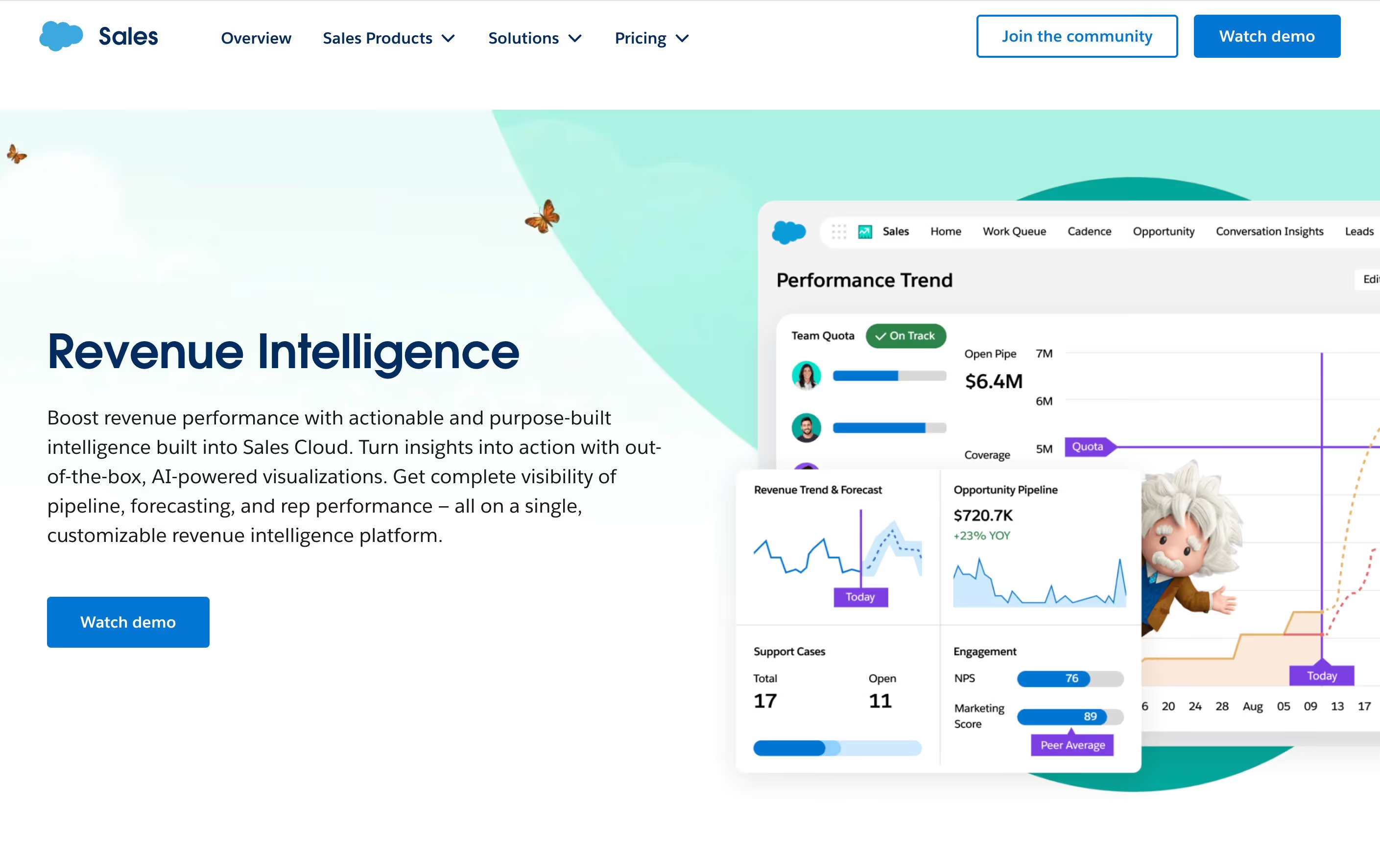
Salesforce's Revenue Intelligence dashboard shows what Level 3 integration looks like when it's fully built out. The Performance Trend view combines pipeline data ($6.4M open pipe), revenue forecasting ($720.7K with year-over-year trends), team quota tracking, support cases, and engagement scores in a single view. This is what closed-loop reporting enables: your website activity, CRM pipeline, and revenue data all visible in one place, with the context to make informed decisions about where to invest next.
For more on measuring website ROI and connecting investment to results:
Getting Started Without Rebuilding Everything
If your current setup is "form submissions go to an inbox" or "someone manually enters leads into the CRM," the jump to full behavioral tracking and closed-loop reporting sounds overwhelming. It doesn't have to be. The phased approach below lets you build the integration incrementally, with each phase delivering immediate value.
Phase 1: Automate Form Routing
Stop copying form data manually. Connect your website forms to your B2B CRM so new contacts are created automatically the moment someone submits. If your CRM software doesn't have a native integration with your website platform, use Zapier or Make as the bridge. This alone saves hours per week, eliminates the response-time gap, and ensures no lead falls through the cracks.
Even this basic level of automation changes the customer experience for new leads. They get a confirmation email within seconds. Their information is already in the CRM when the sales rep calls back. The conversation starts faster because nobody's scrambling to find a form submission buried in an inbox. Phase 1 costs almost nothing and usually takes less than a day to set up.
Phase 2: Install Tracking and Capture Source Data
Add the CRM's tracking script to your website. Set up hidden fields on forms to capture UTM parameters and page-of-submission. Now every new contact enters the CRM system with context: where they came from, which page they were on, and what they've looked at before. Sales reps can see the communication history and behavioral signals before making their first outreach.
This phase typically requires a few hours of setup and no ongoing cost beyond what you're already paying for the CRM. The behavioral data starts accumulating immediately, and within a few weeks, your team members will have enough data to see patterns in how website visitors become customers.
Phase 3: Build Scoring and Workflows
With behavioral data flowing, build a basic lead scoring model. Start simple: high-intent pages (pricing, contact, case studies) get more points than blog posts. Set up one or two automated workflows: notify sales when a lead scores above a threshold, trigger a nurture sequence for content downloads. Iterate based on what the sales team tells you is useful. Don't try to build the perfect model on day one.
The goal is to let the CRM system handle the sorting so your team can focus on closing deals. Once the basic model is running, you can refine it quarterly based on which scored leads actually become customers. That feedback loop is what makes the integration smarter over time.
Start With the Gap That's Costing You Deals
The biggest ROI from B2B CRM integration isn't the fancy dashboards or the lead scoring model. It's eliminating the gap between a prospect raising their hand on your website and your sales team starting a conversation with context. If your forms still route to an inbox instead of your CRM, fix that first. If your sales reps don't know which pages a lead visited before calling, add the tracking script. If your marketing team can't tell which content produces pipeline, set up attribution. Everything builds on the layer below it.
For most B2B companies, the phased approach works: automate form routing first, add tracking and source data second, then layer in scoring and workflows third. Each phase delivers immediate value while building toward the closed-loop reporting that connects your website directly to revenue. You don't need to solve everything at once. You just need to close the gap that's costing you the most deals right now, and build from there.
For more on turning your website into a lead generation system:
For more on measuring whether your website investment is paying off:
