
Your B2B website gets traffic. Maybe SEO is working, maybe LinkedIn posts are driving clicks, maybe your directory listings are pulling visitors in. But your sales pipeline isn't growing at the same rate. B2B website lead generation is the gap between "people visit our site" and "people become real opportunities," and most B2B marketing teams aren't closing it.
The problem usually isn't traffic volume. It's that your website isn't built to convert visitors into conversations. Most B2B sites are digital brochures: they describe the company, list the services, and hope someone clicks "Contact Us." Everyone else leaves without a trace.
This article covers how to build a B2B lead generation system into your website that actually works. Not LinkedIn outreach tactics, not cold calling playbooks, not paid ad lead gen plays. Just the things that happen on your site that turn anonymous visitors into qualified leads and real pipeline for your sales team.
Why Most B2B Websites Fail at Lead Generation
The typical B2B website has a structural problem: it's designed to inform, not to capture. It tells visitors what the company does but gives them no reason to identify themselves until they're ready to pick up the phone. That gap between "interested visitor" and "hand-raiser" is where most of your potential leads disappear. And no amount of lead gen effort elsewhere can compensate for a website that doesn't convert.
The "Contact Us" Trap
Look at most B2B company websites and you'll find one conversion path: a contact form, usually on a dedicated page, sometimes buried in the footer. This works for the 1-3% of visitors who are ready to talk to sales right now. But what about everyone else?
The other 97% are in various stages of research. Some are just starting to understand their problem. Others are comparing options. A few are building a business case for their leadership team.
None of them are ready to fill out a form that says "How can we help?" because they're not sure what help they need yet. So they read a few pages and leave, and you never know they were there. They move on to a competitor who gave them a reason to engage.
Common symptoms of this problem include:
- High traffic, flat sales pipeline. Analytics show visitors are coming, but form submissions stay low.
- Sales team complains about lead quality. The few inbound leads that do come in are either tire-kickers or people who are ready to buy today with no middle ground.
- Marketing can't prove ROI. Without a way to capture and track leads through the funnel, the marketing team can't connect their marketing strategy to revenue.
- Long gaps between touches. A prospect visits the site, leaves, and the next interaction is months later when they're ready to buy (if they remember you at all).
The B2B Buying Timeline Problem
B2B purchases aren't impulse decisions. They involve multiple decision-makers, budget cycles, internal politics, and evaluation periods that can stretch for months. A marketing director might visit your site in January, loop in their VP in March, get budget approval in June, and start seriously evaluating agencies in August.
Your website needs to capture that interest in January and stay connected through August. If your only mechanism is "Contact Us," you're asking visitors to jump from casual browsing to a sales conversation in one step. That's not how B2B buying works, and it's why so many B2B companies feel like their lead generation strategies aren't working. The leads are visiting. The site just isn't giving them a way to engage at their pace.
For more on how B2B buying stages affect website design:
What a B2B Website Lead Generation System Actually Looks Like
Effective B2B website lead generation isn't one tactic or one clever form. It's a system with interconnected components, and each piece feeds the next. Before building any of it, you need clarity on one thing: who your target audience actually is.
Your ideal customer profile (ICP) defines the system. If your best clients are manufacturing companies with $10M-$50M in revenue, your content offers, form fields, and qualification criteria should all be calibrated for that buyer. Building lead generation without an ICP is like building a fishing net without knowing what you're trying to catch.
The core components of this system include:
- Value exchanges. Content offers and tools that give visitors a reason to share their contact information before they're ready for a sales conversation.
- Conversion points. CTAs and forms placed strategically throughout the site, not just on the contact page.
- Qualification mechanisms. Lead scoring and segmentation that separate "downloaded a guide out of curiosity" from "visited the pricing page three times this week."
- Follow-up processes. Automated lead nurturing workflows and sales handoffs that act on leads while they're still warm.
Each component depends on the others. A great content offer without a visible CTA goes unseen. A well-designed form without lead scoring dumps unqualified contacts on your sales team. The system works when the pieces connect.
MQLs, SQLs, and Why the Distinction Matters
Before building conversion paths, define what "qualified" means for your business. Without this, marketing celebrates form fills while sales complains about lead quality, and nobody can agree on whether the website is "working."
A marketing qualified lead (MQL) has shown enough interest to be worth nurturing. They downloaded a guide, registered for a webinar, or visited high-intent pages multiple times. They've identified themselves but aren't ready for a sales conversation yet. The marketing team owns the relationship at this stage.
A sales qualified lead (SQL) has shown enough intent and fit to warrant direct outreach. They requested a quote, booked a consultation, or their behavior and profile indicate they're actively evaluating solutions. An SQL gets routed to a sales rep for a real conversation.
The rest of this article covers the B2B lead generation strategies that move visitors through each stage, from first touch to sales-ready conversation.
Notice how this plays out on a real B2B site. Siemens' SIMATIC Automation page shows two distinct CTAs side by side in the hero section: "Explore products" for visitors who are still researching and evaluating, and "Contact us" for those ready to start a conversation.
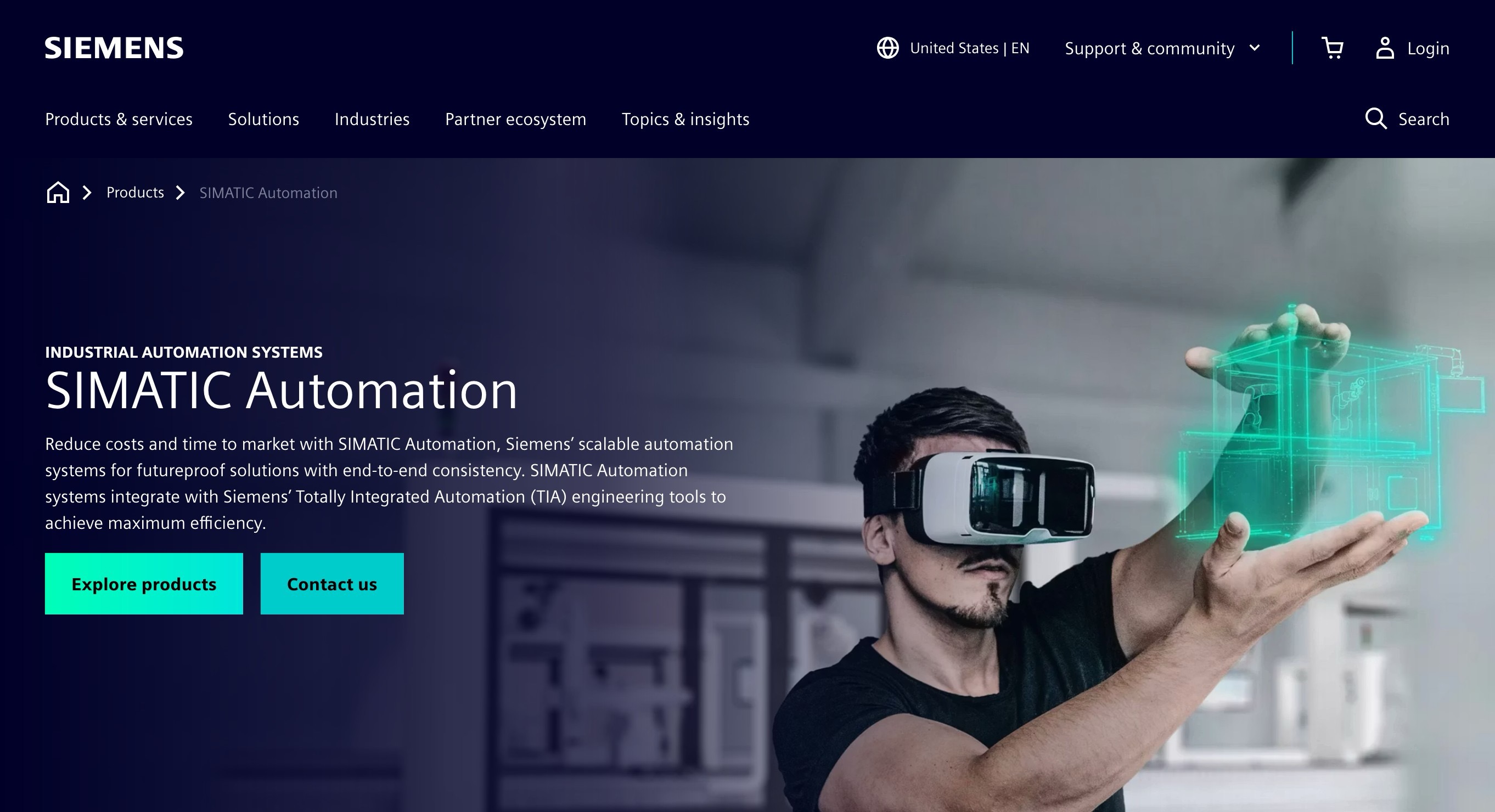
The "Explore products" path is a lower-commitment entry point that keeps engineers and technical evaluators engaged on the site. The "Contact us" path catches decision-makers who already know what they need. Neither CTA competes with the other because they're aimed at different people with different intent levels.
Content Offers That B2B Buyers Actually Want
Gated content is the workhorse of content marketing for B2B lead generation. It captures leads who aren't ready for a sales conversation. You're offering something valuable in exchange for contact information. But the bar is higher than it used to be. Generic whitepapers and "Ultimate Guides" that could be summarized in a blog post aren't worth an email address anymore.
Matching Offers to Buying Stages
Different content offers work at different points in the sales funnel. The key is matching the value exchange to where the buyer is in their decision process:
- Early stage (awareness). Industry benchmark reports, educational guides, checklists. These attract a broad target audience just starting to research a problem. Low commitment, higher volume, but the leads need significant nurturing before they're sales-ready. Think "2026 Manufacturing Website Benchmark Report" rather than "10 Tips for Your Website."
- Mid stage (evaluation). Webinars, comparison templates, assessment tools, ROI calculators. These attract B2B buyers who are actively evaluating solutions. Webinars work especially well here because they demonstrate expertise and give your team face time with prospects without requiring a formal sales meeting. The qualification signal is stronger: someone who spends 45 minutes in a webinar is more engaged than someone who downloaded a PDF.
- Late stage (decision). Case studies, consultation calls, custom audits, detailed pricing guides. These attract people who are close to making a decision. Lowest volume, highest intent, best lead quality. A request for a consultation is essentially an SQL generating itself.
What Makes a Content Offer Worth an Email Address
People are protective of their inboxes. A content offer needs to deliver something the visitor can't easily get from a blog post or a quick search. Three things make the difference:
- Specificity. "Website ROI Calculator for B2B Companies" beats "How to Measure Website ROI." The calculator does the work for them.
- Actionability. Templates and tools they can immediately use beat thought leadership they'll read once and forget. A customizable RFP template beats an ebook about "how to choose an agency."
- Time savings. Original research, proprietary data, and compiled benchmarks save the reader hours of work. Industry-specific data is particularly valuable because it's hard to find elsewhere.
Whitepapers still work when they contain original data, proprietary research, or genuinely novel frameworks. The generic "state of the industry" whitepaper that rephrases publicly available information? That's a relic.
OTTO Motors (a Rockwell Automation company) provides a strong example of what a high-value content offer looks like. Their ROI calculator lets manufacturing operations teams plug in their own numbers (personnel per shift, labor rates, hours, shifts per day) and instantly see a projected payback period. It's not a PDF. It's a tool that does real work for the visitor.

This kind of offer pre-qualifies the lead at the same time it captures them. Someone filling in their actual shift counts and labor rates isn't casually browsing. They're building a business case. The information they enter also tells the sales team exactly where to start the conversation.
For more on building a content marketing strategy that supports lead generation:
CTAs That Convert Without Being Obnoxious
Most B2B websites fall into one of two traps with their calls to action. The first is going too soft: a single "Contact Us" link in the navigation that's easy to miss and offers no reason to click. The second is going too aggressive: popups, slide-ins, and flashing banners on every page that feel desperate. Neither approach serves B2B buyers well.
Primary vs. Secondary CTAs
Every page on your site should have a primary CTA (the main action you want the visitor to take) and, in most cases, a secondary CTA (a lower-commitment alternative). The primary CTA targets visitors who are sales-ready: "Request a Quote," "Schedule a Consultation," "Get a Custom Proposal." The secondary CTA targets those still evaluating: "Download Our Pricing Guide," "See Our Case Studies," "Get the Checklist."
This dual approach means your site captures both SQLs and MQLs from the same page. A manufacturing VP who's ready to talk fills out the quote request. Their engineer who was sent to "check out this company's site" downloads the technical guide. Both are leads that move into your pipeline at different points.
CTA Placement That Follows Attention
Where you put CTAs matters as much as what they say. Most B2B companies put a single CTA at the bottom of the page, which means only the 20-30% of visitors who scroll to the end ever see it. Better placement follows the visitor's attention:
- Above the fold. Your primary CTA should be visible without scrolling on key pages (homepage, service pages, pricing page).
- After proof points. Place a CTA immediately after a testimonial, case study reference, or compelling statistic. The visitor's confidence is highest right after seeing evidence.
- At natural decision moments. In long-form content, place CTAs at the transition between sections where a reader might think "I've seen enough, I want to talk to someone."
- In the sticky navigation. A persistent "Get a Quote" or "Book a Call" button in the header means the conversion path is always one click away.
Repeat CTAs throughout long pages, but vary the copy so the page doesn't feel like a billboard. "Request a Quote" at the top, "See If We're a Fit" after the case studies, "Let's Talk About Your Project" at the bottom. Same action, different framing.
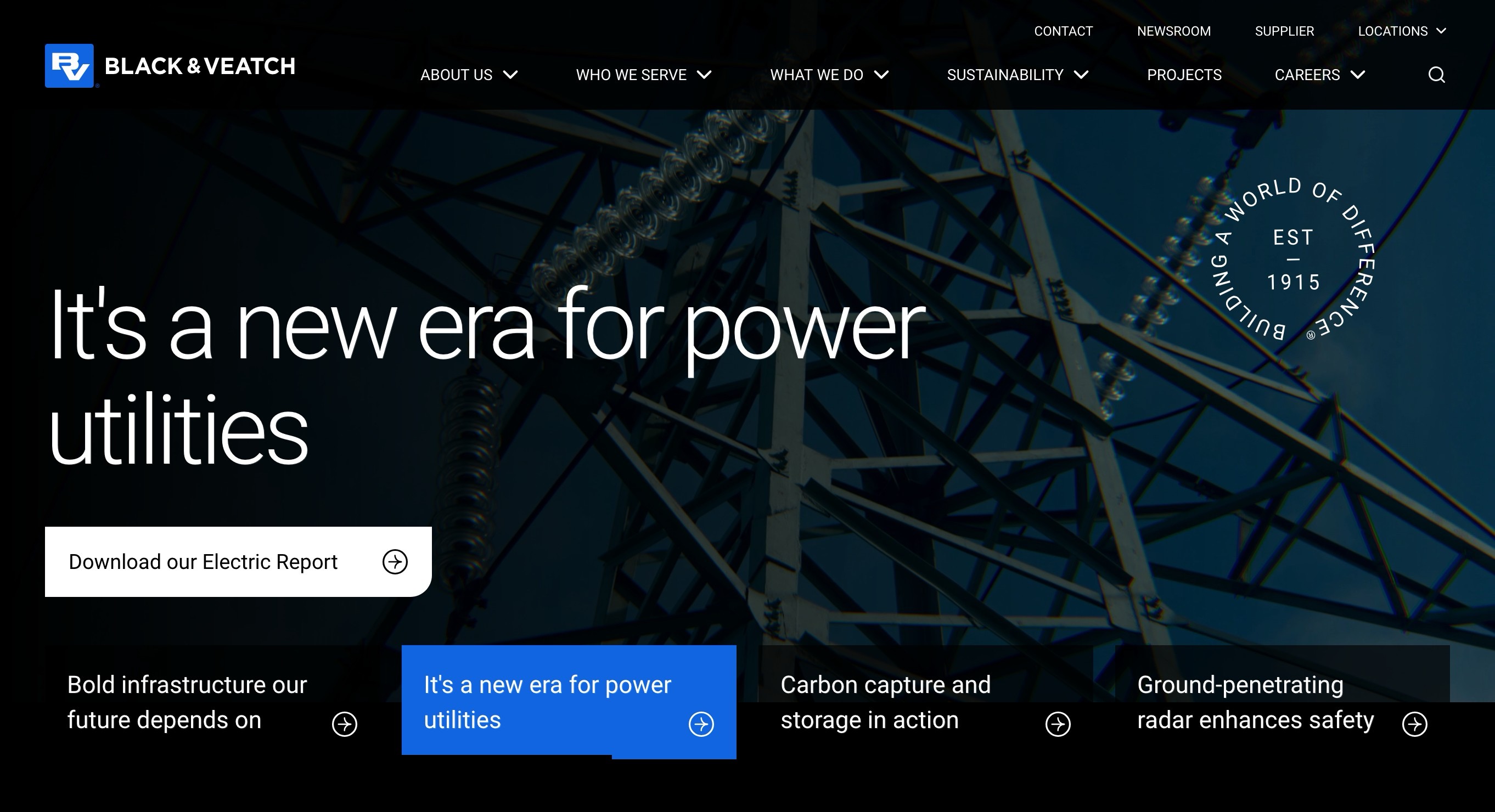
Black & Veatch, an engineering and construction firm, demonstrates this well. Their homepage leads with a content-driven CTA in the hero: "Download our Electric Report." It's a secondary, lower-commitment offer positioned at the very top of the page where first-time visitors are still orienting themselves.
Scroll further down the same page and the CTA shifts. After the visitor has seen recent news, project highlights, and evidence of expertise, Black & Veatch presents the higher-commitment ask: "Seeking a partner with proven expertise? Let's talk."
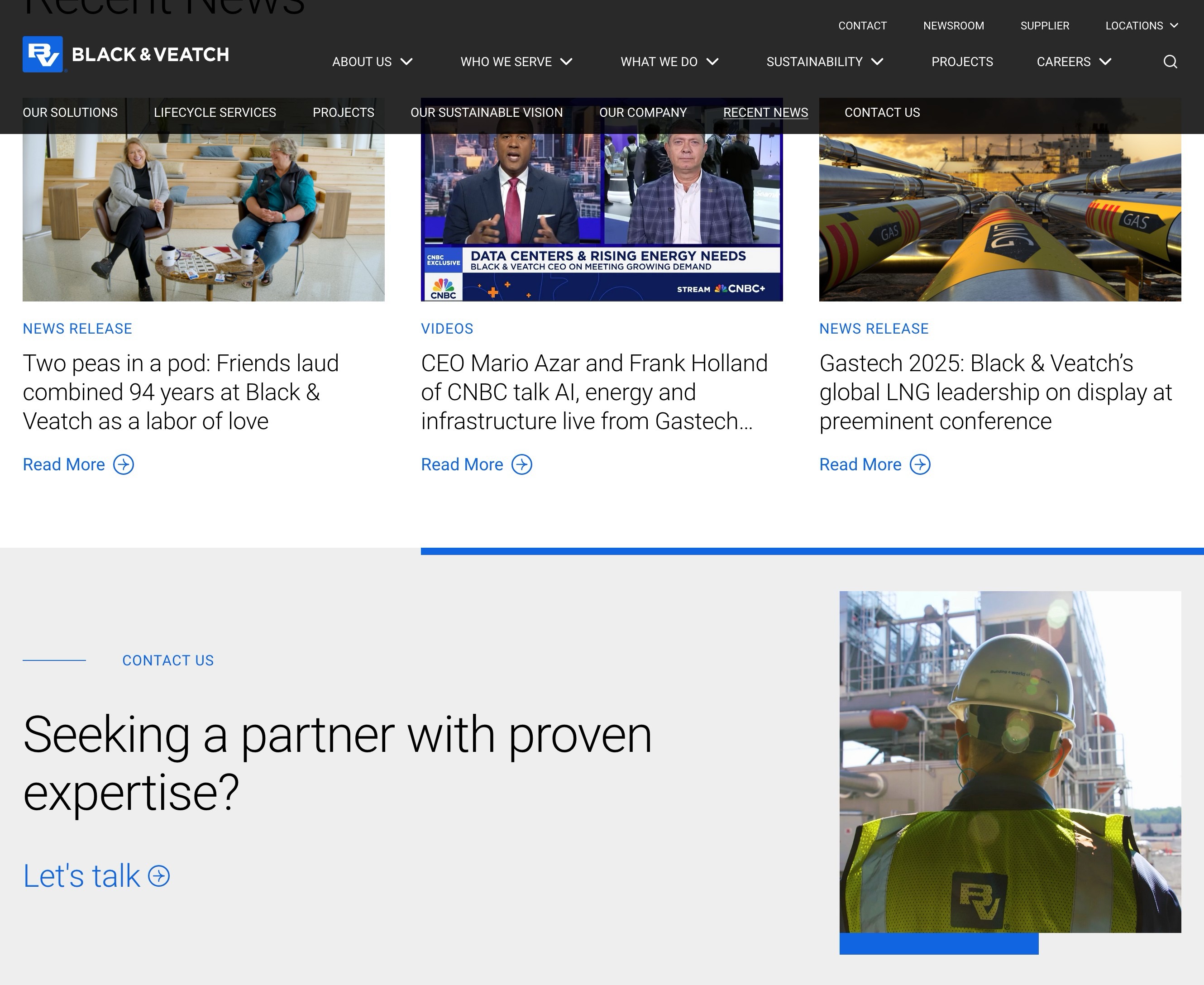
The pattern is intentional: a low-commitment offer at the top for browsers, a high-commitment offer at the bottom for visitors who've read enough to be convinced. Both CTAs serve the same goal (lead generation), but they meet the visitor at different levels of readiness.
Writing CTA Copy That Speaks to Results
"Submit" is the worst CTA button text on the internet. It tells the visitor nothing about what they'll get and everything about what they have to do. CTA copy should describe the outcome, not the action.
Here's what better CTA copy looks like:
- Instead of "Submit" → "Get Your Free Quote"
- Instead of "Contact Us" → "Start a Conversation"
- Instead of "Download" → "Get the 2026 Benchmark Report"
- Instead of "Learn More" → "See How It Works"
- Instead of "Sign Up" → "Reserve Your Spot"
The pattern: lead with what the visitor receives, not what they're giving up. Address the pain points that brought them to the page. A visitor on your services page isn't looking to "submit a form." They're looking to solve a problem. Your CTA should speak to that.
For more on writing copy that resonates with B2B buyers:
For more on the trust elements that make visitors confident enough to click:
Form Strategy for Complex B2B Sales
Forms are where the conversion actually happens, and B2B form strategy is different from B2C or SaaS. You're not just collecting an email address. You're often qualifying the lead at the same time, gathering enough information for your sales team to have an informed first conversation. The balance between "easy to fill out" and "useful for sales" is the central tension.
How Many Fields Is Too Many?
The old rule of thumb was "fewer fields, more conversions." That's oversimplified for B2B. A 3-field form (name, email, message) generates more submissions, but the leads are mostly unqualified. An 8-field form gets fewer submissions, but the ones that come through are more likely to be real opportunities. The sales team actually wants to call them.
The right number depends on your sales process. At minimum, most B2B companies need:
- Name and email. Obviously.
- Company name. Lets sales research the prospect before the first call.
- Job title. Tells you whether you're talking to a decision-maker or a researcher doing preliminary legwork.
- Phone number (optional). Making this optional reduces friction while still capturing it from people who prefer a call.
Beyond that, consider what your sales reps actually need to start a useful conversation. If they always ask about budget range, timeline, or project scope in the first call, putting those on the form pre-qualifies leads and saves everyone time. But every additional field is a tradeoff: you'll get fewer submissions.
Progressive Profiling
Instead of asking for everything upfront, collect information across multiple interactions. First visit: name and email for a guide download. Second visit: company name and role for a webinar registration. Third visit: budget range and timeline for a consultation request.
Each interaction builds a more complete picture in your CRM without overwhelming the visitor with a 12-field form. This approach works especially well with marketing automation platforms like HubSpot, which can recognize returning visitors and dynamically swap out form fields they've already answered.
Procore, a construction project management platform, shows how to balance lead capture with qualification. Their demo request page opens with a clear value proposition ("Do more with the hours you work") and pairs it with a form that collects six fields: name, email, company, phone, and company type.
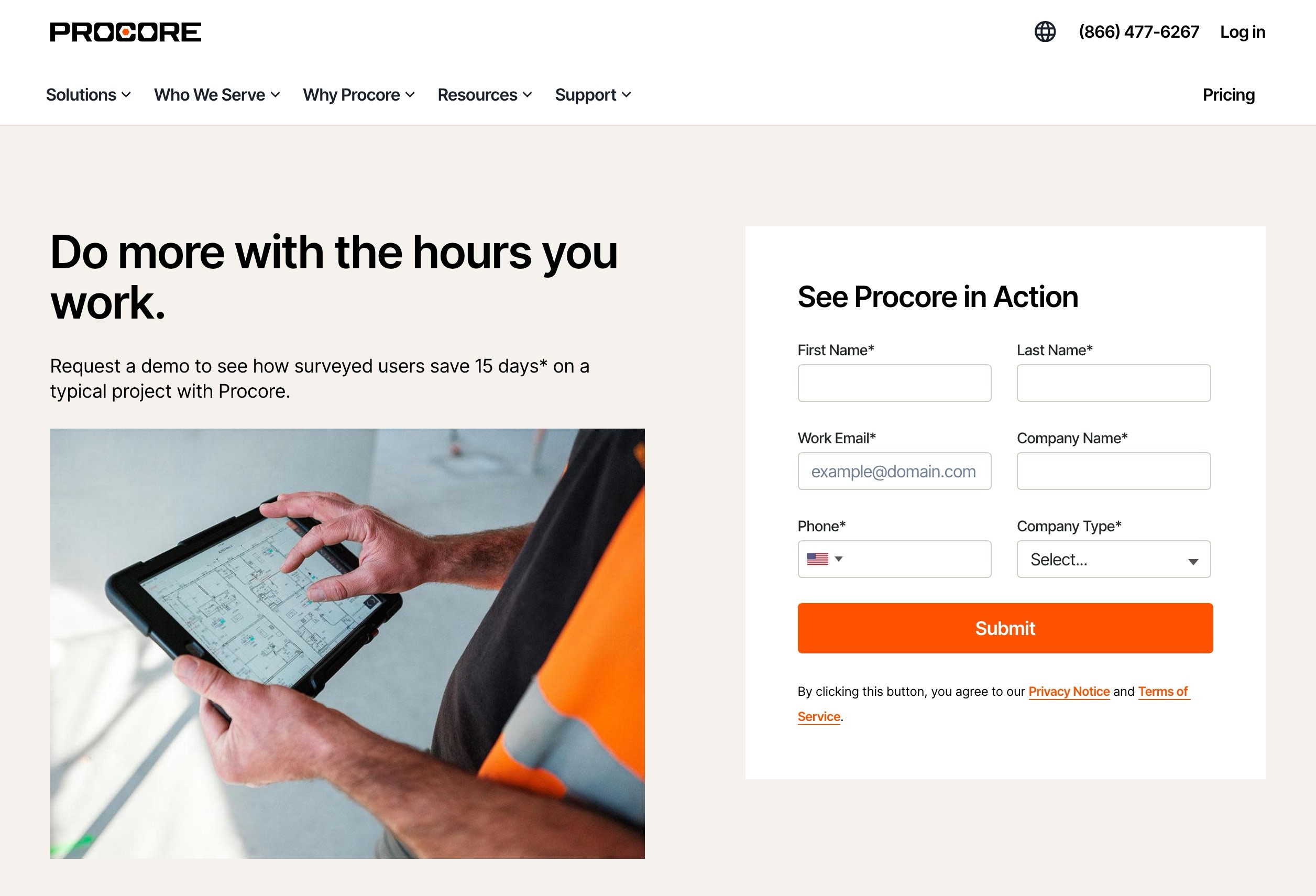
The "Company Type" dropdown is a smart qualifying field. It tells Procore's sales team whether they're talking to a general contractor, specialty contractor, or owner, which completely changes the conversation. The form does double duty: it captures the lead and pre-qualifies them for the right sales track.
Hidden Fields and UTM Tracking
The fields your visitors don't see matter as much as the ones they do. Hidden fields capture data automatically: the page the visitor converted on, the traffic source that brought them (organic search, LinkedIn, referral, social media), the number of pages they viewed, and how many times they've visited the site.
This data feeds your CRM and transforms the sales handoff. A sales rep who knows the lead came from a search engine query for "manufacturing website redesign" and spent 12 minutes on the pricing page has a very different opening than one who just sees a name and email. Context turns cold outreach into warm conversation.
For more on optimizing your conversion paths with data:
Lead Scoring: Letting Website Behavior Prioritize Your Pipeline
Your website generates leads at different levels of intent. Someone who downloaded a general industry guide is not the same as someone who visited your pricing page three times this week. Lead scoring assigns point values to these behaviors so your sales team knows who to call first and who needs more nurturing.
What to Score
Not all website interactions signal the same level of buying intent. A useful scoring model weighs both behavior (what the visitor did) and fit (who the visitor is):
High-value behaviors (score heavily):
- Visited the pricing or investment page
- Requested a quote or consultation
- Viewed multiple case studies in the same session
- Returned to the site three or more times in a week
- Downloaded a late-stage content offer (ROI calculator, pricing guide)
Medium-value behaviors (moderate score):
- Registered for a webinar
- Downloaded an educational guide or whitepaper
- Visited a service or product page
- Spent more than 3 minutes on the site
Low-value behaviors (minimal score):
- Read a single blog post and left
- Visited only the homepage
- Opened a nurture email but didn't click through
Profile fit factors (bonus points):
- Job title matches your ICP (VP of Marketing vs. intern)
- Company size is within your target range
- Industry matches your sweet spot
Connecting Scores to Action
The scoring model is only useful if it triggers specific actions. When a lead crosses the MQL threshold (enough accumulated interest to justify marketing investment), the marketing team adds them to a targeted nurture sequence. When they cross the SQL threshold (enough intent and fit to warrant a sales conversation), the lead routes directly to a sales rep with full context on what they've done on the site.
Without this connection between score and action, lead scoring is just a number that sits in your CRM. The power is in the automation: the right content reaches the right lead at the right time, and your sales team only gets notified when someone is genuinely worth their time.
How you organize your content on the site also functions as a qualification mechanism. OTTO Motors' resource center lets visitors filter by Topic, Content Type, and Language. The content types themselves map to different intent levels: blog posts for casual browsers, downloadable guides for evaluators, webinars for engaged prospects.
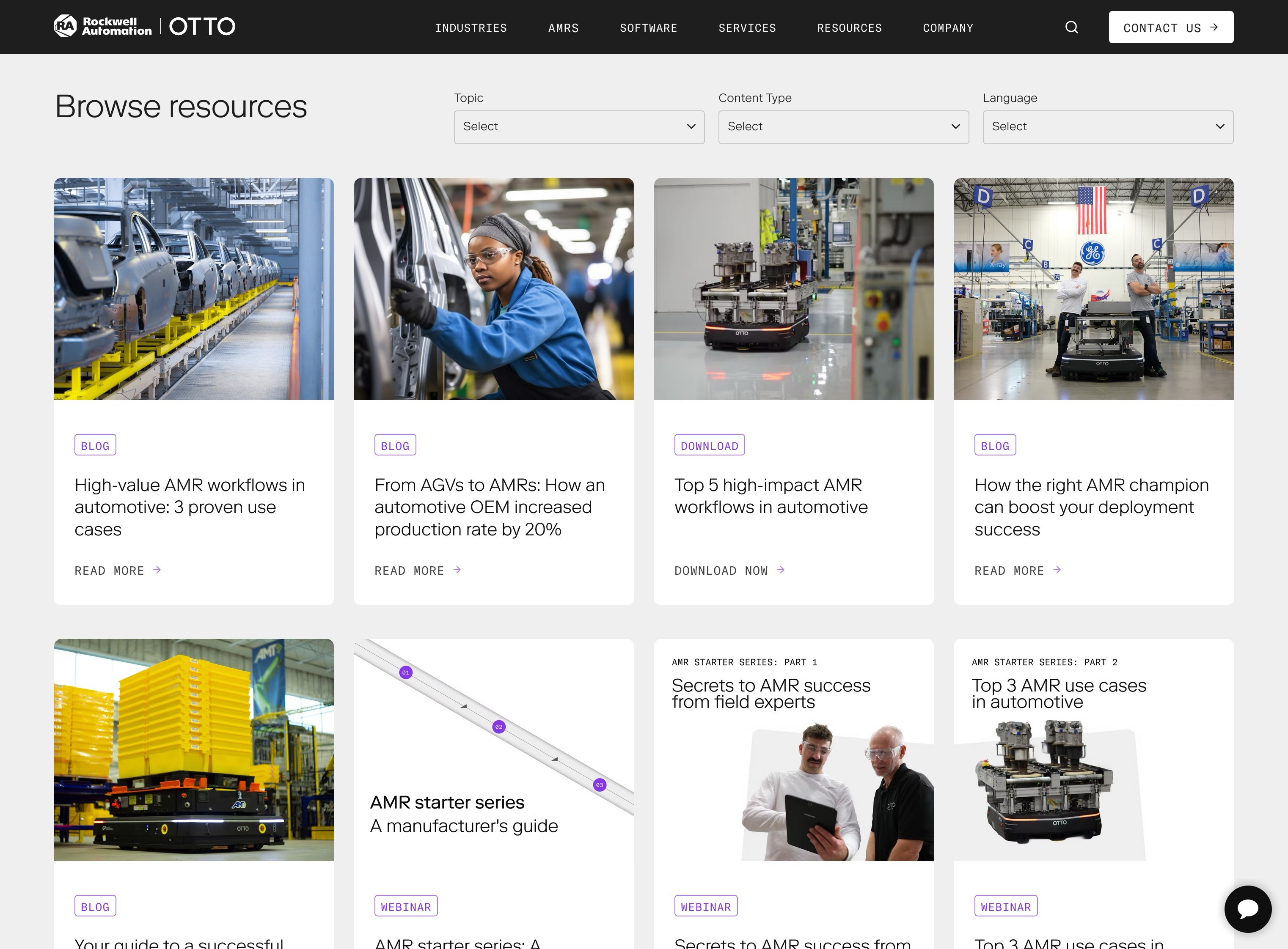
The visitor who navigates to a webinar recording and watches it for 30 minutes is showing different intent than one who skims a blog post title and bounces. When your scoring model accounts for content type, the resource center structure itself becomes a qualification tool. Each filter click and content engagement tells you more about where the visitor is in their buying process.
Chatbots and Live Chat: When They Help and When They Don't
Conversational marketing tools can accelerate lead generation or actively drive visitors away. The difference comes down to context: where the chat appears, when it triggers, and what it says.
Where Chat Works Best on B2B Sites
High-intent pages: pricing, product or service detail pages, and the contact page itself. These visitors have specific questions, and a chat prompt that says "Have questions about pricing?" on the pricing page converts because it's contextually relevant. The visitor is already thinking about cost, and the chat removes friction between "I have a question" and "I got an answer."
Chat also works well as a qualifier. A short bot flow ("Are you looking for a new website or updating an existing one?" → "What's your timeline?" → "Let me connect you with the right person") can route visitors to the appropriate response: a sales rep for high-intent prospects, a resource link for early-stage researchers.
Where Chat Gets in the Way
Blog posts, about pages, and resource libraries. People browsing educational content don't want to be interrupted. A chat popup that fires 5 seconds after landing on a blog post feels like a salesperson following you around a store. It signals desperation, not helpfulness.
The rule of thumb: deploy chat where visitors are likely to have questions that affect a buying decision. Remove it (or set it to passive/minimized mode) where visitors are consuming content at their own pace.
AI-Powered Chatbots: First Filter, Not Closer
AI chatbots have improved dramatically. They can answer common questions, qualify basic intent, capture contact information after hours, and route visitors to the right resources. For a B2B company that doesn't have someone monitoring live chat all day, an AI-powered bot is a practical solution for 24/7 engagement.
But they're still a first filter, not a closer. Complex B2B sales conversations involve nuance, context, and relationship-building that bots can't replicate. Use the bot to qualify and capture. Use humans to consult and close.
HubSpot's pricing page shows this in practice. The chat widget appears in the lower right with a contextual greeting: "Need help choosing a plan? Chat with a sales agent now." It offers two clear paths: "Book a meeting" or "Chat with sales." The chat is specific to the pricing decision the visitor is actively making.
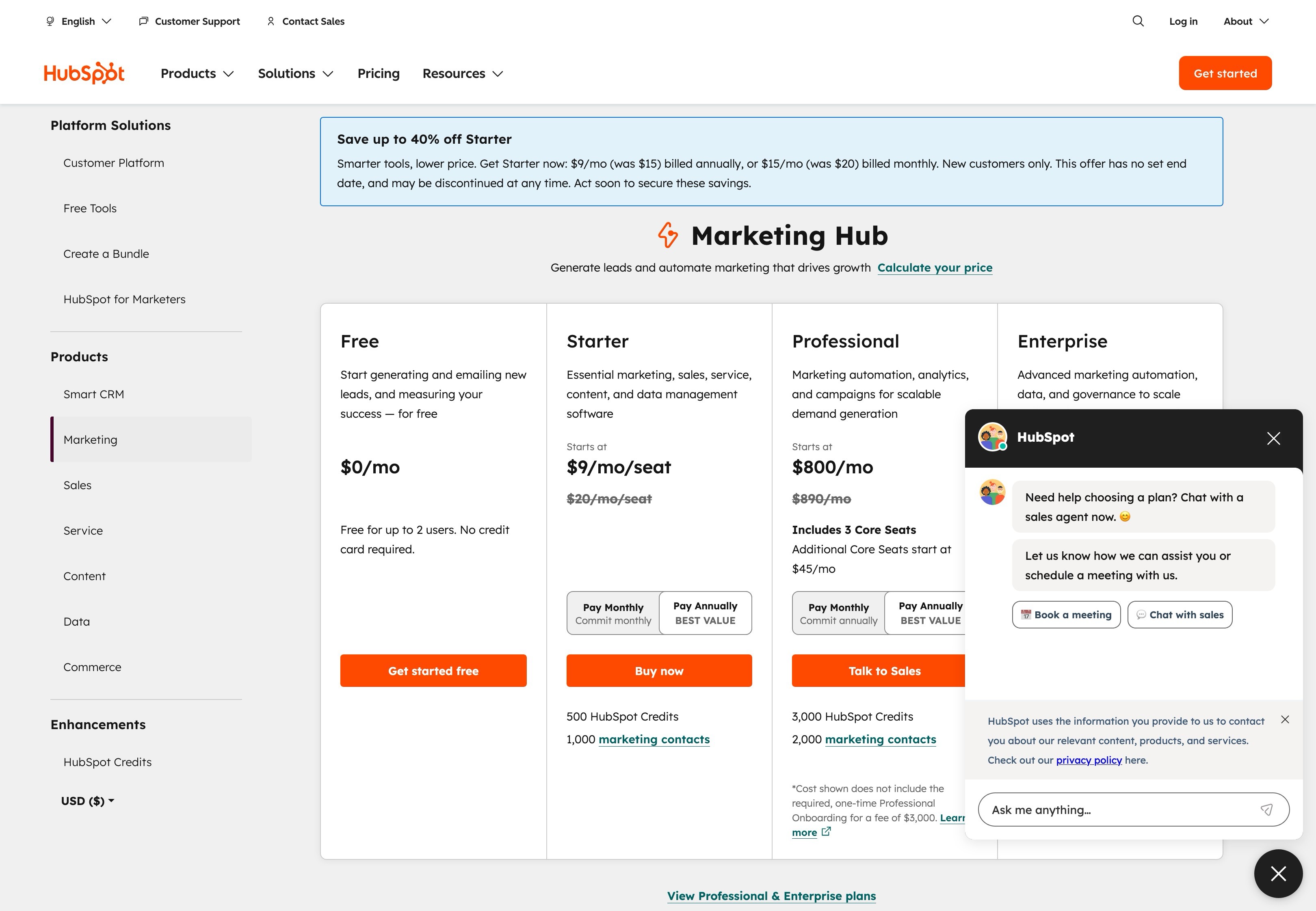
The widget doesn't obscure the pricing information or demand attention. It's available for the visitor who has a question, invisible to the one who doesn't. That restraint is what separates helpful chat from aggressive chat. The same company probably wouldn't deploy this same chat flow on their blog or resource library, and that distinction matters.
Identifying the 98% Who Don't Fill Out Forms
Only 2-3% of B2B website visitors ever fill out a form. That means the vast majority of your traffic, including potential buyers from companies that match your ICP, visits, browses, and leaves without identifying themselves. Visitor identification tools and behavioral signals help you understand who's on your site even when they don't raise their hand.
Website Visitor Identification Tools
Tools like Leadfeeder, Clearbit Reveal, and ZoomInfo WebSights match IP addresses to company names. They can show you which organizations are visiting your site, which pages they're viewing, and how often they come back. This isn't individual-level tracking (privacy regulations prevent that), but company-level identification gives your sales team actionable intelligence.
A sales rep who sees that three people from a target account have visited the pricing page this month can make a warm, relevant outreach call. That's a different conversation than a cold email. For B2B companies with defined ICPs and target account lists, this data is one of the highest-value investments in lead generation beyond the website itself.
Behavioral Signals That Indicate Intent
Not all visitors are equal, even among those who don't convert. Tracking behavioral signals helps your marketing team and sales team prioritize which companies to pursue:
- Pricing or investment page visits. The strongest buying signal short of filling out a form.
- Multiple case study views. Someone evaluating proof points is further along than someone reading blog posts.
- Repeat visits in a short timeframe. Three visits in a week signals active evaluation, not casual browsing.
- Service page depth. Visiting multiple service or product pages suggests they're trying to understand your full capabilities.
- Contact page visits without submission. They considered reaching out but decided not to. Worth a proactive touchpoint.
Retargeting Visitors Who Don't Convert
For visitors who showed interest but didn't fill out a form, retargeting ads bring your brand back in front of them as they browse other sites or scroll through LinkedIn and social media. Retargeting works best when the ads match what the visitor was looking at. Show a case study ad to someone who visited your services page, not a generic brand awareness ad.
This keeps you in consideration during the long B2B sales cycle without relying solely on the visitor returning to your site on their own. It's particularly effective for B2B companies where the buying process involves multiple stakeholders: the first visitor might not convert, but the retargeting ad they share with a colleague can bring a second decision-maker to the site.
Landing Pages vs. Website Pages: When You Need Both
Your main website pages serve multiple audiences and purposes. Your homepage speaks to first-time visitors, returning prospects, existing clients, and potential hires simultaneously. Landing pages don't have that problem. They serve one audience with one offer and one desired action.
When to Build a Dedicated Landing Page
Paid ad campaigns, email marketing pushes, ABM (account-based marketing) plays, webinar registrations, and targeted lead generation campaigns all benefit from landing pages. The defining factor: when the traffic source is narrow and the desired action is specific, a dedicated page removes distractions and focuses the conversion path.
A LinkedIn ad promoting your "2026 B2B Website Benchmark Report" should drive to a dedicated landing page with that report's value proposition, a short form, and nothing else. No main navigation, no sidebar, no links to other pages. The only thing the visitor can do is convert or leave. This sounds aggressive, but conversion rates on focused landing pages consistently outperform general website pages for targeted traffic.
When Your Website Pages Should Do the Converting
Organic search traffic, direct visitors, and referral traffic often land on your main site pages. These visitors arrived through broader channels, and they might need more context before they're ready to convert. Your service pages, case study pages, and blog posts need to balance delivering information with providing conversion opportunities.
The solution isn't to turn every page into a landing page. It's to build conversion mechanisms (CTAs, content offers, chat) into the natural flow of your website content so that visitors always have a next step available, regardless of which page they're on.
Rockwell Automation's webinar hub shows how industrial companies use focused landing pages for lead generation. The featured webinar leads with a specific outcome ("Strategies for Safer, Smarter Operations"), includes the date and time, speaker credentials, and a prominent "Register Now" CTA. A sidebar offers email signup for future events, creating a secondary conversion path.
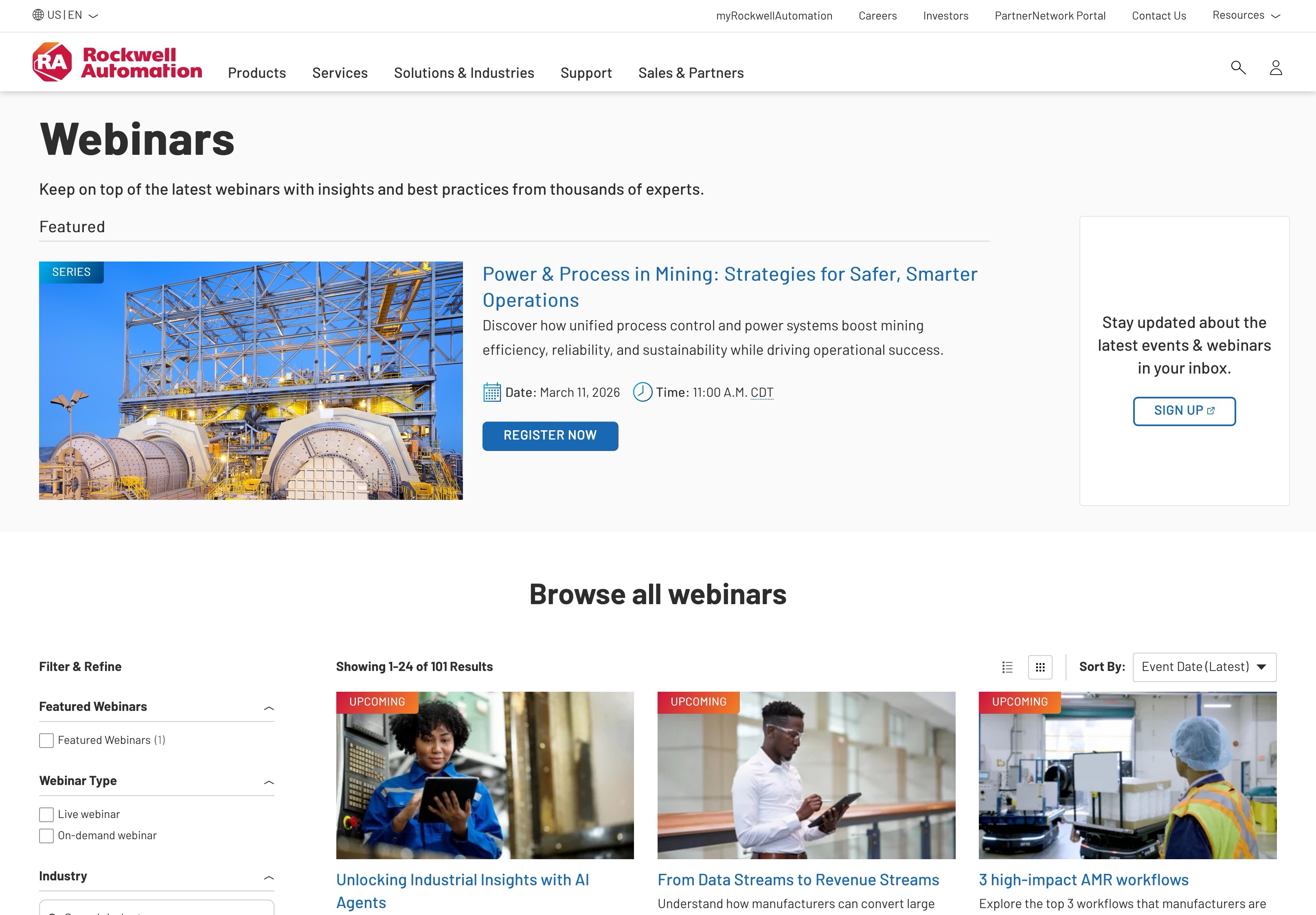
Below the featured event, visitors can browse and filter 101 additional webinars by type (live, on-demand), industry, and topic. This structure serves both purposes: the featured webinar drives registrations from targeted campaigns, while the browsable library captures leads who arrived organically and want to find content relevant to their specific situation.
After the Conversion: Follow-Up and Nurturing
The best lead generation system on your website means nothing if what happens next drops the ball. For B2B companies with long sales cycles, the post-conversion experience is where leads are won or lost. Two problems kill most B2B lead follow-up: slow response time and irrelevant nurturing.
The Five-Minute Window
Research consistently shows that leads contacted within five minutes of submitting a form are dramatically more likely to convert than those contacted after 30 minutes. After an hour, the likelihood drops even further. Most B2B companies respond in hours or days.
This is the easiest competitive advantage you can build, and it has nothing to do with design or technology. It's about process. Set up real-time notifications so your sales team gets an alert the moment a high-intent form is submitted.
For quote requests and consultation bookings, the expectation is a same-day response. Beating that expectation by responding in minutes creates an immediate positive impression and sets the tone for the entire relationship.
Automated Nurture Sequences
Not every new lead is ready for a sales conversation. For MQLs who downloaded a guide, registered for a webinar, or engaged with early-stage content, marketing automation handles the lead nurturing. A well-designed email marketing sequence delivers additional relevant content over weeks, building trust and keeping your company in consideration during the long B2B evaluation period.
The key word is "relevant." A lead who downloaded a guide about website redesign costs should receive follow-up content about redesign timelines, what to expect from the process, and case studies of successful projects. Not a generic monthly newsletter. Not a promotional blast about an unrelated service. Marketing automation platforms like HubSpot, Marketo, or Pardot can trigger email campaigns based on the specific content the lead engaged with, their lead score, and time-based workflows.
The goal is moving leads from MQL to SQL over time. Each touchpoint should add value and build familiarity, so that when the lead is finally ready for a conversation, your company is the obvious choice.
The Sales Handoff
When a lead crosses the SQL threshold, whether through accumulated scoring, a direct request, or a behavioral trigger like repeated pricing page visits, the handoff to sales needs to include context. What pages did they visit? What content did they download? How many times have they been to the site?
A sales rep who opens with "I saw you attended our webinar on manufacturing website ROI and then checked out our pricing page. Are you evaluating a redesign?" starts a conversation that feels relevant and informed. Compare that to a generic "thanks for your interest, would you like to schedule a call?" The context your website captures throughout the lead generation process is what makes the outreach feel like a service rather than a cold call. This is where B2B lead generation separates itself from generic marketing: the website isn't just collecting names, it's building intelligence that makes every sales conversation better.
Think back to the Procore form we looked at earlier. The "Company Type" dropdown isn't just a form field; it's a routing mechanism. When a general contractor requests a demo, the sales rep who calls them has different talking points than the one who calls a specialty contractor. The form captured the context that makes the handoff useful.
For more on aligning your website with your sales process end-to-end:
Measuring What's Working (and What Isn't)
B2B lead generation isn't something you build once and walk away from. The system needs ongoing measurement so you can identify which lead generation strategies are converting, which are leaking, and where to invest your optimization effort next.
The Metrics That Matter
Track these at minimum to understand your lead generation performance:
- Page-level conversion rate. Which pages are turning visitors into leads? This tells you where your CTAs and offers are working and where they need attention. Service pages and pricing pages should convert at higher rates than blog posts.
- CTA click-through rate. Are people seeing and engaging with your calls to action? Low rates point to placement, copy, or design problems.
- Form completion rate. What percentage of people who start a form actually finish it? High abandonment means too many fields, confusing layout, or insufficient motivation to complete.
- MQL-to-SQL conversion rate. Are marketing-generated leads becoming sales conversations? This is the quality metric that tells you whether your qualification system works.
- Lead-to-opportunity rate. The bottom line: are website leads turning into pipeline and revenue? This is the metric that justifies everything upstream.
- Time to first response. How quickly does your team follow up with new leads? Measure it, because the gap between "we respond fast" and reality is often wider than you think.
What Good Looks Like
B2B website conversion rates typically fall between 1-3% for overall visitor-to-lead conversion. Below 1% suggests a systemic issue: either the traffic isn't right, the conversion paths are missing, or the offers don't resonate. Above 3% is strong for most B2B companies.
But the conversion rate that matters most isn't visitor-to-lead. It's lead-to-revenue. A site that converts at 1% but produces high-quality leads that close at 25% is outperforming a site that converts at 5% but sends the sales team chasing unqualified contacts. You can only measure this by connecting your website analytics to your CRM and tracking leads through the full sales funnel to closed revenue.
For more on connecting website performance to business outcomes:
For more on the technical foundations that support lead generation:
Start With What's Missing
You don't need to build this entire B2B website lead generation system at once. Most companies will see the biggest improvement by identifying the single weakest link in their current setup and fixing that first.
If your only conversion path is a contact form, start by adding one content offer matched to your highest-traffic pages. A simple PDF guide or checklist with a short form can start capturing leads who aren't ready for a sales conversation yet.
If you have content offers but they're hidden in a resource library nobody visits, add secondary CTAs to your top service pages. Make the offer visible where the traffic already is.
If you're capturing leads but your follow-up takes days, fix the process before adding new technology. Set up real-time notifications for your sales team. Build a basic automated email sequence for new MQLs. Speed and relevance beat sophistication every time.
Three B2B lead generation strategies that typically produce the biggest return with the least effort: (1) a relevant content offer on your highest-traffic page, (2) secondary CTAs on service pages for visitors who aren't sales-ready yet, and (3) faster, more contextual follow-up. Start there, measure the results, and build out the rest of the system once you know what's working.
