You've invested real money in a B2B website that looks great. The design is sharp. The messaging feels right. But nobody can find it on Google. That's a bigger problem than most companies realize.
We talk to B2B companies about this all the time. They build a beautiful site, launch it with high hopes, and then wait. No traffic. No leads. Just a polished digital brochure that nobody ever sees.
Here's why that matters so much in B2B: your buyers are doing serious research before they ever call you. An operations manager at a manufacturing firm doesn't impulse-buy a $200,000 piece of equipment. They search. They compare. They read. If your website doesn't show up during that research phase, you're invisible during the most important part of their buying decision.
This guide walks through the technical foundation, content strategy, and off-page tactics you need to make your B2B website actually findable. More importantly, we'll make sure the traffic you attract turns into real leads, not just pageviews.
Let's start with the basics.
What Makes B2B SEO Different from B2C?
If you've ever looked at keyword research for a B2B topic, you've probably noticed the search volumes are pretty small. A keyword like "custom metal fabrication services" might only get a few hundred searches per month. Compare that to a B2C keyword like "running shoes," which gets tens of thousands.
That's okay. In B2B, the value of each visitor is dramatically higher. A single visitor who becomes a client could be worth tens or even hundreds of thousands of dollars. So you don't need massive traffic. You need the right traffic.
The Long Sales Cycle Changes Everything
B2C shoppers often search, click, and buy in the same sitting. B2B doesn't work that way. The average B2B sales cycle is 2.1 months, but sales cycles vary widely depending on industry, product complexity, deal size, and other factors.
Your sales cycle might stretch across weeks or months, and your website needs to serve people at every stage of that journey. Someone searching "what is industrial automation" is at the very beginning. Someone searching "industrial automation companies in Atlanta" is much closer to a decision.
Your content needs to meet both of those people where they are. That means creating different types of pages for different stages of awareness (something we'll dig into in the content strategy section below).
Multiple Decision-Makers, Multiple Searches
In B2B, buying decisions rarely rest with one person. They often involve up to 13 stakeholders spanning four or more departments. A business’s plant manager, procurement officer, and CFO might all be researching your company, but they're searching for very different things.
For example:
- The engineer wants technical specs
- The CFO wants to understand ROI
- The operations director wants to know about your process and reliability
Your website needs pages that speak to each of these people. That's a fundamental difference from B2C, where you're typically talking to one type of buyer.
Lead Quality Over Traffic Volume
This is the most important mindset shift for B2B SEO. Success isn't measured in pageviews; it's measured in qualified leads and pipeline. The goal is to attract prospective buyers who are already in a buying cycle—people who are actively looking for what you sell. Fifty visits from the right people beats 5,000 visits from the wrong ones.
Example: Above-the-Fold Messaging That Drives Self-Qualification
A strong B2B homepage makes it immediately clear who the company serves and what problems they solve. Metal manufacturer IMS immediately communicates two key aspects of their business in their above-the-fold hero message:
- Who They Are: A manufacturer of metal fabricated components
- Who They Serve: OEMs of the heavy machinery industry

This makes it easy for visitors to immediately self-qualify and determine whether they’re in the right place, increasing the likelihood of the right prospects moving deeper into the site.
For more on how B2B and B2C web design differ, and how to build sites around the buyer journey:
- B2C vs B2B Website Design: Key Differences That Impact Conversion
- B2B Buyer Journey Mapping: Building Websites That Convert
Technical SEO: The Foundation Your Content Sits On
Think of technical SEO like the plumbing in a building. Nobody sees it, but if it's broken, nothing works. You can have the best content in the world, but if Google can't properly crawl and index your site, that content won't rank.
The good news is that most technical SEO fundamentals aren't complicated. They just need to be done right from the start.
Site Speed and Core Web Vitals
Your website needs to load fast. This might sound obvious, but it's especially important for B2B. The people visiting your site are busy professionals. They're checking your site between meetings, during a lunch break, or while also evaluating three other vendors. If your pages take more than three seconds to load, over 50% of your visitors will move on.
Google also measures site speed through something called Core Web Vitals. These are three specific metrics that Google uses to evaluate how your pages perform for real users:
- LCP (Largest Contentful Paint): Measures how quickly the main content on your page loads
- INP (Interaction to Next Paint): Tracks how responsive your site is when someone clicks or taps
- CLS (Cumulative Layout Shift): Measures whether elements on your page jump while loading
Despite the importance of site speed and performance, 66% of the top 100 websites still fail Google’s Core Web Vitals assessment. While you don't need to memorize these terms to ensure you don’t fail, you do need to understand that Google grades your site on speed and user experience, and those grades affect your rankings.
Some quick actions that help:
- Compress your images before uploading them
- Make sure your site runs on fast and reliable hosting
- Keep your code clean and free of unnecessary bloat
Mobile-Friendliness
Yes, even B2B buyers—about 80%—use their phones at some point during the B2B research process. They're checking your site on the commute home, between sessions at a trade show, or while waiting for a meeting to start. If your site doesn't work well on a phone, you're losing those visitors.
But here's the bigger issue: Google uses what's called mobile-first indexing. That means Google primarily looks at the mobile version of your site when deciding how to rank it. Your mobile experience isn't a nice bonus. It is your SEO.
Responsive design, where your site automatically adjusts to fit any screen size, should be a baseline requirement for any B2B web design in today’s day and age. It's not optional.
Site Structure and Crawlability
How your website is organized matters more than you might think. Google sends automated programs called "crawlers" to read and understand your site. If your site structure is messy or confusing, those crawlers have a harder time figuring out what your pages are about and how they relate to each other.
Clean URLs are a good starting point. Here are examples of good and bad URLs:
- Good: A URL like "yourcompany.com/services/custom-fabrication" tells both Google and visitors exactly what that page covers.
- Bad: A URL like "yourcompany.com/page?id=4827" tells nobody anything.
Beyond URLs, your site should follow a logical hierarchy. Your homepage connects to your main service pages, which connect to more detailed supporting content. Think of it like an outline: broad topics at the top, specific details underneath. This structure helps search engines understand the relationships between your pages.
You'll also want to make sure your site has:
- XML Sitemap: A file that lists all your pages for Google to find
- Robots.txt File: Tells search engines which pages to crawl and which to skip
These are technical details your web developer should handle, but it's worth knowing they exist.
Example: Site Structure That Supports SEO and Buyer Journeys
Clear site structure and navigation help both visitors and search engines understand what your company offers. Design firm HDR, Inc. segments its navigation into categories like markets, services, portfolio, insights, and more. The more expansive of these categories—like markets—is then further segmented into industries served (aerospace, education, finance, transportation, and more).
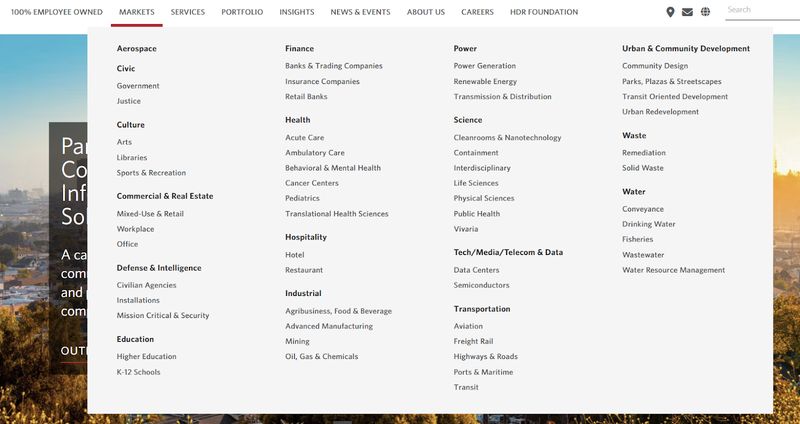
Intuitive navigation structure with clear segmentation helps search engines crawl your website and understand your goals, products, and services. It also ensures visitors can quickly find information relevant to their industry or challenge without facing unnecessary friction.
HTTPS and Security
If your website URL starts with "http" instead of "https," you have a problem. The "s" stands for secure, and it means your site uses an SSL certificate to encrypt data between your site and its visitors. Google has confirmed that HTTPS is a ranking signal, so sites without it are at a disadvantage.
For B2B companies, this is especially important. Your visitors may be submitting contact forms, requesting quotes, or sharing sensitive project details. They need to trust that their information is safe. A site without HTTPS will even display a "Not Secure" warning in most browsers, which is a credibility killer.
Structured Data and Schema Markup
Schema markup is a bit of extra code you add to your pages to give Google more context about your content. Think of it as a label that helps Google understand not just the words on your page, but what those words mean.
For B2B websites, the most useful types of schema include:
- Organization: Tells Google key details about your company
- FAQ: Helps your frequently asked questions appear directly in search results
- Article: For blog posts and guides
- BreadcrumbList: Shows the path to a page in search results
Your web developer can implement these for you. The payoff is that your pages may show up with richer, more informative listings in Google search results.
For a deeper look at speed optimization, site structure, and design best practices:
- B2B Website Speed Optimization: Performance That Impacts Revenue
- B2B Website Navigation: Structure That Guides Complex Buyers
- B2B Website Design Best Practices: The Complete Guide
Content Strategy: What to Write and Why
Technical SEO gets you in the game, but content strategy is how you win it. All the speed optimization and clean code in the world won't help if your site doesn't have content that your buyers are actually searching for.
This is where many B2B companies struggle. They know their business inside and out, but they haven't translated that expertise into web content that answers the questions their buyers are asking on Google.
Start with Your Buyer's Questions, Not Keywords
The best B2B content starts with a simple question: what does your sales team hear from prospects every single day? Those real-world questions are your content roadmap.
Talk to the people in your organization who interact with customers directly: your sales team, your project managers, and your customer service folks. Ask them what topics come up again and again. What do prospects want to know before they're ready to buy? What concerns keep popping up?
Once you've got that list of questions, you can map them to the buyer's journey:
- Early-Stage Questions: These sound like "What is [thing]?" or "How does [process] work?"
- Mid-Stage Questions: These look more like "How do I compare [options]?" or "What should I look for in a [vendor]?"
- Late-Stage Questions: Examples include "Why should I choose [your company]?" or "[Your company] vs. [competitor]."
Each of those questions can become a piece of content on your site. And because real people are asking them, you know the content will be relevant.
Example: Building Authority With Insight-Driven Content
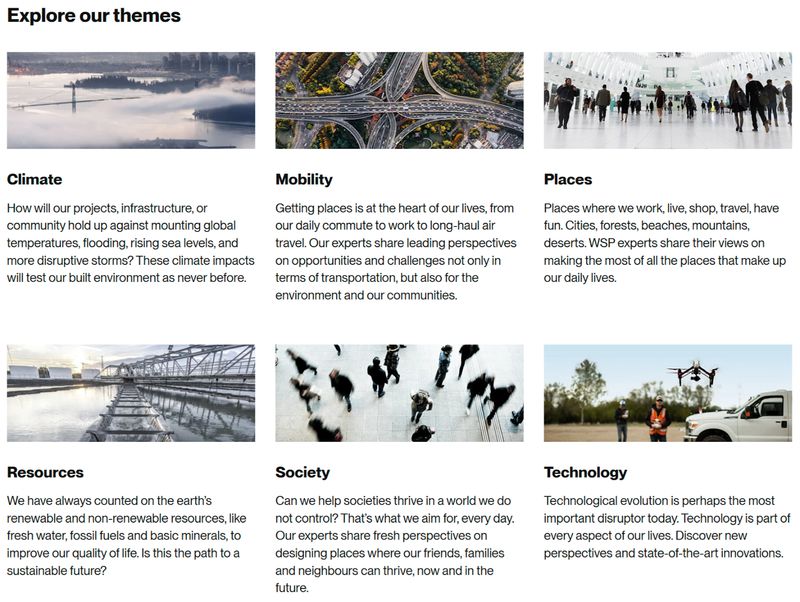
Great B2B content starts by answering the real questions your buyers are already asking. Global engineering and professional services firm WSP offers a robust “Insights” section for visitors seeking inspiring articles that provide unique insights and spark fresh conversations. This resource section is broken down into topics like climate, mobility, and technology, allowing prospective B2B buyers to choose the subject most relevant to their industry.
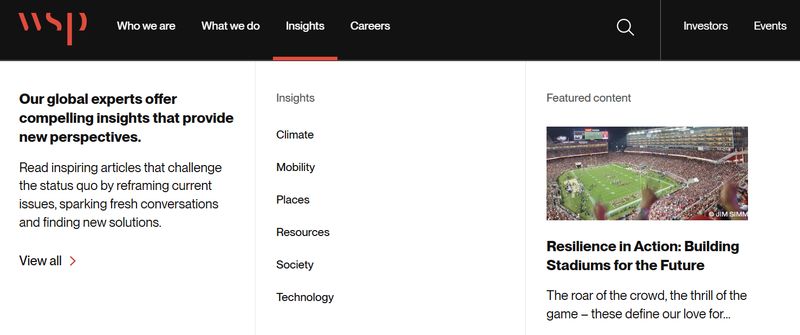
The Insights page provides a high-level summary of the types of questions each theme seeks to answer and the unique perspectives WSP leaders aim to provide. This thematic structure reinforces expertise while making it easy for visitors to navigate complex subject matter.
Keyword Research for B2B
Once you understand what your buyers are asking, keyword research helps you figure out exactly how they're phrasing those questions in Google. This is where you match your expertise to the words people actually type.
In B2B, focus on intent rather than raw search volume. A keyword like "industrial conveyor belt maintenance" might only get 50 searches a month, but every one of those searchers is a potential buyer with a real need. That's far more valuable than ranking for a vague term that gets thousands of searches from people who'll never become a lead.
Long-tail keywords (longer, more specific phrases) are your best friend in B2B. They're less competitive, which means they're easier to rank for. And they tend to attract visitors who know exactly what they're looking for.
You don't need expensive tools to get started, either. Try:
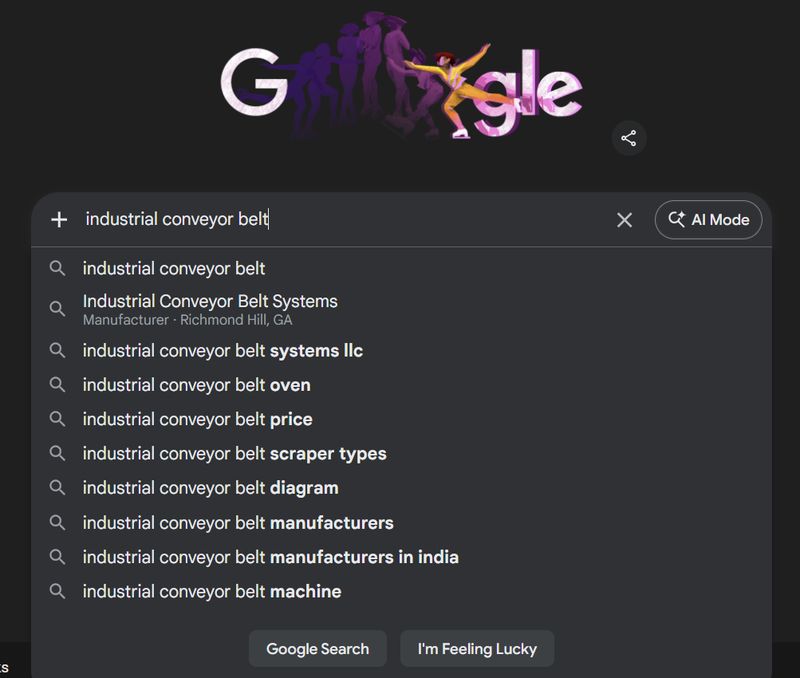
- Google Suggest: This is one of the simplest methods: just start typing a phrase related to your business into Google's search bar and look at what it autocompletes. Those suggestions reflect real searches. Also take a look at relevant “People Also Ask” questions and “Related Searches” for more insights. These appear on Google’s results page after you search.
- Google Search Console: This free platform shows you the keywords your site already appears for.
- AnswerThePublic: This website helps you find the specific questions people are asking around a topic. Registration gets you three free daily searches.
It's also worth looking at what your competitors rank for. If a competing firm is showing up for terms your buyers search and you're not, that's a gap you can fill. Their rankings are essentially a content roadmap for you.
Building Topic Clusters for Authority
One blog post about a topic won't move the needle. To really build authority on a subject, you need depth. That means creating a cluster of related content that covers a topic from multiple angles.
The concept is straightforward: you create one comprehensive pillar page on a broad topic, then surround it with several more focused articles that each cover a specific subtopic. All of these pages link to each other, creating a web of related content that signals to Google: "This site really knows this subject."
For example, imagine a company that specializes in industrial automation. Their pillar page might be a complete guide to industrial automation.
Their cluster articles could cover topics like:
- ROI of industrial automation
- How to implement automation on a production line
- Industrial automation vs. manual processes
- Choosing an automation partner
Each article targets a different search term, and together they build a comprehensive resource that establishes the company as an authority on the topic.
Over time, this approach compounds. As Google sees that your site covers a topic thoroughly, it becomes more likely to rank your pages for related searches. You stop competing for individual keywords and start owning an entire topic.
Example: A Content Library That’s Easy to Filter and Explore
A well-organized content library grouped by topic builds authority and helps both readers and search engines navigate your expertise. Industrial automation provider Rockwell Automation sorts its blog library (featuring nearly 900 articles) in several ways:
- Industry: Aerospace, chemical, etc.
- Hardware: Connection devices, human machine interface, etc.
- Software: Advanced process control, digital transformation, etc.
- Solutions: Cybersecurity, digital engineering, etc.
- Results Achieved: Optimize production, drive sustainability, etc.
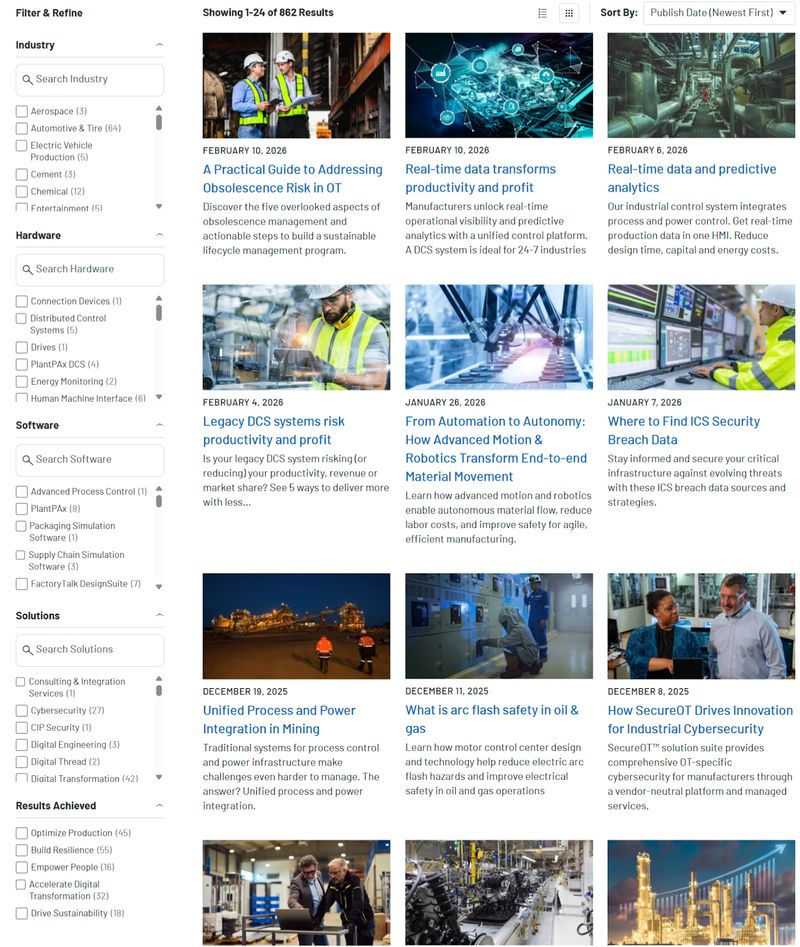
This enables site visitors and prospective buyers to search, filter, and refine results based on their specific needs, shortening the path from research to action and strengthening topical authority signals for search engines.
Content Formats That Work for B2B
Not all content needs to be a blog post. B2B companies have several content formats that tend to perform well for SEO, and mixing them up keeps your site useful to buyers at different stages.
High-performing formats include:
- Case Studies: Case studies and client success stories are powerful because they rank for problem-based searches and prove that you've done this work before. When a prospect searches for something like "how to reduce downtime on a packaging line," a case study showing how you solved that exact problem can be the very thing that earns their trust.
- Comparison Pages and "Alternative to" Pages: These types of pages capture buyers who are actively evaluating their options—people at the very bottom of the funnel who are close to making a decision.
- In-Depth Guides and Pillar Content: These formats work well as topic cluster hubs, and they naturally earn links from other websites because they're genuinely useful.
- Service and Product Pages: Core pages like these deserve SEO attention too. Many companies put effort into optimizing blog posts but neglect the pages that actually describe what they sell.
- Pricing Pages: An underused format, pricing pages build trust through transparency and rank well for high-intent searches like "[service type] cost." "Should we show pricing?" is a question we hear often. The answer for most B2B companies is yes, at least in some form. Even a pricing range or a "starting at" figure is better than nothing.
Creating Content That Demonstrates Expertise
B2B buyers need to trust you before they'll pick up the phone. That means your content needs to show genuine experience and expertise, not just repackage what's already out there on the internet.
Content that shows deep knowledge and experience includes:
- Real Examples From Your Own Work: Share industry-specific insights that only someone with hands-on experience would know. If you're writing about commercial HVAC maintenance, include observations that come from actually doing the work, not just from reading about it.
- Original Images: These matter too. Photos of your team, your projects, and your process build credibility in a way that stock photos never will. Google's own quality guidelines emphasize the value of content that demonstrates first-hand EEAT, or experience, expertise, authoritativeness, and trustworthiness.
- Author Bios and Credentials: These also play a role, especially for complex or high-stakes industries. When a reader sees that an article about structural engineering was written by someone with 25 years of structural engineering experience, that matters. It matters to the reader, and it matters to Google.
Example: Demonstrating Credibility Through Author Expertise
Showing who wrote your content and why they're qualified builds trust with both readers and search engines. This “Insights” article from global management consulting firm McKinsey & Company features an edited transcript from a discussion between McKinsey innovation leader and senior partner Erik Roth and Nathaniel Whittemore, founder/CEO of AI enablement platform Superintelligent and creator of podcast AI Daily Brief.
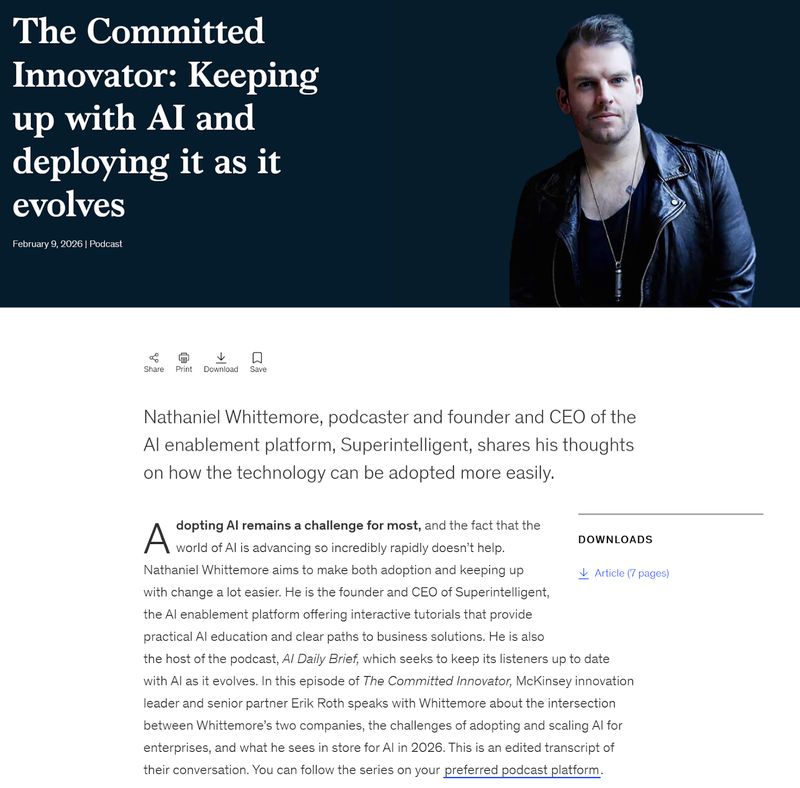
Names and credentials, and even a photo of Nathaniel, are highlighted right from the start to immediately demonstrate expertise. That’s because clearly identifying subject-matter experts signals authority, reinforces credibility, and aligns with Google’s E-E-A-T signals (experience, expertise, authoritativeness, trustworthiness). This makes it more likely that both readers and search engines will view the content as trustworthy.
For more on content strategy, messaging, and building trust:
- B2B Website Content Strategy: From Awareness to Decision
- B2B Website Messaging Framework: Copy That Resonates
- B2B Website Trust Signals: Building Credibility That Converts
On-Page SEO for B2B Pages
You've got the technical foundation and a content plan. Now let's make sure each individual page is set up to rank. On-page SEO is the practice of optimizing specific elements on a page so that search engines understand what the page is about and consider it a strong result.
The good news: none of this is complicated. It just requires attention to detail.
Title Tags and Meta Descriptions
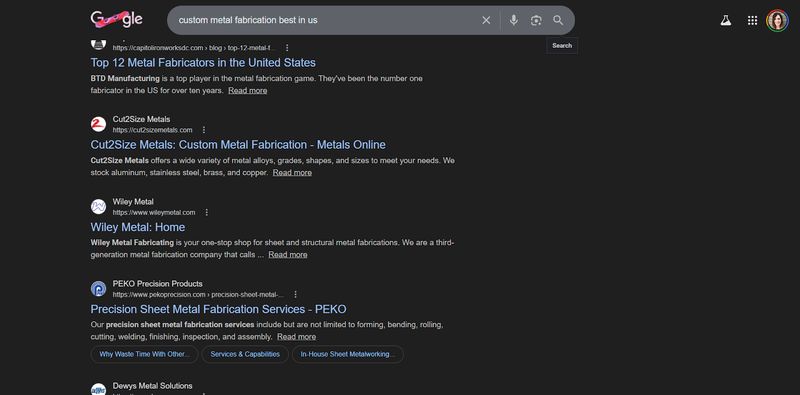
Your title tag is the blue clickable headline that appears in Google search results. It's one of the most important SEO elements on any page. Include your primary keyword in the title tag, ideally closer to the beginning. Keep it under 60 characters so it doesn't get cut off in search results.
Your meta description is the short summary that appears below the title in search results. Think of it as your page's elevator pitch in search results. Google doesn't use it directly as a ranking factor, but a well-written description gets more people to click.
Follow these meta description best practices:
- Use action-oriented language
- Address a pain point
- Stay under 155 characters
For example, a title tag like "Custom Metal Fabrication Services | Precision Metalworks" is clear, keyword-focused, and tells the searcher exactly what they'll find. A meta description like this gives them a reason to click: "Custom metal fabrication for industrial and commercial applications. Request a quote from our experienced team."
Header Structure
Every page should have one H1 tag, and it should describe the main topic of that page. Below the H1, use H2 and H3 tags to organize the content into clear, logical sections. This structure helps readers scan the page, and it helps search engines understand the hierarchy of your content.
Include keyword variations in your subheadings when it feels natural. For instance, if your page targets "commercial HVAC maintenance," an H2 like "Why Preventive HVAC Maintenance Saves Money" naturally includes a relevant variation without feeling forced.
Internal Linking
Internal links are the connections between pages on your own website. Every new page you publish should link to two to five related pages on your site, and those pages should link back when relevant. This helps Google understand the relationships between your content, and it helps visitors find more useful information.
Use descriptive anchor text for your links. Instead of "click here to learn more," write something like "read our guide to B2B website conversion optimization." The anchor text tells both readers and search engines what the linked page is about.
Don't forget to go back to older, well-performing pages and add links to your newer content. This passes some of that established authority to the new page, giving it a better chance of ranking.
Example: Structuring Content With Headings and Internal Links
Clear headings and well-placed internal links make content easier to read and help search engines understand the page structure. Here’s a snippet of a blog post from CRM platform HubSpot discussing the impact of AI on customer relationship management:
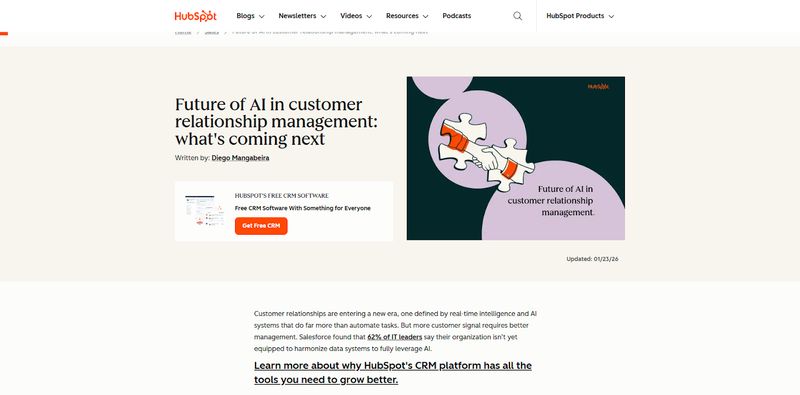
The H1 is “Future of AI in customer relationship management: what’s coming next.” This header describes the blog’s main topic, and it’s the only H1 on the page.
“What is the future of CRM with AI, and how will it change go-to-market teams?” is just one of many H2s within the blog. “1. AI removes friction between teams” is just one of many H3s. H2 and H3 headers organize content for both users and search engines.
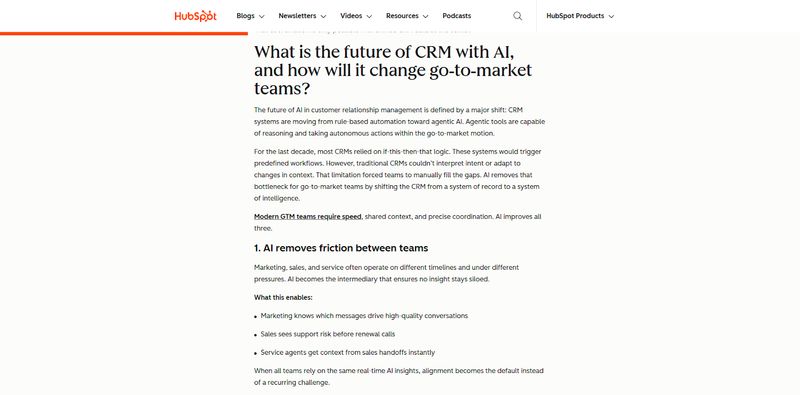
This snippet also features an internal link. The anchor text “modern GTM teams require speed” links directly to another HubSpot blog about AI usage in sales, enabling Google to crawl related content more efficiently and directing readers to an additional relevant resource. This not only provides additional value, but increases time on site as well.
Image Optimization
Images deserve SEO attention too. Follow these image optimization best practices:
- Give Your Image Files Descriptive Names: A file named "custom-steel-fabrication-process.jpg" gives Google useful context, while "IMG_4827.jpg" tells it nothing. Optimize file names before you upload images to your website.
- Add Alt Text to Every Image: Alt text is a short description of the image that helps both accessibility tools and search engines understand what the image shows. Keep it accurate and descriptive.
- Compress Your Images: Compression keeps file sizes small and pages loading fast.
- Use Authentic Imagery: Whenever possible, use original photos from your own projects and team rather than generic stock imagery.
For more on optimizing B2B pages for conversions and design best practices:
- B2B Website Conversion Optimization: A Data-Driven Approach
- B2B Website Design Best Practices: The Complete Guide
Off-Page SEO: Building Authority Beyond Your Website
What other websites say about you matters just as much as what you say about yourself. Google treats links from other sites like votes of confidence. When a respected industry publication or a partner's website links to your content, Google sees that as a signal that your site is trustworthy and worth ranking.
This is called off-page SEO, and it's one of the hardest parts of the SEO puzzle. You can't fully control it. But you can take steps that make it much more likely.
Why Backlinks Matter
Backlinks are links from other websites that point to your site. They remain one of the strongest ranking signals in Google's algorithm. But not all links are created equal. One link from a well-known industry trade publication or a respected professional organization is worth far more than dozens of links from random, low-quality directories.
For B2B companies, earning quality backlinks is often more natural than you'd think. You already have relationships with partners, clients, industry associations, and trade media. The key is turning those relationships into links.
How B2B Companies Earn Links
There are several approaches to earning quality links to your B2B website:
- Create Valuable, High-Quality Content: Creating content that other people genuinely want to reference is the most effective approach for B2B link building. Original research, comprehensive guides, and useful tools are the kinds of content that naturally attract links. When you publish data that nobody else has, or a guide that covers a topic better than anything else available, other websites will link to it because it makes their own content better.
- Get Featured in Industry Publications and Trade Media: Industry features are another strong path. If your company has expertise worth sharing, pitch your insights to the editors of publications your buyers read. Contribute expert commentary when journalists are covering your industry. This kind of coverage almost always includes a link back to your site.
- Secure Partnerships: Partnerships offer another opportunity. When a client features a case study about working with you on their website, they'll usually link to your site as part of the story. Same goes for industry associations, event sponsors, and collaborative projects.
Example: Authority Earned Through Industry Media Mentions
Getting featured in the publications your buyers already read earns both credibility and valuable backlinks. Here’s an expert roundup from Manufacturing Digital highlighting the top 10 manufacturing technology companies:
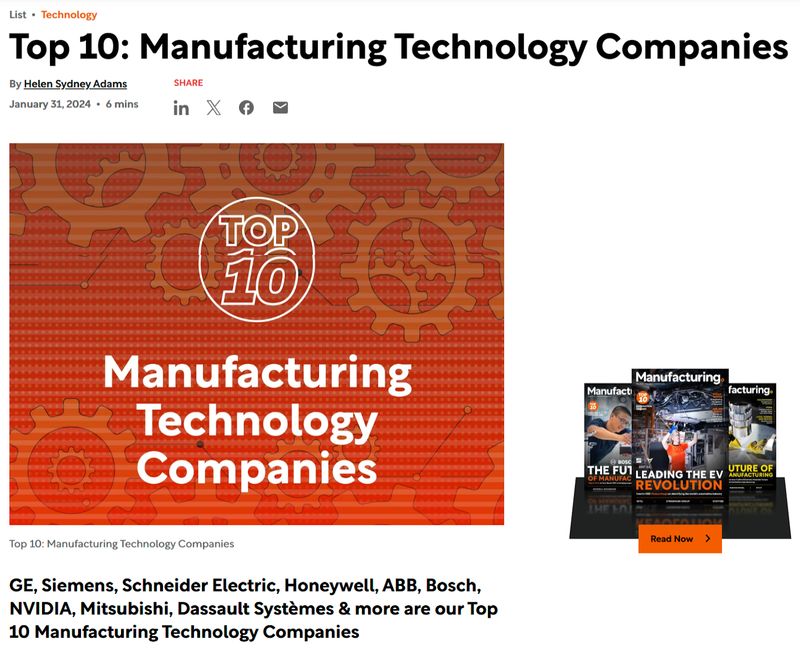
Each company mentioned in the article is showcased with their logo, a summary of their background and product offering, and—perhaps most important—a backlink from the publication to their website.
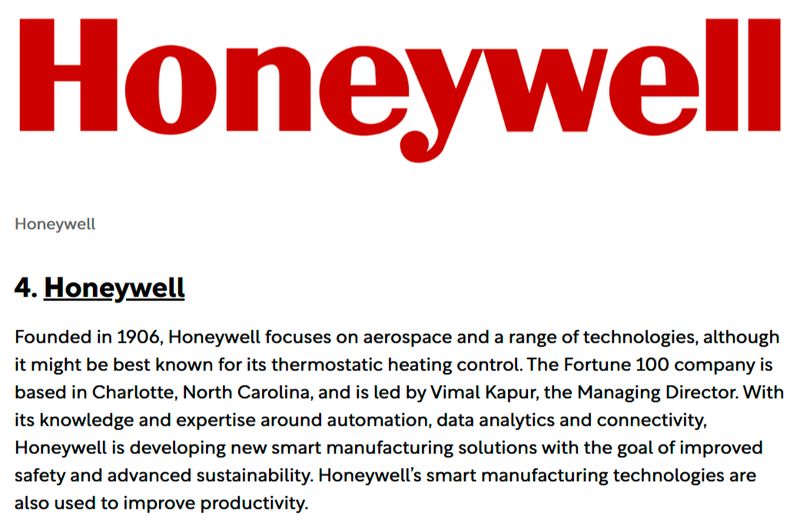
These features not only drive referral traffic from a highly targeted audience, but they also strengthen domain authority through high-quality backlinks. Authority improves your ability to rank for competitive industry keywords over time.
Tracking Your Off-Page Progress
The key metric to watch is referring domains, which is the number of unique websites linking to you. You can monitor this for free using Google Search Console's Links report, which shows you which external sites are linking to your pages.
Don't obsess over the total number. Focus instead on the quality and relevance of the sites linking to you. A handful of links from respected sources in your industry will do more for your rankings than hundreds of links from irrelevant sites.
Measuring What Matters
SEO isn't a "set it and forget it" project. You need to know what's working and what's not. In B2B, the metrics that matter aren't always the obvious ones, because raw traffic numbers can be misleading.
Key Metrics for B2B Website SEO
Track these metrics to analyze your site’s SEO performance:
- Organic Traffic: Are more people finding your site through search over time? Google Analytics can show you this. But don't stop there, because organic traffic on its own is just a number. What matters is what that traffic does after it arrives.
- Keyword Rankings: These rankings tell you whether you're moving up for the specific terms your buyers search. Are you on page five or page one for "industrial automation consulting"? Tools like Google Search Console can show you this for free, along with how many times your site appeared in search results (impressions) and how often people clicked through.
- Lead Quality from Organic Traffic: This is the most important metric in B2B SEO. Track which keywords and which pages drive form submissions, consultation requests, and contact page visits. A page that brings in 20 visits and three qualified leads is more valuable than a page that brings in 2,000 visits and zero leads.
How Long Does B2B SEO Take?
Let's set honest expectations. SEO is not a quick fix. For most B2B companies, it takes three to six months to see meaningful movement in rankings and traffic. For highly competitive terms, it can take 12 months or more.
That's not a reason to avoid SEO; it's a reason to start now. The companies that commit to consistent effort over time are the ones that build lasting organic visibility. Every piece of content you publish, every technical improvement you make, and every link you earn builds on the ones before it. The effect compounds. A site that's been consistently investing in SEO for two years has a massive advantage over one that just started last month.
Consistency matters more than any single tactic. Publishing one high-quality article per month for a year will almost always outperform publishing ten articles in one week and then going silent.
For more on tracking ROI and ongoing website maintenance:
Common B2B Website SEO Mistakes to Avoid
Before we wrap up, let's cover the most common mistakes we see B2B companies make with their SEO. Avoiding these pitfalls will save you time, money, and frustration.
Mistake #1: Ignoring Technical SEO Entirely
A beautiful website that Google can't properly crawl is invisible. We've seen companies invest heavily in design and content, only to discover that technical issues were keeping their pages out of search results entirely. Make sure the foundation is solid before you build on top of it.
Mistake #2: Writing for Your Industry, Not Your Buyer
It's tempting to use the language you use internally, but your prospects may not search that way. If your team calls something a "thermal management solution" but your buyers search for "industrial cooling system," you risk missing qualified traffic and creating confusion for visitors who don’t immediately understand what you offer. Ditch the jargon and write the way your customers actually speak, not how you talk around the office.
Mistake #3: Treating SEO as a One-Time Project
SEO isn't a checkbox you complete during a website launch and then forget about. Search engines constantly update their algorithms, competitors publish new content, and your industry evolves. Companies that treat SEO as an ongoing investment consistently outperform those that think of it as a one-time task.
Mistake #4: Stuffing Keywords Everywhere
Google is far too sophisticated for keyword stuffing. Cramming the same phrase into every heading, sentence, and image tag won't help you rank. In fact, it can hurt. Write naturally and focus on covering a topic thoroughly. If you do that well, the keywords will appear naturally throughout your content.
Mistake #5: Neglecting Internal Links
Pages on your site that have no links pointing to them are called orphan pages. Google has a hard time finding and understanding these pages. Every page on your site should be linked to from at least one other page, preferably several. A deliberate internal linking strategy helps Google discover your content and understand how your pages relate to each other.
Mistake #6: Skipping Mobile Optimization
Your B2B buyer is reading your site on their phone right now. Maybe at the airport, maybe between meetings, maybe on the job site. If your site doesn't work well on mobile, you're losing visitors and hurting your rankings at the same time.
Mistake #7: Chasing Traffic Instead of Leads
High traffic numbers feel satisfying, but they mean nothing if the visitors aren't your buyers. It's better to have a modest amount of highly targeted traffic that converts into leads than to attract thousands of visitors who have no interest in what you sell. Always keep lead quality at the center of your SEO strategy.
For guidance on when and how to plan a website overhaul, check out:
Build a B2B Website That Actually Gets Found
B2B SEO comes down to three pillars:
- Technical SEO: This lays the foundation: a fast, secure, well-structured site that search engines can easily understand.
- Content Strategy: Strategy builds the house: pages that answer your buyers' real questions at every stage of their journey.
- Off-Page Authority: Authority earns your reputation: other websites linking to your content because it's genuinely valuable.
You need all three. But you don't have to do everything at once.
Start with the technical basics. Make sure your site is fast, mobile-friendly, and secure. Then build your content plan around the questions your buyers actually ask. The links and authority will follow as you publish genuinely useful content that demonstrates your expertise.