
Picture this scenario: a facilities manager at a major manufacturing plant needs new industrial equipment. She finds your company through search, clicks your link, and waits. And waits. After 8 seconds of watching a loading spinner, she hits the back button and clicks on your competitor's site instead. That potential 6-figure deal just vanished because your website couldn't load fast enough.
This happens more often than you might think. B2B buyers expect websites to load quickly, even when they're researching complex industrial equipment or evaluating consulting services. The difference between B2B and B2C isn't about patience levels anymore. Your buyers are doing serious research, comparing multiple vendors, and downloading technical specifications. They need all of this to happen smoothly and quickly.
Speed matters even more for B2B companies than consumer brands because your buyers are often accessing your site during work hours on corporate networks. They're dealing with security firewalls, older browsers, and shared bandwidth. If your site struggles under these conditions, you're losing opportunities before you even get a chance to present your value proposition.
The Real Cost of a Slow B2B Website
Lost Revenue Opportunities
Every second your website takes to load costs you money. When an engineering firm's procurement team can't quickly access your product specifications, they move on to a competitor who makes their job easier. When an architect can't efficiently browse your portfolio during a client meeting, your work never gets considered for the project.
The impact goes beyond just losing a single visitor. B2B purchases involve multiple stakeholders, and each one visits your site multiple times throughout their decision process. A slow site frustrates every person at every stage, compounding the negative impression and decreasing your chances of making it to the shortlist.
Boeing: Prioritizing Buyers by Prioritizing Speed
Meanwhile, a B2B website like Boeing that loads quickly and efficiently keeps high-intent buyers engaged, reduces friction in the research process, and signals the reliability that buyers have come to expect from an industry leader.

Here’s a quick snapshot of Boeing’s Core Web Vitals Assessment from Google’s PageSpeed Insights. This assessment reveals that the company’s homepage loads in under 2 seconds, delivering a seamless user experience without delay.

Together, these metrics reinforce how a fast, stable site strengthens buyer trust at every click.
Impact on Your Sales Team
Your sales team feels the pain of a slow website every day. They're on calls with prospects, trying to walk them through your capabilities, and the site won't cooperate.
Common issues that create a terrible first impression include:
- Demo request forms timing out
- Product pages failing to load during screen shares
- PDF downloads stalling out just when a prospect shows genuine interest
These are all problems that your sales team must now work even harder to overcome. Instead of focusing on value and fit, they're apologizing for technical issues and promising to send materials later. The momentum is lost, and with it, often the opportunity itself.
Your Competition's Advantage
While your site struggles to load, your competitors are capturing the leads you're losing. A faster website becomes a competitive advantage in crowded markets where multiple companies offer similar products or services. Speed sends a subtle but powerful message about your company's technical competence and attention to detail.
Think about it from your buyer's perspective. If you can't manage your own website performance, how can they trust you to handle their complex manufacturing processes or critical infrastructure projects?
SEO Rankings at Risk
Google made it official with Core Web Vitals; site speed directly impacts your search rankings. For B2B companies with extensive product catalogs, resource libraries, and technical documentation, this creates a particular challenge. Search engines allocate a limited "crawl budget" to index your site, and slow pages mean fewer of your pages get discovered and ranked.
The connection between speed and visibility creates a vicious cycle. Slow sites:
- Rank lower
- Get less traffic
- Miss more opportunities to prove their value
Meanwhile, faster competitors climb the rankings and capture more market share.
Related resources on conversion and competition:
- B2B Website Conversion Optimization: A Data-Driven Approach
- B2C vs B2B Website Design: Key Differences That Impact Conversion
What "Fast" Really Means for B2B Websites
Industry Benchmarks
Fast for a B2B website means something specific:
- Your homepage should load in under 3 seconds, even for visitors on average corporate internet connections
- Product pages and resource libraries should be interactive within 4 seconds
- Forms should respond instantly when clicked
- Downloads should start immediately
These aren't arbitrary numbers. They're based on how B2B buyers actually behave. Unlike consumer shopping, B2B research sessions are longer and involve more page views. Your visitors are comparing specifications, downloading whitepapers, and sharing links with colleagues. Each interaction needs to feel smooth and responsive.
A Real-World Example of an Enterprise Site Falling Short
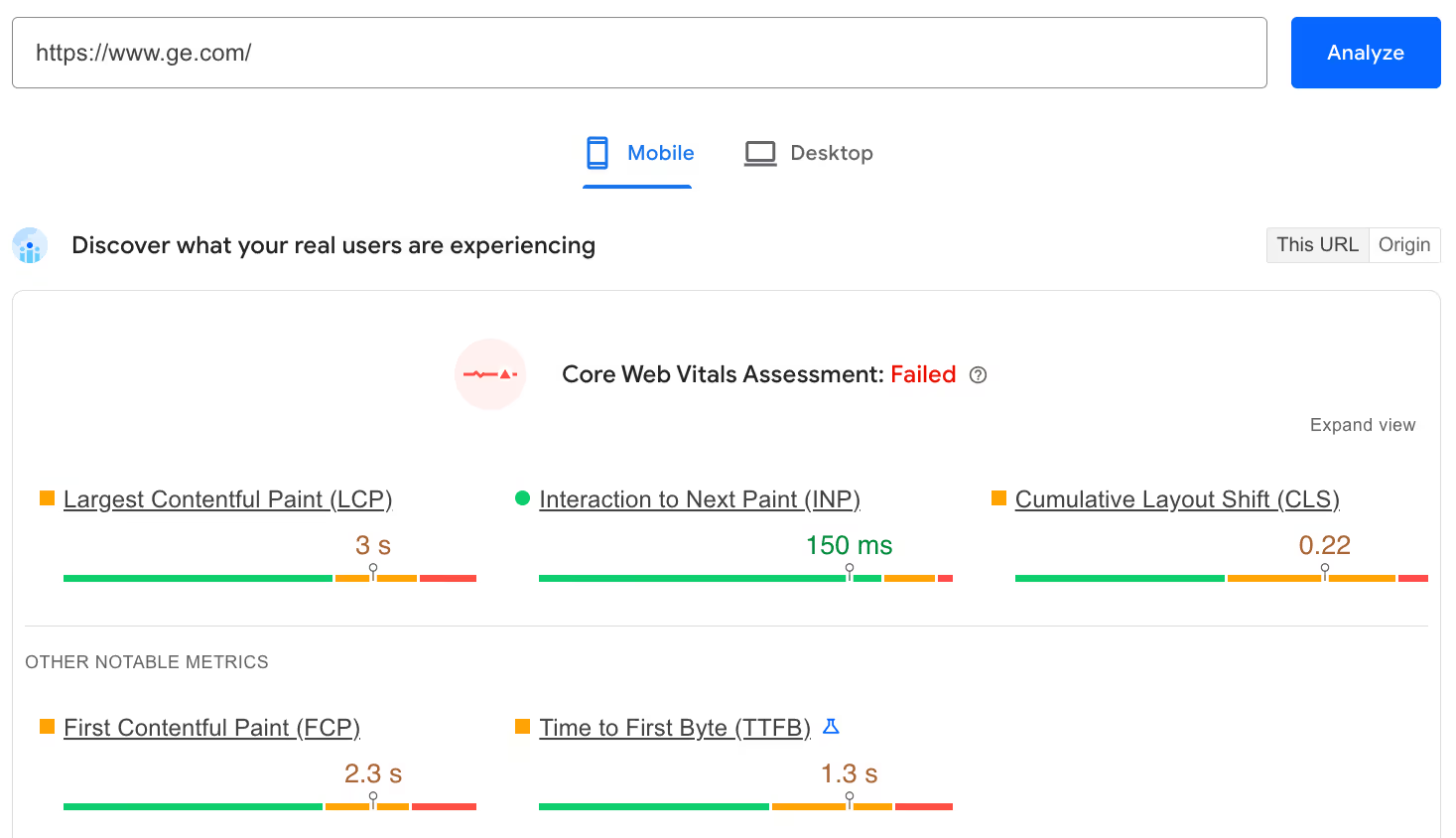
Let’s take a look at General Electric’s homepage via Google’s PageSpeed Insights tool. At the time of this analysis, the homepage fails its Core Web Vitals Assessment; most paint-related metrics fall into the amber “Needs Improvement” range.
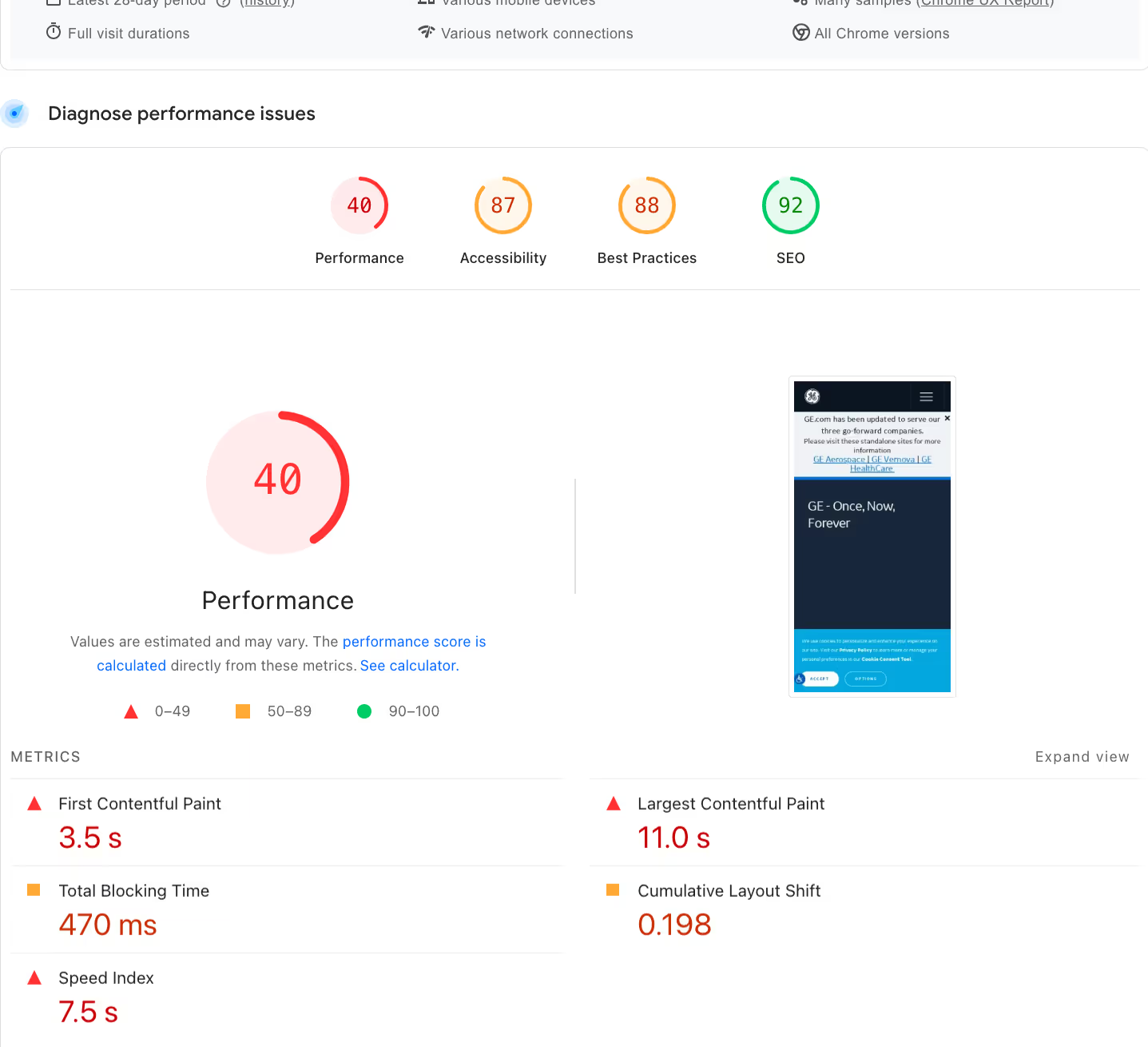
The site’s “Performance” score is poor, while it lands in the “Needs Improvement” category for both “Accessibility” and “Best Practices.” These scores point to friction points for buyers, from slower load times to inefficient accessibility that hurt trust and reliability.
You can run an assessment on your own website homepage to gather similar insights. Scroll down below the “Metrics” section to find expandable insights and diagnostics. These reveal specific actions you can take to improve your performance, accessibility, best practices, and search engine optimization (SEO).
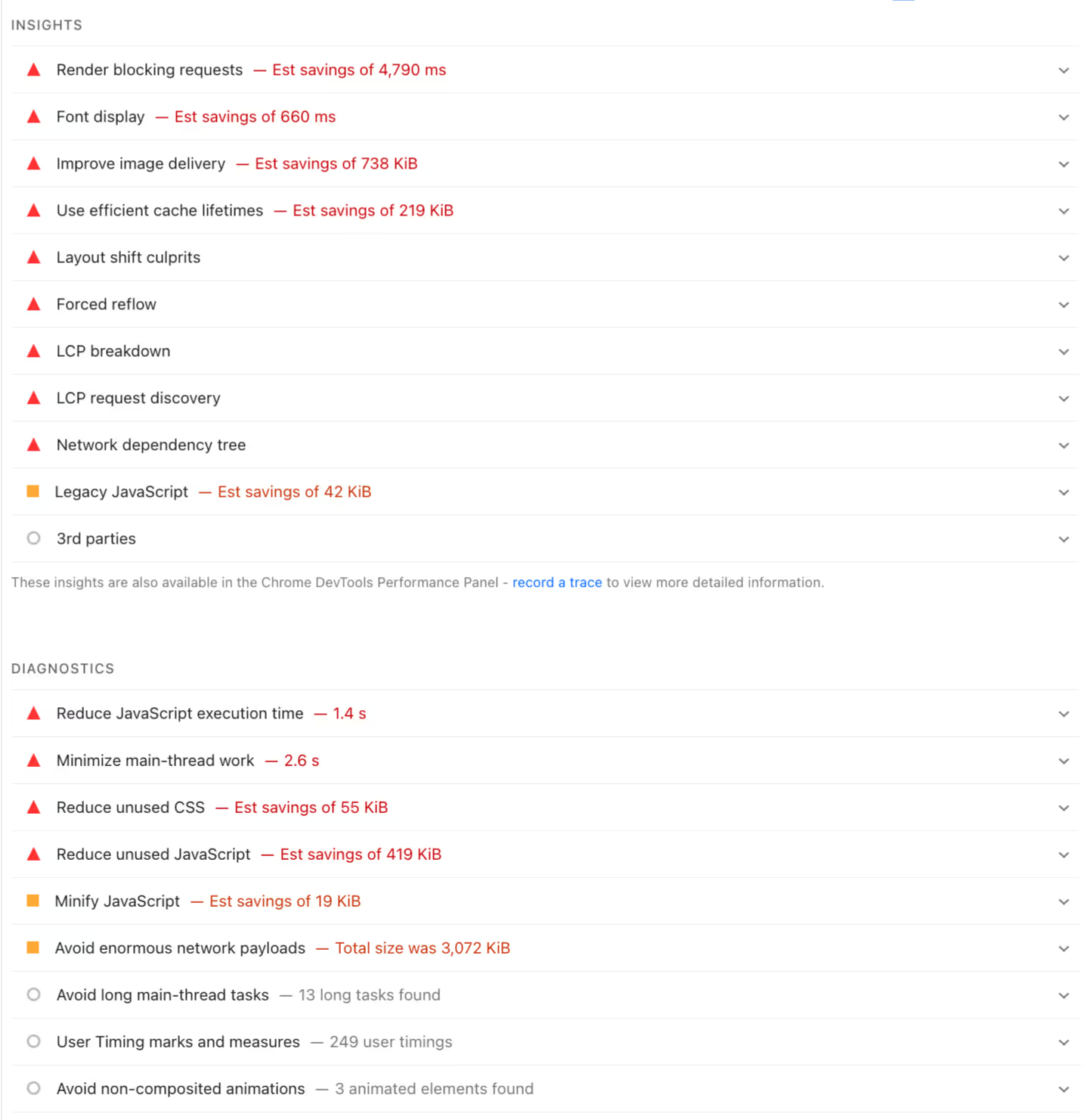
These insights provide a roadmap for improving your website’s speed, search visibility, and overall user experience.
Understanding User Experience Metrics
The technical metrics matter, but what really counts is how your site feels to use. Pay attention to user experience metrics like:
- Time to Interactive: This measures when visitors can actually click buttons and fill out forms, not just when the page appears to load. For B2B sites with complex calculators or configurators, this metric often reveals problems that basic load time doesn't catch.
- First Input Delay: This metric tracks the lag between when someone clicks something and when the site responds. On B2B sites, this often shows up as sluggish dropdown menus in product selectors or delayed responses in quote request forms. These small delays add up, especially when buyers are evaluating multiple options across different vendor sites.
- Cumulative Layout Shift: This is a measurement of visual stability. Nothing frustrates a B2B buyer more than clicking the wrong button because the page jumped around while loading. This is particularly problematic on mobile devices where screen space is already limited.
The Mobile Factor
Here's something that might surprise you: a significant portion of B2B research happens on mobile devices, especially during the early stages. That plant manager might first discover your company while scrolling LinkedIn during their commute. The architect might pull up your portfolio on their tablet during a job site visit.
Mobile B2B visitors have different needs than desktop users. They're often looking for:
- Quick access to contact information
- Brief capability overviews
- Specific product details to share with colleagues
If your mobile site takes forever to load or requires excessive scrolling and zooming, you're creating barriers right when buyers are forming their first impressions.
The speed expectations on mobile are actually higher than desktop because mobile users are often in time-sensitive situations. They need answers quickly, whether they're in a meeting, at a trade show, or responding to an urgent request.
Common Speed Killers on B2B Sites
Heavy Resource Libraries
B2B companies love their resource libraries. Technical specifications, whitepapers, case studies, installation guides, safety data sheets—the list goes on. These resources are valuable for buyers who need detailed information, but they can destroy your site's performance when not handled properly.
The problem isn't the resources themselves but how they're integrated into your site. Major contributors to sluggish performance include:
- Massive PDF files embedded directly in pages
- Auto-loading video tutorials
- High-resolution technical drawings
Your visitors end up waiting for content to load that they might not even need.
Salesforce: A High-Speed Content Hub That Keeps Prospects Engaged
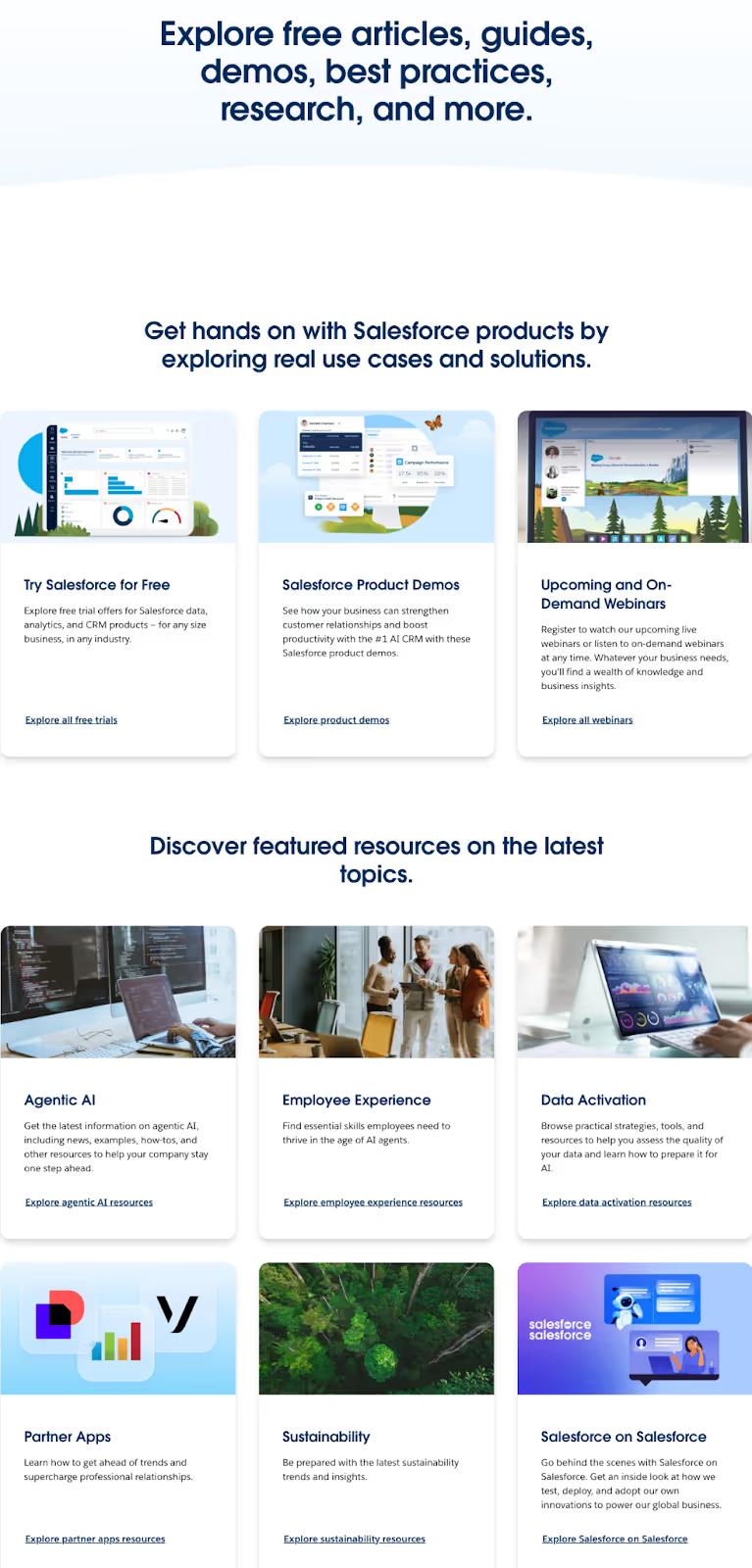
Salesforce’s robust “Resources” page is well-organized and fast loading, despite housing an extensive library of articles, guides, demos, research, and more. The library’s structure makes it easy for prospects to find the information they’re seeking by content type and topic, moving buyers further along in the decision-making process.
Salesforce also keeps load times short, despite the high volume of content. This keeps users engaged rather than getting frustrated and abandoning the site before ever interacting with value-rich content that drives trust and conversions.
Complex Product Configurators
Product configurators and quote builders are powerful tools for B2B sales. However, they can be performance disasters when:
- Every dropdown selection triggers database queries
- Each configuration change recalculates pricing
- Real-time inventory checks slow everything down further
These tools become even more problematic when they're built with outdated technology or poorly optimized code. The irony is that these are often the most important pages on your site, where serious buyers go to explore options and build solutions. Making them wait here is like making customers stand in line at the register.
Video and Animation Overload
Video can be incredibly effective for explaining complex products or showcasing manufacturing capabilities. But when every page has an auto-playing background video or elaborate animation sequence, you're creating performance problems that overshadow any marketing benefit.
The challenge is finding the balance. Your buyers do want to see your products in action and understand your processes. They just don't want to wait 30 seconds for a homepage video to buffer before they can navigate to the information they actually need.
Third-Party Integrations
Modern B2B websites connect to everything:
- Your CRM system powers the contact forms
- Chat widgets provide instant support
- Analytics tools track visitor behavior
- Marketing automation platforms manage lead scoring
Each integration adds another external dependency that can slow your site.
The cumulative effect is significant. A typical B2B site might be loading scripts from a dozen different external services. If any one of them experiences delays, your entire site performance suffers. Visitors don't care that your chat provider is having issues—they just know your site feels slow.
Learn more about B2B website structure:
- B2B Website Navigation: Structure That Guides Complex Buyers
- B2B Website Design Best Practices: The Complete Guide
- B2B Buyer Journey Mapping: Building Websites That Convert
Quick Wins for Immediate Speed Improvements
Image Optimization
The fastest speed improvement you can make is optimizing your images. Those high-resolution photos of your manufacturing facility or detailed product shots are probably far larger than they need to be for web display. A single unoptimized hero image can add several seconds to your load time.
Start with your homepage and your most-visited product pages, and then:
- Convert images to modern formats that balance quality with file size
- Set up your system to automatically create multiple sizes for different screen resolutions
This ensures mobile visitors aren't downloading desktop-sized images on their phones.
The beautiful part about image optimization is that it's mostly a one-time fix. Once you establish the right process and settings, every future image you add to your site will automatically be optimized.
Gensler: High-Impact Visuals Done Right
Global architecture and design firm Gensler displays large volumes of imagery without sacrificing performance. The site’s “Projects” page features dozens of architectural case studies, each represented by a vibrant, clickable photo paired with a clear project title.
Despite the image-heavy nature of this content, the experience remains quick and smooth. Images load progressively as users scroll, preventing bandwidth overload on desktop and mobile devices. The result is a gallery that feels immersive without slowing buyers down, allowing prospects to seamlessly compare and explore the firm’s architectural work.

Browser Caching Setup
Browser caching sounds technical, but the concept is simple. When someone visits your site, their browser can save certain files locally. The next time they visit, those files load instantly from their computer instead of downloading again from your server.
For B2B sites where buyers make multiple research visits, this creates dramatic improvements. That engineering team comparing your products across multiple sessions experiences a much faster site on their return visits. The procurement specialist downloading multiple spec sheets gets quicker access to each subsequent document.
Setting up proper caching requires some technical work, but the impact is immediate and lasting. Your returning visitors—which in B2B often means your most serious prospects—get the best possible experience.
Content Delivery Networks (CDNs)
Geography matters more for B2B companies than you might think. If your servers are in Atlanta but you're selling to manufacturers in Seattle, that distance creates delays. A CDN solves this by storing copies of your site in multiple locations, serving visitors from the nearest point.
This becomes especially important for companies selling nationally or internationally. That construction firm in Denver shouldn't have to wait longer than one in your home city. CDNs level the playing field and ensure consistent performance regardless of location.
The cost of CDN services has dropped dramatically in recent years, making them accessible even for mid-sized B2B companies. The performance improvement often pays for itself through increased conversions and better user engagement.
Optimizing Calls-to-Action
Your calls-to-action are the most important elements on your page, so they should load first. This means more than just making buttons appear quickly. All related elements need to be ready instantly, including the:
- Forms they trigger
- Pop-ups they launch
- Next pages they lead to
Many B2B sites make the mistake of loading their CTAs last, after all the decorative elements and background videos. By the time visitors can actually take action, they've either lost interest or moved on to a competitor. Prioritizing these critical elements ensures you never miss an opportunity due to technical delays.
Code Cleanup
Over time, B2B websites accumulate digital debris, like:
- Old tracking codes from campaigns that ended years ago
- Plugins that seemed useful but never got configured properly
- CSS styles that don't apply to any current pages
- JavaScript libraries loaded globally when they're only needed on specific pages
This accumulation happens naturally as sites evolve, especially when multiple people or agencies have worked on them over the years. Regular code cleanup can dramatically improve performance by eliminating unnecessary processing and downloads.
Advanced Strategies for Serious Performance
Server-Side Optimization
Your hosting infrastructure sets the foundation for everything else. B2B sites have unique hosting needs compared to simple brochure sites or blogs. You're serving complex product data, handling form submissions from potential high-value leads, and possibly integrating with internal systems.
Choosing hosting that's optimized for business sites means considering factors beyond just speed. Prioritize factors such as:
- Reliability during business hours
- Support for your specific technology stack
- Scalability for traffic spikes from marketing campaigns
The cheapest hosting option rarely provides the performance B2B sites require.
Database optimization becomes critical for sites with extensive product catalogs or configurators. Transform sluggish database-driven pages into responsive experiences through:
- Proper indexing
- Query optimization
- Caching strategies
How Strong Hosting Providers Build Confidence
Here’s an example of a hosting page from provider Liquid Web. This company promises 100% uptime across their network and power infrastructure, underscoring their confidence in the stability of their platform. They even guarantee a 1,000% credit if your server is ever unreachable, plus expert support within a minute or less, free migrations, and proactive service monitoring.
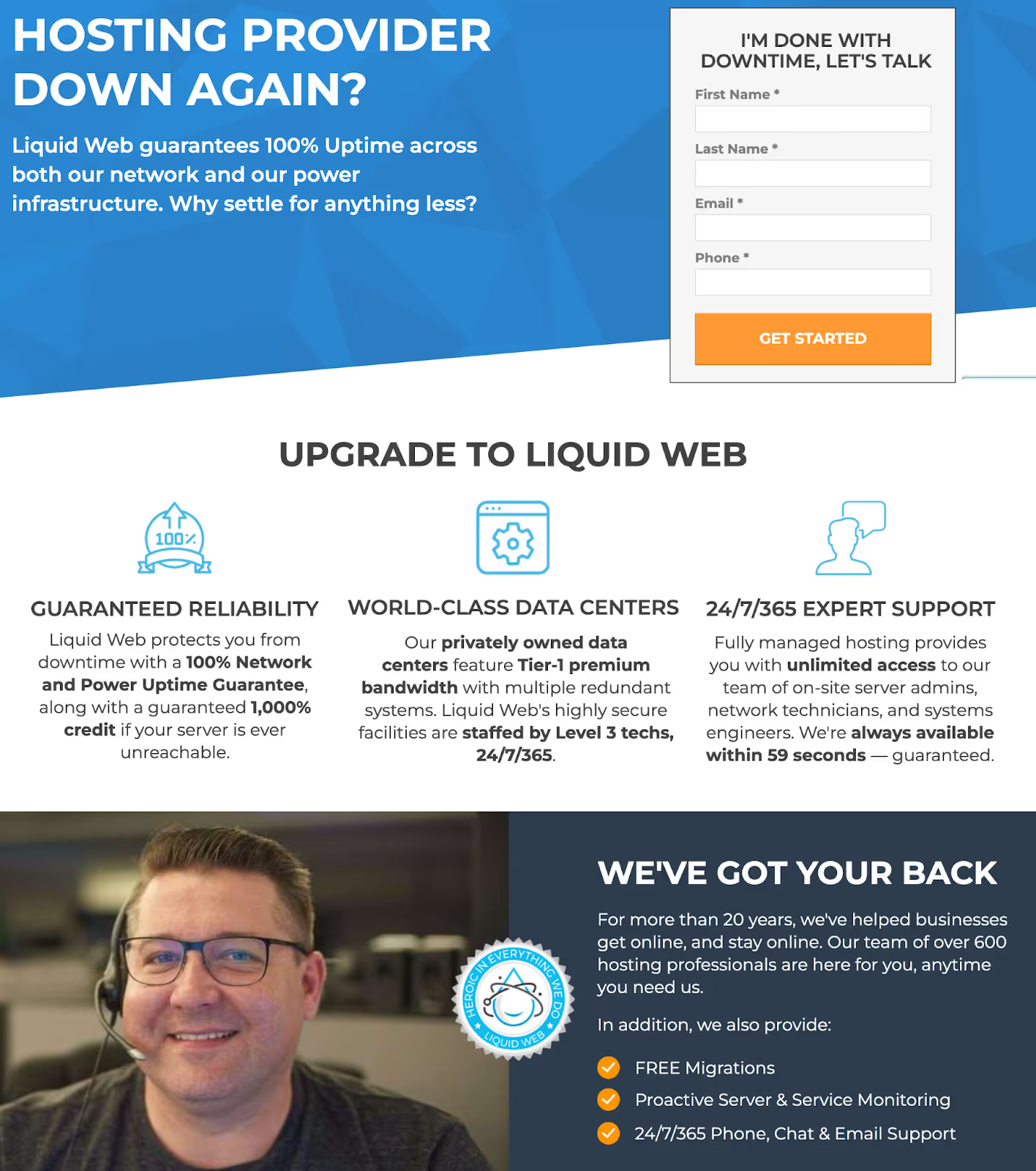
As you review and compare hosting providers, look for uptime transparency, meaningful guarantees, fast human support, and built-in safeguards that keep your B2B website fast and stable for your prospects.
Progressive Web App Features
Progressive Web Apps bring app-like performance to websites. For B2B companies, this means your:
- Product catalogs can work offline
- Configurators can respond instantly
- Resources can be accessed even with spotty conference center WiFi
The offline functionality particularly benefits B2B sellers. Sales reps can demo your products at trade shows without worrying about internet connectivity. Engineers can access technical specifications from job sites with poor cell coverage. Procurement teams can review proposals during flights.
These features require significant development work but can differentiate your digital experience from competitors still using traditional website approaches.
Lazy Loading for Complex Pages
Lazy loading means only loading content when it's needed. This can dramatically improve initial load times for B2B sites with long product pages, extensive case studies, and detailed technical specifications.
Instead of making visitors wait for every product image, technical diagram, and embedded video to load, you show them what's immediately visible and load the rest as they scroll. This is particularly effective for mobile users who might only need to see basic product information before deciding to request more details.
The key is implementing lazy loading intelligently. Critical content should load immediately, while supplementary materials can wait. This requires understanding how your specific audience uses your site and what information they need first.
Optimize your buyer's journey:
- B2B Buyer Journey Mapping: Building Websites That Convert
- B2B Website Content Strategy: From Awareness to Decision
Measuring and Monitoring Your Progress
Essential Tools
You can't improve what you don't measure. Start with free tools that provide immediate insights into your site's performance:
- Google's PageSpeed Insights: Gives you specific recommendations for improvement
- GTmetrix: Shows you exactly what's slowing down your pages
- WebPageTest: Lets you test from different locations and connection speeds
For ongoing monitoring, you need tools that alert you to problems before visitors complain. Performance monitoring services can track your site speed continuously and notify you when things slow down. This is especially important for B2B sites where a performance problem during business hours could cost you valuable leads.
Breaking Down Performance Data in Catchpoint’s WebPageTest Tool
Let’s take a look at the performance assessment of Caterpillar.com using Catchpoint’s WebPageTest tool. The “Summary” tab provides a quick snapshot of whether Caterpillar’s homepage is quick, usable, and resilient. Its “Page Performance” metrics highlight speed indicators like “time to first byte” and “first contentful paint,” showing how quickly the server responds and meaningful content appears on screen.

You can switch from the “Summary” tab to “Filmstrip,” “Waterfall,” “Assets,” or “JavaScript” for additional insights. Here’s a quick overview of what each tab reveals:
- Filmstrip: A frame-by-frame view of how your webpage loads
- Waterfall: A detailed timeline of each asset loading
- Assets: A list of all resources your page loads, plus file sizes
- JavaScript: A breakdown of the performance impact of your scripts
With these insights, you can identify bottlenecks, validate improvements, and build a faster, more reliable user experience.
Key Metrics to Track
Focus on metrics that connect to business outcomes, not just technical statistics:
- Track your bounce rate on key landing pages before and after speed improvements
- Monitor form completion rates to see if faster load times increase submissions
- Watch your pages-per-session metric to understand if better performance encourages deeper engagement
For B2B sites, pay special attention to metrics during business hours in your target markets. Your site might test fast at 2 AM but struggle during peak business hours when your buyers are actually visiting. Understanding these patterns helps you optimize for real-world conditions, not just test scenarios.
Create dashboards that your entire team can understand. Your sales team should know if product pages are loading slowly. Your marketing team needs to see if campaign landing pages are performing well. Making performance visible across your organization creates accountability and support for ongoing optimization.
A/B Testing Speed Improvements
Not all speed improvements have equal impact on conversions. Testing lets you prioritize optimizations that actually influence buyer behavior. Maybe faster-loading forms increase submissions, but optimizing image galleries doesn't affect engagement. You won't know without testing.
Run tests that isolate specific performance improvements. For example:
- Test a faster-loading version of your homepage against the current one
- Compare conversion rates between optimized and standard product pages
- Measure whether faster quote calculators actually generate more qualified leads
Remember that B2B testing requires patience. Your sample sizes are smaller than consumer sites, and your sales cycles are longer. But the insights you gain are proportionally more valuable when each conversion could represent significant revenue.
Regular Maintenance Schedule
Website performance isn't a one-time project. It requires ongoing attention to maintain optimal speed as you add content, integrate new tools, and update functionality. Establishing a maintenance schedule ensures performance doesn't gradually degrade over time.
Monthly tasks should include:
- Checking your key pages for speed issues
- Reviewing new content for optimization opportunities
- Monitoring your performance metrics for unusual changes
Quarterly reviews can tackle bigger issues like:
- Updating plugins
- Auditing third-party integrations
- Cleaning up accumulated code debt
Annual audits provide opportunities for major improvements. Technology changes rapidly, and optimization techniques that weren't available last year might now offer significant benefits. Regular maintenance is always more cost-effective than emergency fixes when your site has become unusably slow.
Measure your website's business impact:
- Website ROI: How B2B Firms Calculate Payback
- Digital Marketing for Professional Services Firms: A Complete Guide
Making the Business Case for Speed Investment
Calculating Potential ROI
Making the business case for speed optimization requires speaking the language of business results, not technical metrics. Start with your current conversion rate and average deal value. Then estimate the improvement from better site performance. Even a conservative 10% increase in conversions could justify significant investment.
Consider the full value chain. Faster sites don’t just increase initial conversions—they also:
- Improve the entire buyer experience, potentially shortening sales cycles and increasing customer satisfaction
- Reduce your sales team’s load since prospects can self-serve effectively on your site
Remember to include the cost savings of faster sites in your calculations:
- Fewer server resources → reduced hosting costs
- Better performance and improved quality scores → lowered cost-per-click in paid advertising
- Reduced bounce rates → your marketing spend works harder
Budget-Friendly vs Premium Solutions
Speed optimization doesn't always require massive investment.
Start with the fundamentals that any competent web professional can handle. You could see significant improvements (without breaking the budget) by implementing:
- Image optimization
- Basic caching setup
- Code cleanup
These foundational improvements often provide the best return on investment.
Moving up the investment scale, CDN services and advanced caching solutions offer professional-grade performance at reasonable monthly costs. These services have become increasingly affordable and can be implemented without completely rebuilding your site.
Premium solutions involve more significant development work but can transform your competitive position. Elements that require larger investments but can differentiate your digital experience in competitive markets include:
- Custom-built progressive web apps
- Advanced server configurations
- Comprehensive performance overhauls
What a Sleek, Optimized Contact Page Looks Like
Here’s an example of the clean, simple contact page Trajectory created for civil construction powerhouse North Georgia Pipeline (NGP). This page shows the end result of thoughtful optimization—a quick loading, easy-to-navigate experience that removes friction for busy buyers who want to reach out easily.
The page layout is straightforward, form fields are minimal, and key contact methods are clearly visible without overwhelming the user with information. By keeping the page clean and performance-focused, we made sure prospects can access it instantly from any device. This strategy resulted in improved load times and boosted conversions for NGP.
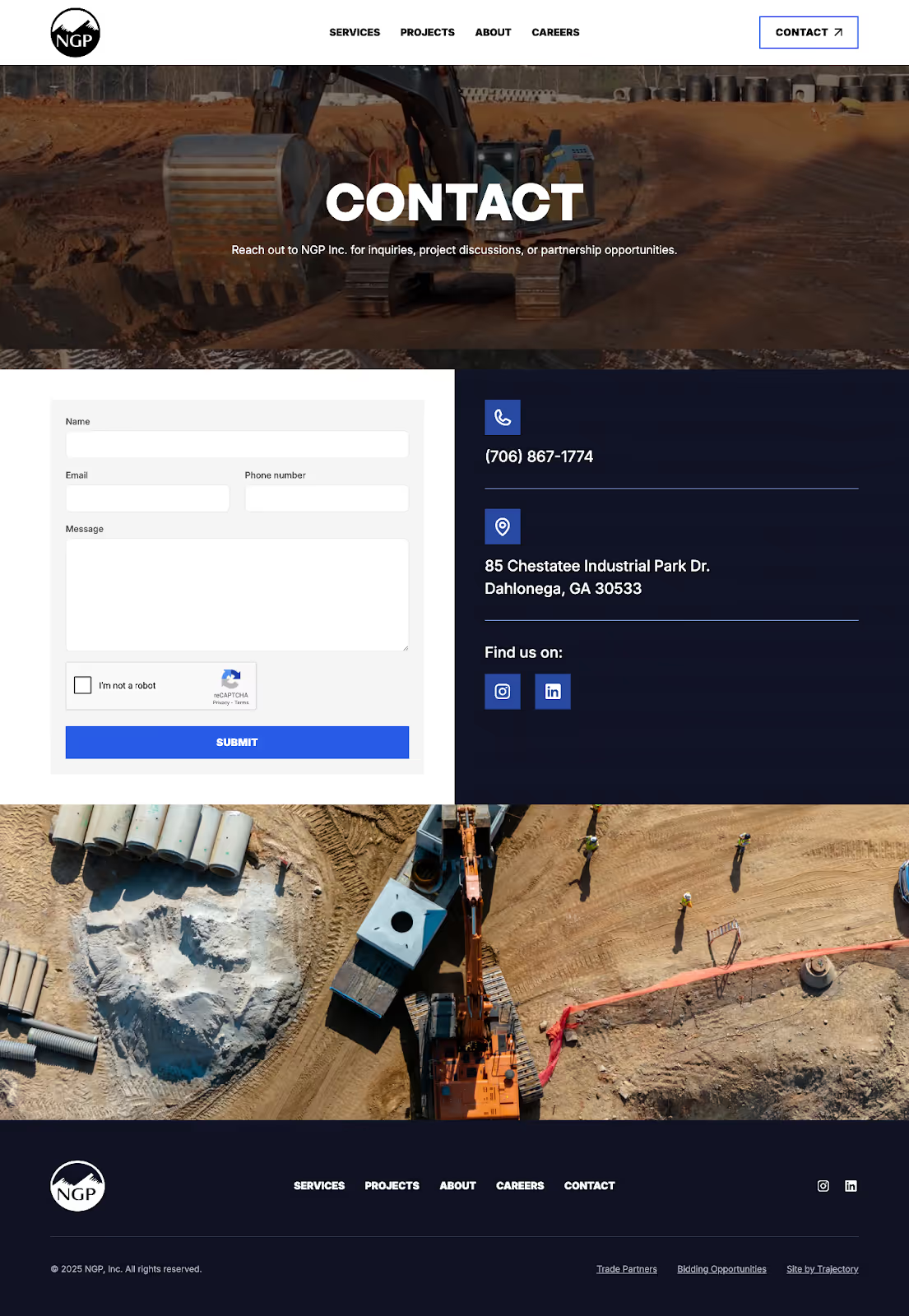
See how we transformed NGP’s outdated presence into an enterprise-ready platform through dual pathways, detailed case studies, authentic culture storytelling, and confident messaging.
Timeline Expectations
Quick wins can happen within days. Basic optimizations like image compression and browser caching can be implemented immediately with noticeable results. Your team could see improvements by next week if you start today.
More substantial improvements take weeks to months. Implementing a CDN, optimizing databases, and restructuring content delivery require planning and testing. These medium-term projects often deliver the most noticeable improvements in user experience and conversion rates.
Long-term optimization is an ongoing process. As your site grows and technology evolves, new optimization opportunities emerge. Building performance consideration into your regular website maintenance and update cycles ensures sustained speed advantages over competitors who treat performance as an afterthought.
Plan your optimization project:
Turning Speed Into Your Competitive Advantage
Website speed isn't just a technical metric for B2B companies. It directly impacts your ability to generate leads, support your sales team, and compete effectively in your market. Every second of delay costs you opportunities, whether it's a frustrated buyer abandoning your site or a sales rep unable to demo your products effectively.
Start With Quick Wins
The good news is that meaningful improvements are within reach for any B2B company willing to prioritize performance. Start with the quick wins we've outlined:
- Optimize your images
- Set up caching
- Clean up your code
These basic steps can deliver immediate improvements that your visitors will notice.
Lay the Foundation for Continuous Optimization
Then build from there. Invest in the infrastructure and ongoing optimization that keeps your B2B website fast as it grows. Make performance a key consideration in every website decision, from choosing hosting providers to selecting marketing tools. Your website is often the first impression buyers have of your company. Make sure it's a fast one.
Start by testing your key pages with free tools, then create a prioritized list of improvements. Your future customers will thank you with their business.
Continue improving your B2B digital presence:
