
Your B2B website is not something you build once and forget about. It is a living, breathing business tool that needs regular attention. Yet so many companies launch a beautiful new site, celebrate for a week, and then let it sit untouched for years. Sound familiar?
We get it. You’re busy running a business. You have clients to serve, projects to deliver, and a team to manage. Website maintenance feels like one more thing on an endless to-do list. But here’s the truth: neglected websites cost you leads, hurt your credibility, and create security risks that can be expensive to fix.
The good news? Monthly maintenance does not have to be overwhelming. This checklist breaks it down into manageable tasks organized by priority. Even covering the basics will put you ahead of most of your competitors. By the end of this guide, you will have a practical system you can start using this week.
Why B2B Websites Need More Maintenance Attention
Your website is not like a brochure you print once and hand out at trade shows. It works around the clock, even when your sales team is asleep. And for B2B companies, the stakes are higher than you might think.
The B2B Difference
B2B sales cycles are long; the average B2B buying cycle now lasts 11.3 months. A prospect researching engineering firms or construction contractors might visit your website five, ten, or even twenty times before they ever pick up the phone. That means they will notice if your project portfolio still shows work from three years ago. They will notice if your team page lists someone who left the company last spring. They will notice if your contact form is broken.
Trust matters enormously in high-value B2B decisions. When someone is about to sign a contract worth hundreds of thousands of dollars, they scrutinize everything. An outdated copyright year or a slow-loading page might seem minor to you, but to a prospect comparing three firms, it signals carelessness.
The Importance of Showing That Your Website Is Current
Let’s take a look at a freshly updated B2B website. Award-winning international architectural firm BHDP displays the current copyright year in its website footer.

Recent dates on their “Insights” articles and “In the News” press pieces show that the firm is consistently publishing new thought leadership content, sharing unique insights, and keeping its audience informed.
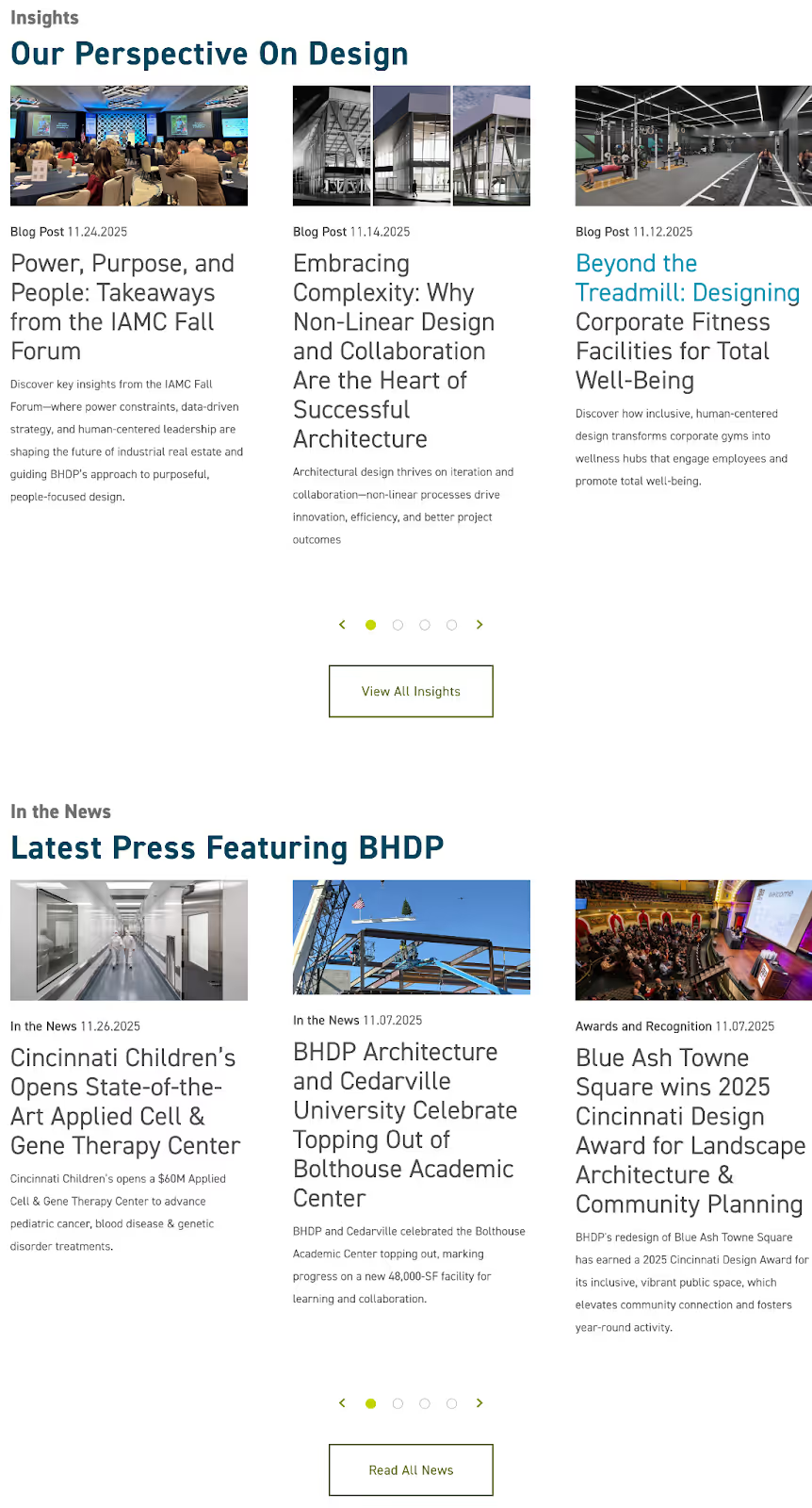
Small details like fresh content with current dates signal that a company is active, attentive, and invested in maintaining an up-to-date digital presence. This level of care builds trust, encouraging visitors to view you as a credible partner and ultimately convert into qualified B2B leads.
What Happens When Maintenance Slides
Many significant issues can occur when you fail to maintain your B2B website, including:
- Security Vulnerabilities: These do not stay small; they compound over time. A plugin you forgot to update six months ago might now have a known exploit that hackers are actively targeting. Your backup system might have quietly failed three weeks ago, and you would not know until disaster strikes.
- Slow Page Speeds: Speed degrades as your site ages. New content gets added without optimization. Old plugins slow things down. Caching settings get stale. What loaded in two seconds at launch might now take six seconds, and your visitors are not waiting around.
- Broken Links and Forms: These are silent lead killers. A prospect fills out your contact form, clicks submit, and nothing happens. They do not call to tell you your form is broken. Instead, they simply move on to your competitor. This happens more often than most companies realize.
- Decreasing Search Rankings: Rankings slip when competitors stay fresh and you do not. Google rewards websites that are regularly updated, secure, and fast. If your competitors are publishing new case studies and optimizing their pages while yours sits stagnant, you will slowly disappear from search results.
The Real Cost of Neglect
Small problems become expensive redesigns when left unaddressed. A few broken links today become a tangled mess of 404 errors next year. Skipped security updates become a hacked website that needs to be rebuilt from scratch. The company that spends a few hours each month on maintenance spends far less over time than the one that ignores everything until the site is beyond saving.
Downtime during critical moments can cost you deals. Imagine a prospect finally ready to reach out, and your site is down for maintenance because an emergency security fix could not wait any longer. That prospect is not coming back.
For more information about how website performance connects to business results:
- B2B Website Speed Optimization: Performance That Impacts Revenue
- Website ROI: How B2B Firms Calculate Payback
- B2B Website Trust Signals: Building Credibility That Converts
The Monthly Maintenance Checklist: Overview
This checklist is organized into four main categories:
- Security and Backups: These come first because they are non-negotiable.
- Performance and Technical Health: Your website’s health keeps everything running smoothly.
- Content and Conversion: Make sure your site keeps generating leads.
- Analytics and Optimization: Catch problems early and spot opportunities.
Think of these as pillars that keep your website healthy. Some of these tasks take five minutes. Others might take an hour. You do not have to do everything every month, but you should at least touch each category. Whether you use WordPress, Webflow, or another content management system, these principles apply across platforms.
The key is consistency. A little attention each month prevents the big, expensive problems that come from years of neglect.
Security and Backups
These tasks are non-negotiable. Security issues can destroy trust instantly, and compliance failures can have legal consequences. This is where you start, every single month.
Verify Backup Completion
Your backup system is your safety net. But a safety net with holes is not much help. Each month, take a few minutes to check that your automated backups are actually running. Log into your backup service or hosting dashboard and confirm recent backups completed successfully.
Make sure your backups are stored somewhere other than your main server. If your server crashes or gets hacked, backups stored on the same server are worthless. Cloud storage or an off-site location gives you real protection.
Once a quarter, actually test your backup restoration process. It sounds tedious, but you do not want to discover your backups are corrupted the day you desperately need them. Add a reminder to your calendar.
Update Your CMS, Plugins, and Themes
Updates exist to:
- Fix bugs
- Patch security vulnerabilities
- Keep your site compatible with modern browsers
Ignoring updates is like ignoring a recall notice on your car. The problem does not go away just because you are not looking at it.
Best practice is to update your staging or test environment first, then push updates to your live site once you confirm nothing breaks. This is especially important for major updates. Keep a simple log of what you updated and when. If something goes wrong, you will be glad you have that record.
After making updates, clear your site cache. Caching is great for speed, but it can also serve old versions of your pages after you make changes. A quick cache clear ensures visitors see your current site.
Review Security Scan Results
If you have automated security scanning set up, review the results monthly to look for:
- Malware warnings
- Suspicious file changes
- Unusual activity
Many hosting providers include basic security scanning, or you can use dedicated security services.
Check that your SSL certificate is active and note when it expires. An expired SSL certificate will show visitors a scary warning that your site is not secure. That is not the first impression you want to make on a potential client.
While you are at it, check your domain name renewal date. Domains that accidentally expire can cause major headaches. Set reminders at least 60 days before expiration so you have plenty of time to renew.
Check User Access and Permissions
People come and go. Employees leave, contractors finish projects, and agency relationships end. But their website access often lingers long after they should no longer have it.
Each month, be sure to:
- Review who has access to your website backend
- Remove access for anyone who no longer needs it
- Pay special attention to admin-level accounts, which have the power to do serious damage if compromised
If you notice any accounts you do not recognize, investigate immediately. This could be a sign of unauthorized access. Update passwords for sensitive accounts regularly, especially if you suspect any account might be compromised.
Verify Legal Compliance
Privacy policies, cookie consent banners, and legal disclosures are not just nice to have. Depending on your industry and where your visitors are located, they may be legal requirements. Be sure to:
- Confirm your privacy policy is current and easy to find
- Test your cookie consent banner to make sure it actually works and records consent properly
- Check that any industry-specific disclosures are in place and up to date
Keep an eye on regulatory changes. Laws like GDPR in Europe and various state privacy laws in the US evolve over time. What was compliant last year might need updates this year.
Making Your Legal Policies Easy to Find
Let’s take a look at an accessible privacy policy from automobile manufacturer General Motors. The company’s footer contains a “Legal” column with clear links to important policies like “Copyright/Trademark,” “Privacy Statement,” and “Accessibility.”
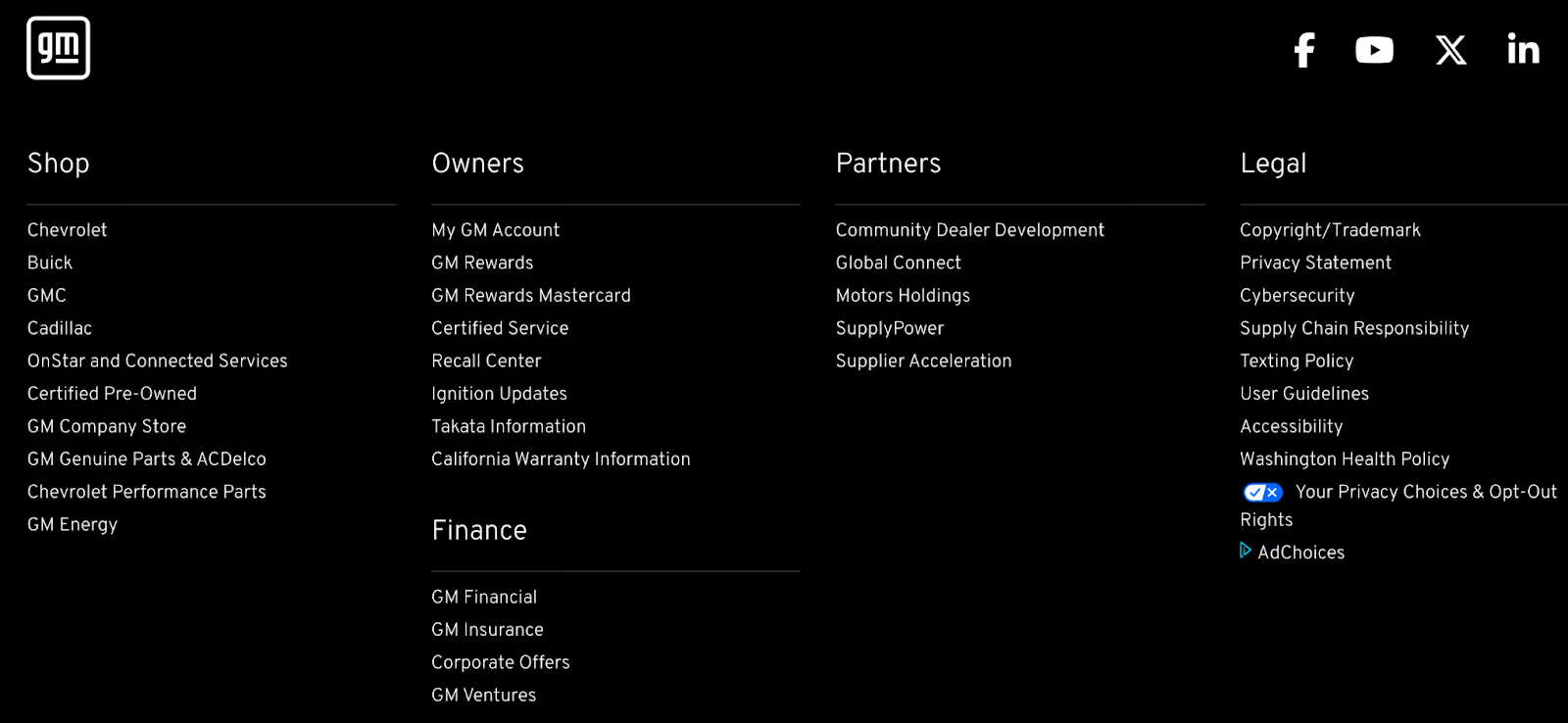
Users who click the “Privacy Statement” link are directed to General Motors’ well-organized privacy policy page, which features a transparent “Last updated” date and a clear outline of all data practices covered within.
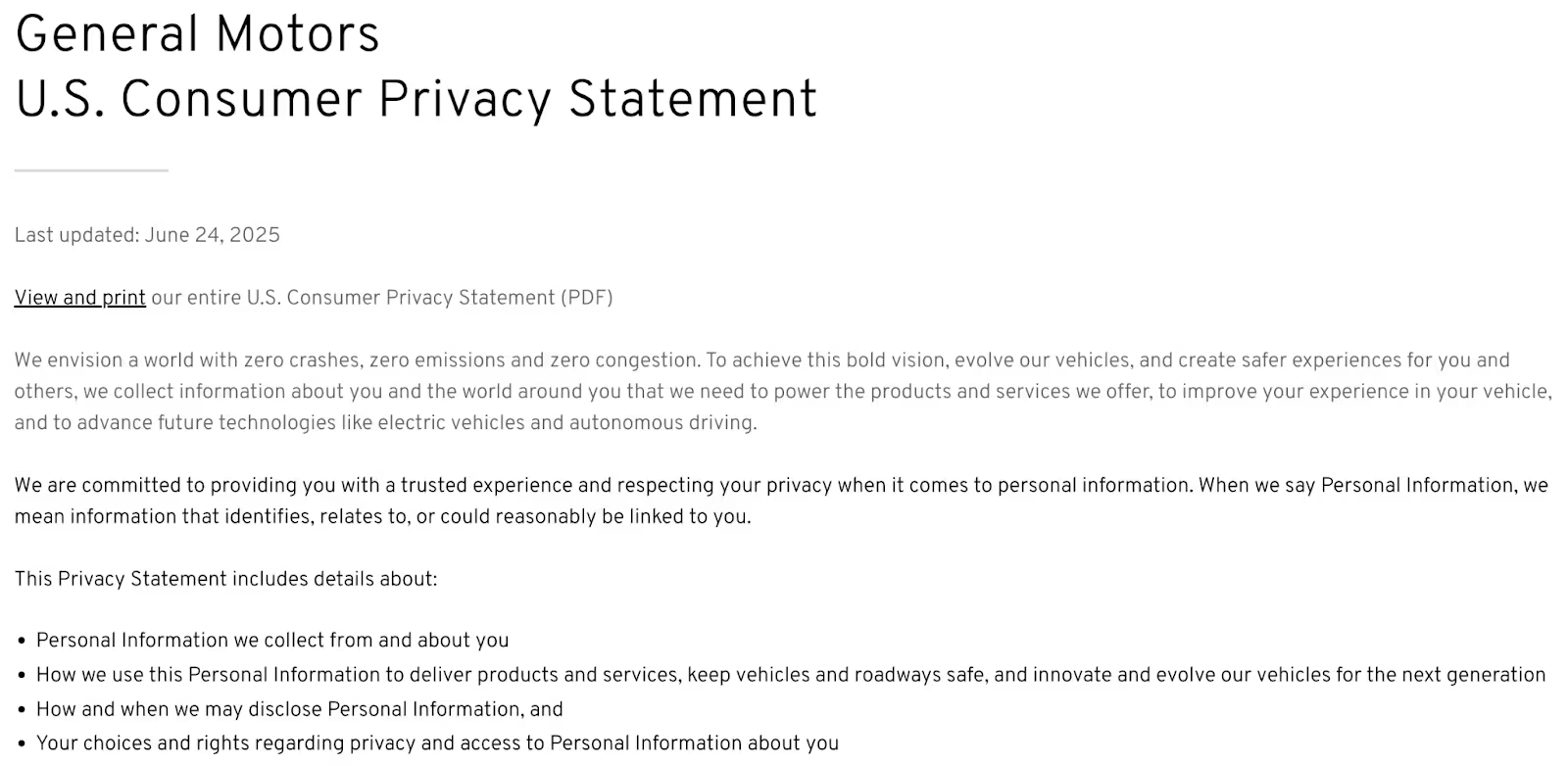
Easy-to-find legal links like these build credibility with potential B2B buyers while ensuring your business remains trustworthy and compliant.
Performance and Technical Health
A slow or broken website kills conversions. It also hurts your search engine rankings. These tasks keep everything running smoothly so prospects have a great experience every time they visit.
Run a Speed Test
Page speed matters more than most B2B companies realize. When your prospect is comparing three engineering firms and your site takes eight seconds to load while your competitors load in two, you are already at a disadvantage. Studies show that B2B sites that load in one second have conversion rates about three times higher than sites that load in five seconds, and about five times higher than sites that load in ten seconds.
Use free tools like Google PageSpeed Insights or GTmetrix to test your site each month. Pay attention to Core Web Vitals, which Google uses as ranking factors. Compare your scores to the previous month and watch for negative trends.
Check for oversized images that might have been uploaded recently. Photos straight from a camera can be several megabytes each. Compress anything over 200KB to keep load times fast. Also verify that caching is working correctly and not accidentally serving outdated content to visitors.
Using PageSpeed Insights to Spot Performance Issues
Let’s review PageSpeed Insights results for the homepage of B2B construction and mining manufacturer Caterpillar. The page currently fails Google’s Core Web Vitals Assessment, as metrics like “Largest Contentful Paint,” “Interaction to Next Paint,” and “Time to First Byte” fall into the orange “Needs Improvement” category.
Meanwhile, the “Cumulative Layout Shift” metric falls into the “Poor” category, revealing that the website’s content unexpectedly shifts or moves as it loads. This poor visual stability can frustrate users, causing them to lose their place while reading or click the wrong element as the page jumps.
Caterpillar’s team can use these insights as a starting point for making intentional homepage improvements that strengthen the user experience.
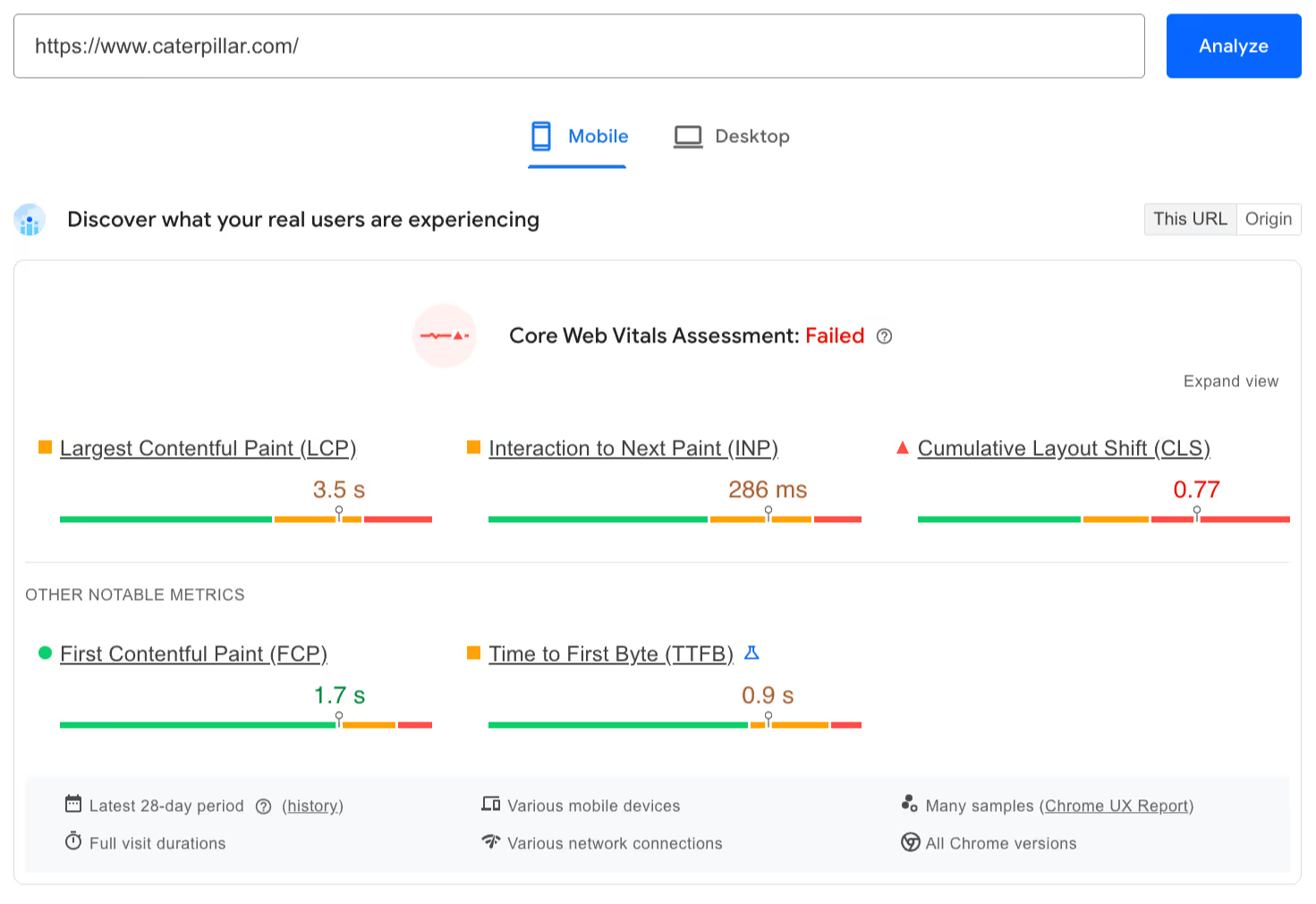
Below the Core Web Vitals Assessment are scores for “Performance,” “Accessibility,” “Best Practices,” and “SEO.” While Caterpillar’s “Accessibility” score is high, its “Performance” score is low and requires significant optimization. Meanwhile, “Best Practices” and “SEO” both need improvement.
You can scroll to see specific metrics for each category, along with expandable insights that show you exactly where to begin.
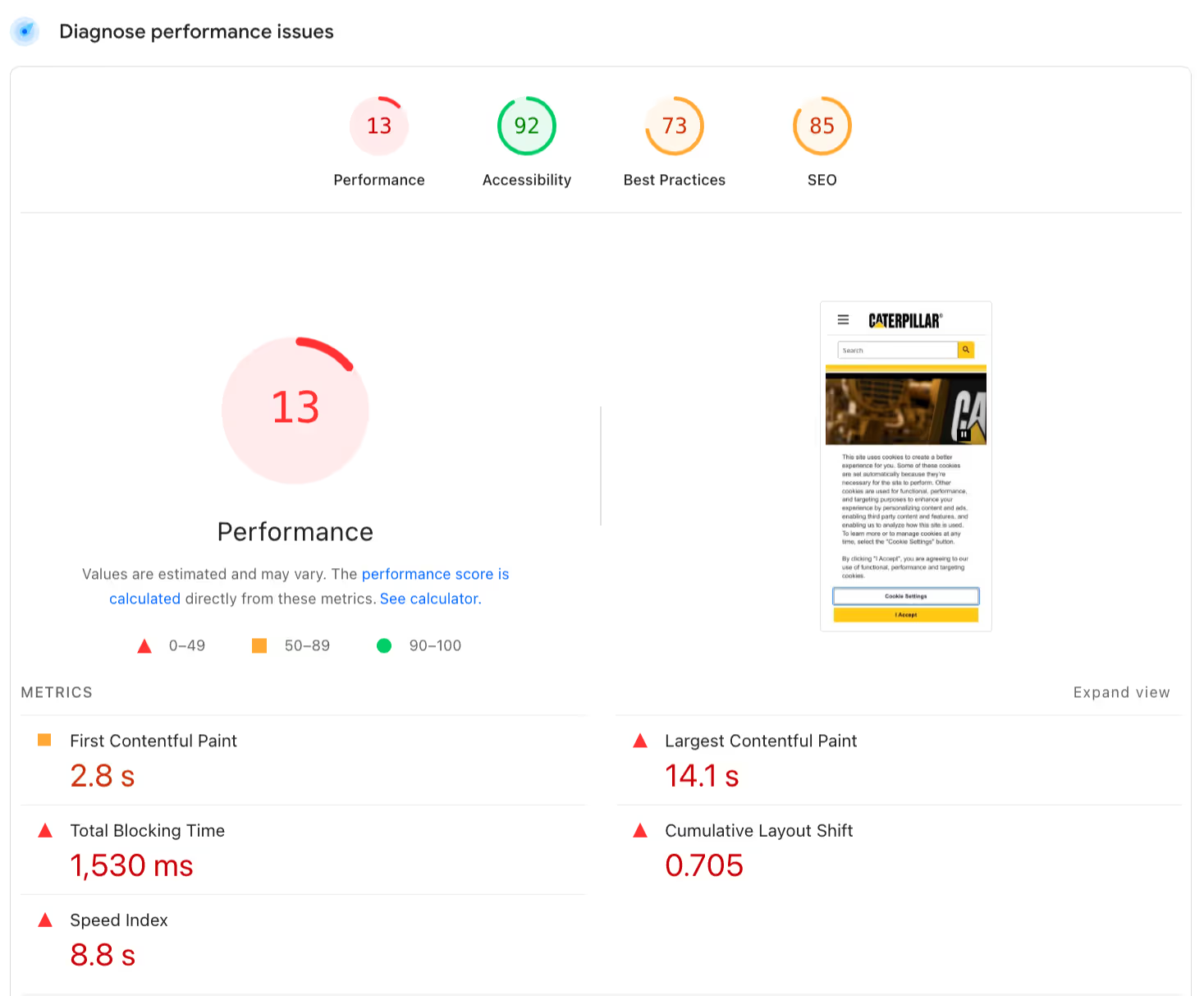
Monthly speed tests like these help you catch performance problems before they start hurting conversions.
Check for Broken Links
Broken links frustrate visitors and hurt your SEO. When a prospect clicks a link expecting to see your case studies and instead gets a "page not found" error, you have lost credibility.
Use free tools like Screaming Frog (the free version handles smaller sites) or online broken link checkers to scan your site monthly. Prioritize fixing links on high-traffic pages first. A broken link buried deep in an old blog post is less urgent than one on your homepage.
Test All Forms
This might be the most important task on this entire checklist. Broken forms are silent lead killers. A prospect fills out your contact form, hits submit, and the form fails silently. They assume you received their information and will reach out. You never even knew they existed.
Every month, submit test entries through every contact form on your site. Check that confirmation emails send. Verify that submissions actually reach the right people or land in your CRM correctly. Do not skip this one.
Review 404 Errors and Redirects
Check Google Search Console for crawl errors. These are pages that Google's bots tried to access but could not find. Some 404 errors are normal, but a sudden spike might indicate a bigger problem.
When you remove or move pages, set up proper redirects so visitors and search engines get sent to the right place. If you notice pages getting traffic but showing errors, fix or redirect them promptly. Every 404 error is a missed opportunity.
Test Mobile and Browser Compatibility
More than half of web traffic now comes from mobile devices. If your site does not work well on phones, you are losing prospects.
Test key pages on actual mobile devices, not just by resizing your browser window. Check that:
- Buttons are easy to tap
- Forms are usable
- Navigation works smoothly
- Text isn’t too small
- Elements don’t overlap awkwardly
Also spot-check your site in multiple browsers. Chrome, Safari, Firefox, and Edge can all render things slightly differently. Browser updates can occasionally break functionality that worked fine before.
Review Uptime Monitoring
Uptime monitoring tools watch your site around the clock and alert you if it goes down. Check your monitoring tool for any downtime events from the past month. If you had downtime, understand what caused it.
If you do not have monitoring set up yet, free tools like UptimeRobot can get you started. Make sure alerts are going to someone who will actually see them and respond.
For more information about website performance and conversion:
- B2B Website Speed Optimization: Performance That Impacts Revenue
- B2B Website Conversion Optimization: A Data-Driven Approach
Content and Conversion
Your website content needs to stay fresh, accurate, and optimized for converting visitors into leads. Outdated content signals neglect, and neglect signals untrustworthiness.
Review and Update Key Pages
Focus your monthly review on the pages that matter most, including your:
- Homepage
- Main service pages
- Top-performing blog posts
These deserve the most attention because they’re the pages prospects see most often.
Check for:
- Outdated statistics
- Old pricing information
- Team members who have moved on
Update your copyright year if you have not done so recently. Remove references to past events or expired offers that make your site look stale.
Keeping Product and Service Pages Up to Date
Product and service pages should always reflect your current capabilities and positioning. For example, the “Products” page for Carl E. Smith & Son’s Building Materials shows clear, current product offerings alongside authentic imagery and clean, modern design.

When prospects visit a specific product page, like their “Lumber” page, they see an accurate list of lumber options, from cedar and cypress to spruce and pine. Below that, visitors can browse a list of manufacturers whose lumber products the company carries.

It’s crucial that Carl E. Smith & Son’s Building Materials keeps this information up to date to ensure buyers can make informed decisions without confusion or outdated data. Consistently refreshing key content pages reinforces credibility and helps prospects feel confident in what you offer.
Refresh Trust Signals
Trust signals are the elements that help prospects feel confident choosing you. Trust signals that contribute to credibility include:
- Client logos
- Testimonials
- Certifications
- Awards
- Partnership badges
Each month, look for opportunities to add fresh proof.
- Did you complete a notable project? → Add it to your portfolio.
- Did a client send a great email? → Ask if you can use it as a testimonial.
- Did you earn a new certification or win an award? → Make sure it is on your site.
Also remove outdated references. A logo from a client you worked with five years ago but no longer have a relationship with can backfire. Expired certifications or old partnership badges hurt more than they help.
Verify Contact Information
This sounds obvious, but you would be surprised how often contact information goes wrong. Phone numbers change. Employees leave and their direct email addresses bounce. Offices move.
Be sure to:
- Check that all phone numbers, email addresses, and physical addresses on your site are correct
- Test click-to-call functionality on mobile
- Verify that chat widgets, scheduling tools, and other contact methods actually work
Make absolutely sure prospects can reach you.
The Importance of Offering Multiple Clear Contact Options
Multiple contact options make it easy for prospects to reach out however they prefer. Atlanta-based architecture and design firm PRAXIS3 provides several clear options on its “Contact” page, including phone, email, and a contact form. The firm even includes downloadable parking details to help visitors easily access their office—a thoughtful, user-focused touch that enhances the overall experience.
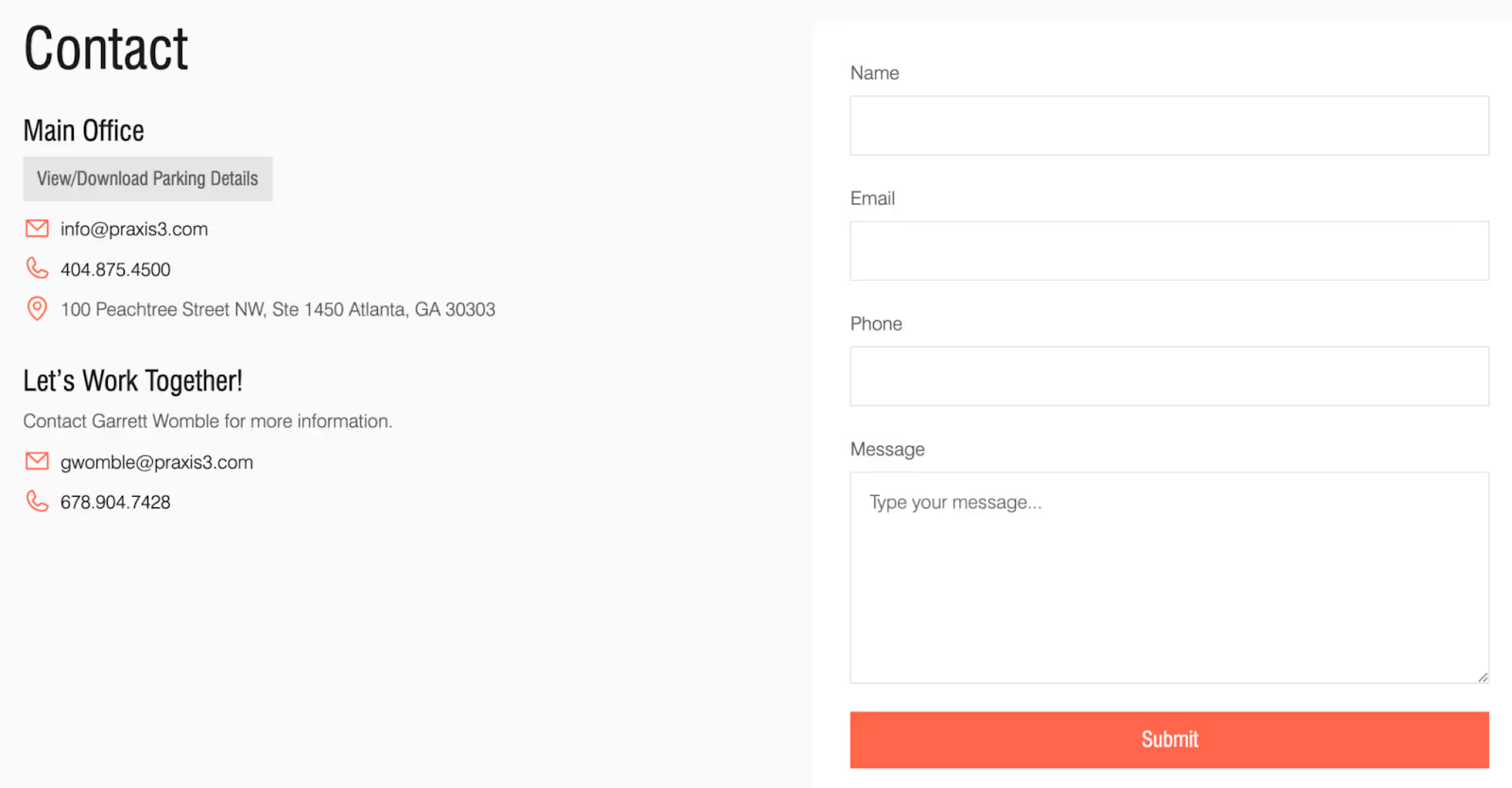
When prospects feel supported at every step, they’re far more likely to move forward with a conversation.
Review CTAs and Conversion Paths
Your calls-to-action should still be relevant and compelling. A CTA promoting a webinar from last year or a downloadable guide you no longer offer creates a dead end for visitors.
As you review CTAs and conversion paths, be sure to:
- Check that all CTA buttons link to the right destinations
- Make sure the path from visitor to lead is still clear and logical
- Look for anything blocking that path, like broken forms, confusing navigation, or unclear next steps
Check Blog and Resource Sections
If you publish content, make sure your blog and resource sections stay organized by:
- Removing or updating severely outdated posts that might embarrass you
- Verifying that download links and gated content still work
- Checking that blog categories and tags make sense and help visitors find related content
- Confirming that new content is being indexed properly by search engines (because a great blog post does you no good if Google cannot find it)
For more information about content strategy and trust building:
- B2B Website Content Strategy: From Awareness to Decision
- B2B Buyer Journey Mapping: Building Websites That Convert
- B2B Website Trust Signals: Building Credibility That Converts
- B2B Website Navigation: Structure That Guides Complex Buyers
Analytics and Optimization
Data tells you what’s working and what needs attention. These tasks help you catch problems early, spot opportunities, and make smarter decisions about where to focus your efforts.
Verify Analytics Tracking
Before you can trust your data, you need to confirm your tracking is actually working. Use Google Tag Assistant or check real-time reports in Google Analytics to verify that pageviews are recording correctly across all pages.
Broken tracking means you are flying blind. You might think traffic is declining when really your tracking just stopped working. A quick monthly check prevents this.
Review Traffic Trends
Compare your traffic this month to last month. Look at both overall numbers and patterns. Ask yourself:
- Which pages are gaining traffic?
- Which are losing it?
- Are there any sudden changes that need investigation?
A gradual decline might indicate SEO issues or competitive pressure. A sudden drop could mean a technical problem. A spike might signal a successful content piece or an opportunity to create more content on that topic.
Monitor Lead Generation Metrics
Your website exists to generate leads. Track how many form submissions you received this month. Note which pages are generating the most leads and which seem to attract traffic but not conversions.
Compare your lead generation to previous months. Are lead numbers trending up, down, or flat? If conversions are declining while traffic is steady, you might have a conversion problem rather than a traffic problem.
Check SEO Health
Review Google Search Console regularly for issues and crawl errors. Look at which keywords are driving impressions and clicks. Note any changes in your search visibility over time.
Check for manual actions or penalties, though these are rare if you are following best practices. Monitor keyword rankings for terms that matter to your business. If you notice drops for important keywords, investigate what might have changed.
Using Google Search Console to Understand Your Performance
Google Search Console gives you direct insight into how Google sees your site. Here’s a quick example of what the “Performance” report for your website might look like:
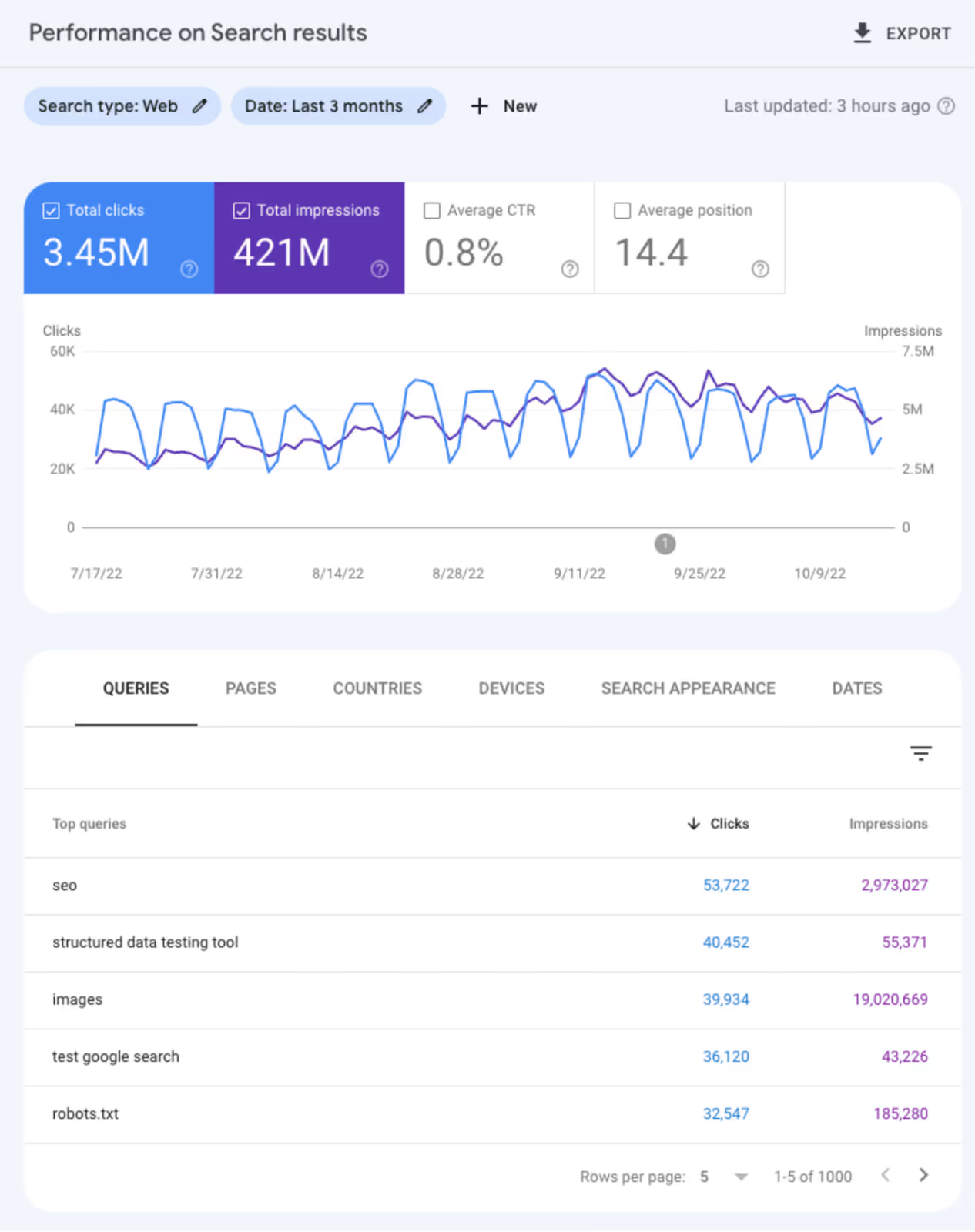
You’ll see metrics including:
- Clicks: Number of user clicks from Google Search results to your property
- Impressions: Number of times users saw your property on Google search results
- CTR (Click-Through-Rate): Click count divided by impression count
- Position: Average search result position for the URL, query, or site in general
You can also check how each query, page, country, device, or search appearance contributes to your traffic and visibility. This data gives you a clear path for strengthening your search performance over time.
Review User Behavior
Look at which pages have high bounce rates, meaning visitors leave without taking any action. Examine where users drop off in your conversion funnel. Are there pages with high traffic but low engagement that might need improvement?
Use these insights to prioritize next month's improvements. If a key service page has great traffic but a high bounce rate, that page deserves attention.
Document and Plan
Keep a simple log of any issues you find and actions you take. Note items that need deeper attention next month. This documentation becomes invaluable over time as you track patterns and remember what you have already tried.
For more information about conversion and lead generation:
- B2B Website Conversion Optimization: A Data-Driven Approach
- B2B Lead Generation: Proven Strategies for Local Market Growth
Quick-Reference Checklist Summary
Here is a condensed version of all the tasks, organized by priority level. Use this as a quick reference once you are familiar with the full checklist.
Must-Do Tasks (Never Skip These)
- Verify backups are running successfully
- Update CMS, plugins, and themes
- Review security scan results
- Test all contact forms
- Check for site downtime events
Should-Do Tasks (Important for Ongoing Health)
- Run a speed test and address any issues
- Check for broken links on key pages
- Review and update high-traffic content
- Verify contact information is correct
- Check that analytics tracking is working
Monthly Nice-to-Do (Can Slide If Time Is Short)
- Refresh trust signals with new testimonials or logos
- Review user behavior data for optimization opportunities
- Test mobile and browser compatibility
- Document findings and plan next month's priorities
When Monthly Maintenance Is Not Enough
Sometimes monthly maintenance reveals problems too big to fix with small tweaks. Other times, circumstances change in ways that require more than routine care.
Signs You Need More Than Maintenance
Here are a few clear warning signs that tell you when it’s time to take a deeper look:
- Security Failures: Security breaches or repeated security warnings mean you need professional help immediately, not just a monthly checklist.
- Major Traffic or Conversion Drops: Significant changes in traffic or conversions that do not have an obvious explanation warrant a comprehensive audit.
- Significant Business Shifts: Big changes also call for more than maintenance. If you have launched new services, rebranded, merged with another company, or shifted your target market, your website probably needs a strategic overhaul rather than incremental updates.
- Outdated Technology: Age matters too. If your site is more than three to four years old, it may be built on outdated technology that monthly maintenance cannot fix. Design trends, user expectations, and technical standards evolve quickly.
- Competitive Disadvantage: Finally, if your competitors have significantly better websites than you do, routine maintenance will not close that gap. You need a B2B website redesign.
Quarterly and Annual Tasks to Add
Beyond monthly maintenance, some tasks make sense on a longer schedule.
- Full SEO Audit: Conduct once or twice a year to uncover opportunities and issues that monthly checks miss.
- Comprehensive Content Audit: Identify outdated material that needs refreshing or removal.
- Design Reviews and Usability Testing: Gain an outside perspective on how well your site actually works for visitors.
- Accessibility Audits: Ensure your site works for everyone, including people with disabilities.
- Competitive Analysis: Learn where you stand in your market.
- Deep-Dive Performance Review: Uncover technical issues that accumulate over time.
For more information about when and how to approach bigger website projects:
- B2B Website Redesign: When to Update and How to Plan
- B2B Website Design Best Practices: The Complete Guide
Building Your Maintenance Routine
Knowing what to do is one thing. Actually doing it consistently is another. Here’s how to build a maintenance routine that sticks.
Start Small and Stay Consistent
You do not have to do everything at once. Start with the highest-impact tasks, which include:
- Security
- Backups
- Form testing
These protect your investment and prevent the worst disasters.
Once those become a habit, expand to speed testing and content reviews. Build the routine gradually rather than trying to tackle everything from day one and burning out.
Automate what you can by:
- Setting up uptime monitoring to alert you automatically
- Configuring automatic backups with notifications
- Using tools that scan for broken links on a schedule
The less you have to remember to do manually, the more likely it all gets done.
Who Should Own This
Someone needs to be accountable for maintenance. It might be someone on your internal marketing team, your IT department, or an outside agency partner. What matters is that one person or team clearly owns the responsibility.
When maintenance is "everyone's job," it becomes no one's job. A dedicated owner ensures tasks actually happen by tracking what was done, documenting issues, and following through on fixes.
If you do not have internal resources for maintenance, consider outsourcing to professionals. Many web agencies offer maintenance retainers that handle all of this for you.
These services typically include:
- Regular updates
- Security monitoring
- Backups
- Basic content updates
The cost is usually far less than dealing with emergencies caused by neglect.
Tools to Make It Easier
The right tools make maintenance faster and more reliable. For monitoring, free tools can handle the basics while paid tools offer more features and flexibility. For backups, most modern hosting platforms include automated backup options.
Create calendar reminders for monthly tasks. Use a simple spreadsheet or project management tool to track what you have done and what needs attention. Keep a log of updates, issues, and fixes so you have a record to reference.
Using Simple Tracking Tools to Organize Your Website Maintenance
Here’s an example of a website maintenance checklist from Process Street, a workflow standardization tool. A simple tracking system using a project management or task tracking interface helps ensure nothing falls through the cracks.
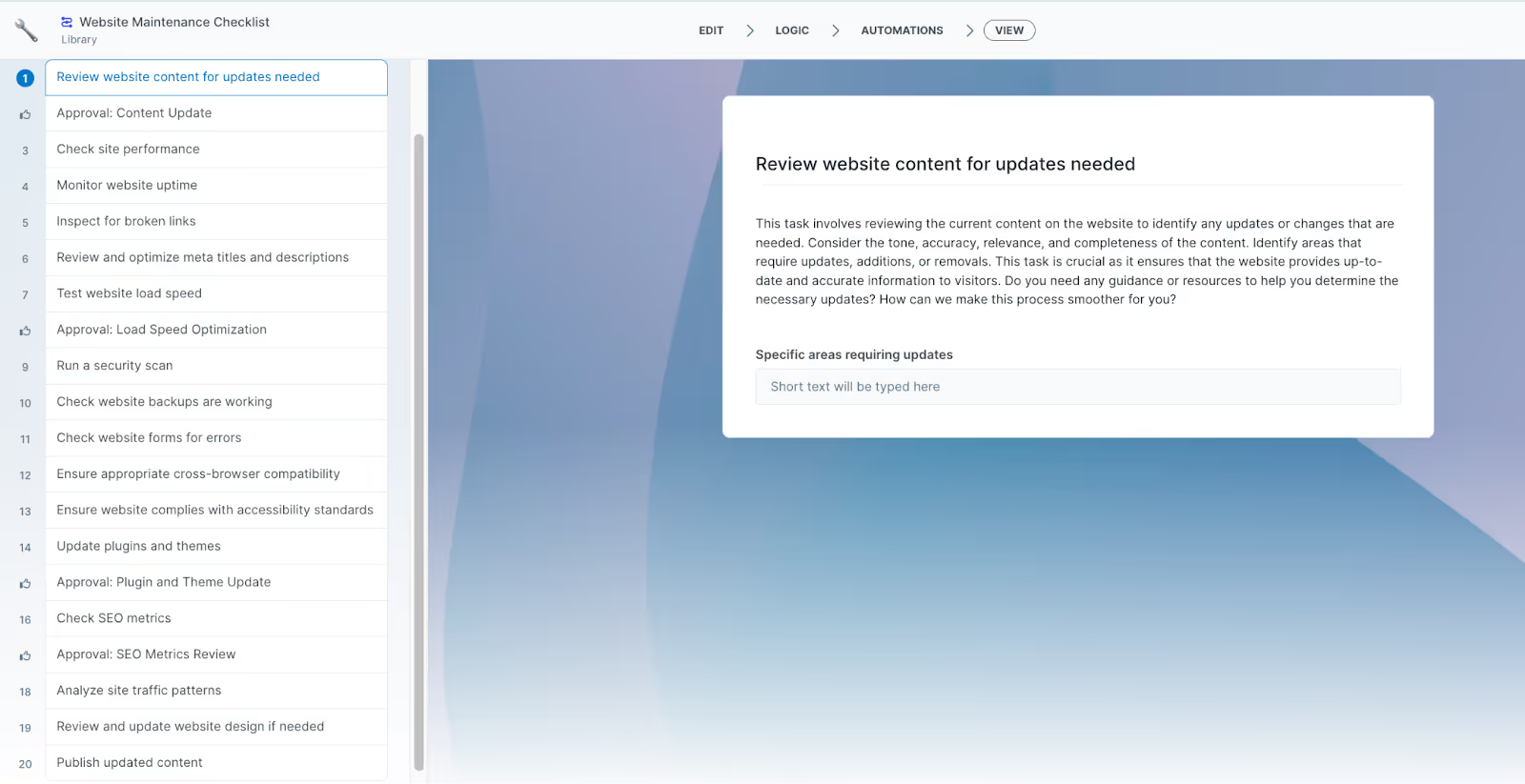
You can also use a basic spreadsheet—like this issue tracking template from ProjectManager—to record all the problems you find, their potential impact on your business, priority level, status, and more.

By putting even a lightweight tracking system in place, you’ll make it far easier to stay proactive, spot issues early, and keep your B2B website running smoothly.
Keep Your B2B Website Working as Hard as You Do
Monthly website maintenance is not glamorous work. It will never be the exciting part of running your business. But it protects your investment, keeps leads flowing, and prevents the expensive emergencies that come from years of neglect.
Even covering the basics puts you ahead of most competitors, who are ignoring their websites until something breaks. A well-maintained website builds trust, converts better, and costs less in the long run than one that gets rebuilt every few years due to accumulated problems.
You do not have to tackle this entire checklist tomorrow. Start with security tasks this week. Test your forms. Check your backups. Then build from there, one category at a time, until monthly maintenance becomes a natural part of how you run your business.
Your website works for you around the clock. A little care each month ensures it keeps working well.
